


Loopysue
Loopysue
About
- Username
- Loopysue
- Joined
- Visits
- 10,413
- Last Active
- Roles
- Member, ProFantasy
- Points
- 10,161
- Birthday
- June 29, 1966
- Location
- Dorset, England, UK
- Real Name
- Sue Daniel (aka 'Mouse')
- Rank
- Cartographer
- Badges
- 27
Latest Images



-
[WIP] Swamp Witch
I love that you have made good use of the cutout on the ripples sheet around the trunks.

-
Advice on how to make the rivers look better
You could do that, or maybe you could use Change Properties on them all to make them a thinner line width?
You can find out how wide they are right now by using the pick properties eyedropper tool. The line width should then be shown at the top.
Then use Change Properties to make them slightly thinner.
-
[WIP] Haunted Mansion
It's down to personal preference in the end, but that looks nicer to me.
Don't worry too much about what other people (including me) think and say if you feel it needs to be more obvious/darker than that.
-
Lost fills on drawing tools
You might find this FAQ helpful - particularly the short video:

-
Live Mapping: Modern Streets with Cities of Schley
Not to worry. I work from home and live alone. It was over a day before I remembered the hour had changed in my own country.
-
fill style locations
Hi Brian :)
There's no catalogue of fills, as such, but they are usually named in a fairly standard way. For example if you go to the C:\ProgramData\Profantasy\CC3Plus\Bitmaps\Tiles folder and put "Farmland" in the File Explorer search bar, you will discover all the fills called Farmland from all the styles you have installed.
Can you link to the video where you saw this fill being used? Many of us can identify styles from the fills and may be able to help you locate it that way.
There are lots of free third party assets available. This is a useful thread to explore:
-
[WIP] - Sakherma Ruins
That's better again because the lit side of the dunes aren't bleaching out now. Depending on time you could play with all the settings till you get it looking how you want it to look.
-
WIP - Talessa
A beautiful map :)
Good luck with the writing.

-
Please help with hex map scales...
CC3 provides a way to automate hex grid creation.
In the Draw menu find the "Hex or Square Overlay" option and click it.
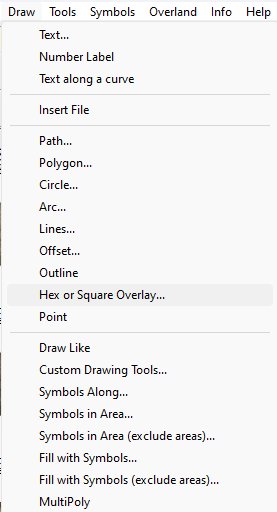
This will show you a dialog like this one below, where you can specify which way up you want your hexes and how big you want them in map units. If your map is an imperial overland map this would give you hexes that are 6 mile hexes. In a metric map the same settings would give you hexes that are 6km hexes. In a city or dungeon map, 6 map units would be 6 feet in imperial templates and 6m in metric templates.
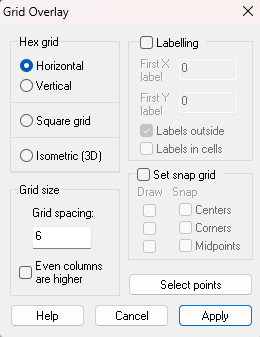
If the grid you create is wrong just delete it and try a different scale.
I hope that helps.

-
[WIP] Winter Solstice
You should find it a lot easier to see where the moon should go once you've done that.

