


Loopysue
Loopysue
About
- Username
- Loopysue
- Joined
- Visits
- 10,416
- Last Active
- Roles
- Member, ProFantasy
- Points
- 10,163
- Birthday
- June 29, 1966
- Location
- Dorset, England, UK
- Real Name
- Sue Daniel (aka 'Mouse')
- Rank
- Cartographer
- Badges
- 27
Latest Images



-
Community Atlas - Blackrock WIP
Ok. I'm not sure I will have time to look at the FCW, where I'm up to my eyeballs in Japanese structures in Sketchup right now, but I'm pretty sure that even with just a few more weeks experience you will probably find it yourself anyway.
As for the scale of the fill - maybe. The thing about fills is that if you scale them up too much they pixelate, so it very much depends on how large you want to print your map. There are two ways of disguising the redundancy (which is what we call it when a seamless tile starts to generate that kind of noticeable pattern). You can either put a lot more in the map so that not enough of the background shows through for the pattern to be visible (you will have some idea of how that works by looking at the area of the settlement). The other way is only necessary if you don't intend to put anything at all in the rest of the grassy area, and involves creating irregular patches of a very similar coloured texture on another sheet above the grass that are themselves not large enough to have the problem, but which cover one in three or four of the more noticeable parts of the pattern where they appear in a line or column without interruption.

-
Community Atlas - Blackrock WIP
It's looking pretty cool, Jim :)
I think you might have an unexpected glow effect, or something similar set on the sheet with the second level of grass on it. That would be what is causing that darker line between the different levels of grass. If you haven't got anything like that I would be interested in seeing what you do have on that sheet.
-
Fix Grid and Snap?
Its when you get to cackling hysterically at the mess you're in trying to spin a Blender terrain the same way you would a Gaea terrain that you know it's time to take a break.


-
Community Atlas - Blackrock WIP
That's quite a lot of work for the time - especially if you are trying to do stuff you haven't done before :)
There is an awful lot of space involved in this map that in the real world would be totally covered with detail almost as dense as the detail of the city itself. There would be a network of smaller roads and tracks with hamlets and farms along them, and the rest of the land would be covered in fields, woods and moorland. A city needs a network of satellite settlements to provide it with food and other produce. Presumably there will be a lot more than just a few bags of grain and the odd cabbage being sold in the market place. The fields you have done are good, but they wouldn't provide everything the citizens of Blackrock need for a healthy and varied diet - or enough of it by far. I think they would be killing each other for flour to make bread only a month after the grain harvest was done.
There are lots of other land uses besides woodland and fields. Have you thought about mills, cemeteries, or landmarks like ruins?
I sometimes add a sheet called SKETCH to the top of the map that can be deleted when the map is done, and I draw on it in white with the freehand drawing tool the approximate position of satellite settlements, roads and field systems etc. This makes it easier to fill in the area with the required amount of detail without having to entirely re-imagine everything every time I've finished a single field or copse before I do the next field or copse. I draw the manmade stuff first, and then fill in the gaps with fields and woods as appropriate.
Title's, scale bars and compasses also help, and it is sometimes easier to pick a spot for these before it gets too crowded with detail so you don't end up covering a bit you are proud of with the title, or try to squish the title into the corner to avoid it.
The Symbols in Area tools use the default symbol scale, which is set in the Drawing Presets dialog here:
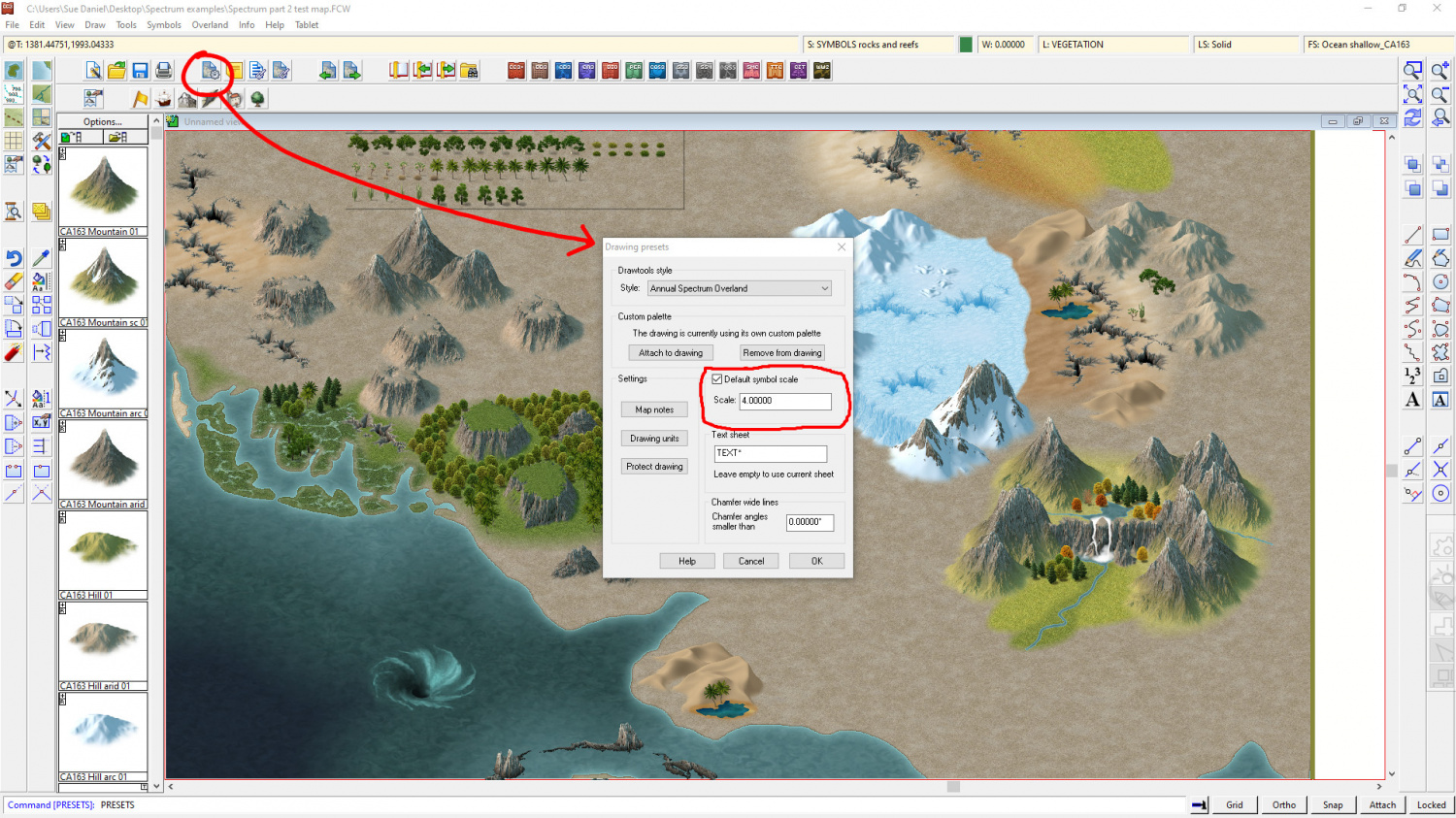
I would make a note of what the scale is before you change it, so that you can go back to the default when you are done.
Mapping can be slow when you are learning. And that is exactly the point. You might not have got a lot done on the map, but you did a lot of learning that will help you be much faster next time you are doing a city. That is nothing to be scoffed at - especially if you are aiming to do commissions one day, where time is of the essence and could make or break your bid if it is only one among many.
If you upload your FCW I think you might find that several people will look at it, and you will get a nice cluster of suggestions to pick little gems from and learn even more.
-
Community Atlas - Blackrock WIP
Oh go on, then.
My head is fizzing with too much Sketchup right now.
Do you want me to look at that FCW for you to sort out that edge on the grass?
-
Fix Grid and Snap?
Yes, I've seen your page before.
Very impressive :)
I'm not so much into animation, having set a PC on fire one night a few years back when something went wrong on an 18 hour render. A person has to sleep eventually! That was the one I threw out of the window before it set the rest of the flat on fire.
I keep a fire extinguisher in the room these days ;)
-
October Community Challenge - Faeridge
I think it has much more character in it now. You have added your own personal little details without going overboard too far and just cramming it with lots of meaningless things.
How about if you straightened that little road to the fountain and made it end at the fountain by placing a dead end circle of road like a path around the fountain. And then, how about placing the fountain on a sheet of it's own without the shadow effect so that it sits on the ground?

-
Random Houses using CA161?
The House tool (and the Street tool, because that is dependent upon the House tool) uses filled and shaded polygons to construct each roof. The tool has limitations because of this, particularly where the style has details such as broad and detailed ridges, since all the House tool can do is a line of a fixed colour for these things.
It can also only do certain shapes of house. However, you can still do some quite complex things with House by combining 2 or more separate house entities as one building. This blog is about drawing cliffs, but I've linked it here because the city itself (with the exception of the open courtyard buildings) is made entirely of CD3 Bitmap B houses - and the FCW is available if you want to have a look and see how the more complicated shapes were made.
-
Random Houses using CA161?
Thank you! :)
There is a set of connecting cliff symbols I made more recently to save you a bit of work if you have this year's annual.
(I just thought I should say, before you spent all that time drawing them like they are drawn in the Orde map)
-
Supplemental to Humble Bundle
Hi Punch :)
You seem to have quite a solid toolbox kit there. I hadn't realised quite how much of a good deal the last bundle really was!
The remaining stuff is mainly the annuals, which are sets of styles and tools or tutorials issued once a month and bundled into a year each year.
If you want to have some idea of what there is in the annuals you could use this thread here, where I created a wall of links to all the issues in one place.
If you like one of the issues you have to buy that year's annual, since the issues are not sold separately.

