Loopysue
Loopysue
About
- Username
- Loopysue
- Joined
- Visits
- 10,415
- Last Active
- Roles
- Member, ProFantasy
- Points
- 10,161
- Birthday
- June 29, 1966
- Location
- Dorset, England, UK
- Real Name
- Sue Daniel (aka 'Mouse')
- Rank
- Cartographer
- Badges
- 27
Latest Images



-
Winter Village style development (March 2022 CA issue)
Well, having settled on a design for the thatched cottages, I now have to decide how to do the tiled cottages.
Where the thatched cottages had a handy herringbone decoration I could use to add interest to the buildings, the tiled ones have nothing other than the tiles. I've already tried using something from the tile texture and it just looked a mess, so I'm wondering now if the lumpy snow look will be enough. The part building at the top of this shot is one of the thatched buildings, while the one at the bottom is a prototype tiled house. It's a bit scruffy around the edges and the chimney hasn't been cut out of the map file so it's too bright, but I do those things when I've finished the design.

The question here is one of the required amount of detail. Does it have enough to make it interesting?



-
Winter Village style development (March 2022 CA issue)
Well, I had a go with combining what I did with the original tiled house. It's not great - mainly because the map files are quite different and the combination was a crude mask that erased some of the snowy version and its map file to reveal the original house underneath it. The map file for the tiled version is very steep. The map file for the snowy version is very shallow - so that the snow doesn't bleach out to being completely white all over. There are a few strange patches you can see on the darker parts of the roof to the south where the resulted blended map file is neither one thing or another.
Let me know what you think.
@JulianDracos - I live in an area with plenty of thatched buildings, and since thatch is one of the greenest roofing materials available that isn't likely to change very much. It is also about 10 times more insulating than tiles unless you have excellent insulation in the attic space of a tiled house. So the snow does tend to stick and stay much better on thatched cottages than it does on tiled houses. It's therefore not inconceivable that you would get some wind erosion of the snow on tiled rooftops and/or melt off. The tiles are warmer because they don't keep the heat in as well as thatch does.
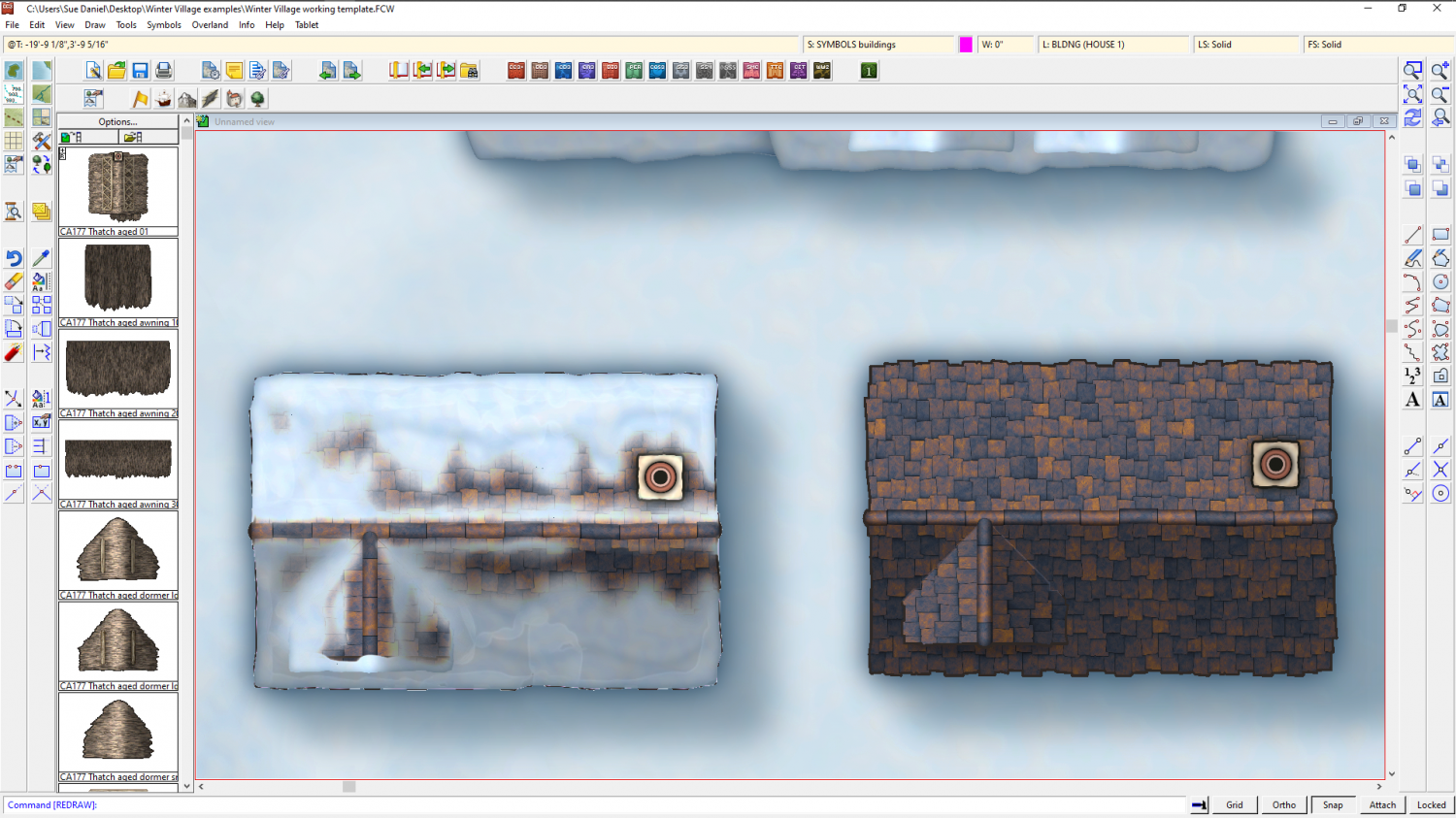
The other question I have is: does the snow melt into tidy sharp-edged patches, or is there a blend like I've created above where the snow shades out gradually into a melted patch?

-
Live Mapping: Contour Shading (Annual Vol 2) CANCELLED TILL NEXT WEEK
Hi Everyone! :D
In tomorrow's Live Mapping session Ralf will be discussing contour shading - what it is, what it brings to a map, and how to add it in a Campaign Cartographer 3+ map.
Come along and join in, or watch later :)


-
advice for large circular map
Use List in the Info menu to find out how many nodes you have in that large landmass. It's the node count that really slows CC3 down. over 10,000 is where it starts to get slow, while 30,000 is nearly impossible to work with. But do you really need that many? In most cases, not really.
If you can get away with it without losing something important, use SIMPLIFY to get rid of unnecessary nodes. Even if you use a very small factor with SIMPLIFY, it will still get rid of any nodes that are right on top of each other and not really doing much because they are too close to make any difference.
Fractalise is a high risk tool to use. If you use it too many times all you end up doing is making the coastline frilly and CC3 slow, neither of which are good things. I don't recommend fractalising anything large more than twice with the default settings and definitely no more than 3 times. You also have to consider that however many nodes you end up with in the coastline you will double that if you then trace the coastline with all your terrain fills.
If you want to be able to edit and trace your coastline, use a colour key for the central ocean instead of multipolying the two parts. A multipoly can't be traced, edited, or fractalised.

-
Panzer sample thread
You're doing some beautiful work, Hans. Keep it up! :)


-
Battleground Cimitery A3 80 x 55 👻
Ralf did a Live Mapping session on DD3 lighting, which you can actually use in city or overland maps, though its not so common. This example is dungeon, but it should be fairly easy to adapt. Shout if you have any difficulties.


-
Darkland cities tools showing as blank
In the first instance, that's not right. There is an FCW file containing a sample of each of those fills in the Drawtools folder that should be showing itself in each of those field tool images. But I can see from my own installed copy of the template that this isn't happening.
In the second instance - colour 6 is the knockout colour that punches a hole in the water to reveal the land and make an island, so that is perfectly correct.
I have reported the invisible fields as a bug.


-
Need a tutor
Hi stubbjo8 :)
Its not something that we've had a request for before, so there are no official tutors.
Have you tried any of the Live Mapping sessions or video tutorials? We do all levels. https://forum.profantasy.com/discussion/10519/video-tutorials/p1
The best bit is that if you get stuck with anything in particular you can always ask right here - and its free :)


-
[WIP] City of Accordo (Ferraris Style)
I had to stop going there. Too many hours spent gazing already.

-
The Creepy Crypt project
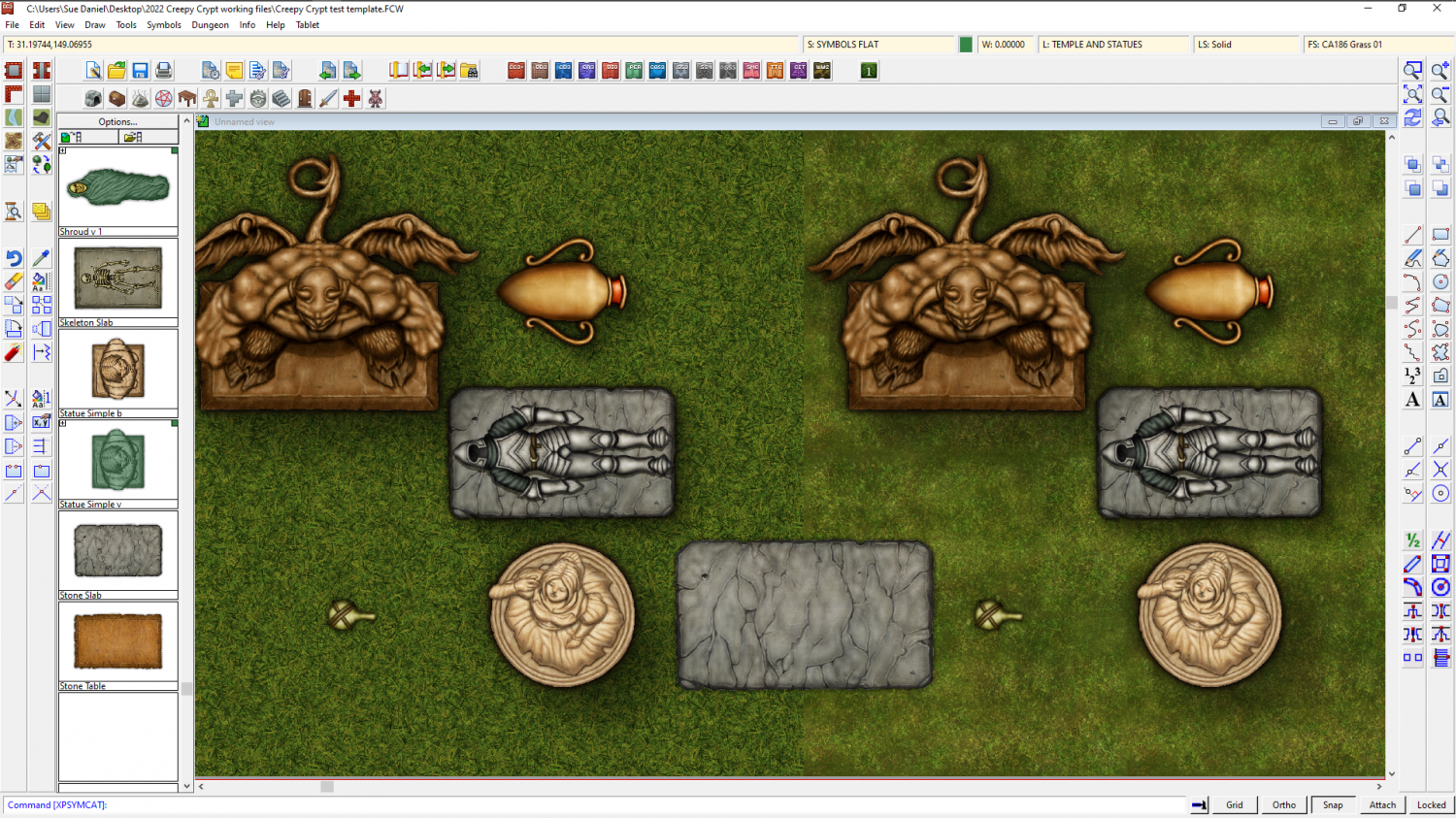
The Creepy Crypt style is taking shape, thanks to all your suggestions for appropriate symbols (both here and on the FB Group page). However, I find myself making grass... of the variety that cows eat... for above ground crypts. The question is - should I bother with the grass textures, or leave it to you to import the standard DD3 grass fills to your above ground crypt maps? Here is a sample of one I drew this morning on the left, against the default DD3 grass on the right, - both with standard DD3 symbols for scale and appearance.