


Loopysue
Loopysue
About
- Username
- Loopysue
- Joined
- Visits
- 10,415
- Last Active
- Roles
- Member, ProFantasy
- Points
- 10,161
- Birthday
- June 29, 1966
- Location
- Dorset, England, UK
- Real Name
- Sue Daniel (aka 'Mouse')
- Rank
- Cartographer
- Badges
- 27
Latest Images



-
How do I fill an area?
You can convert the line to a polygon using 'Path to Poly' in the right click menu of the Fractalise tool. It looks like you might have a line width greater than zero, which will form an open polygon. Use Change properties to set the line to zero width and pick your fill, sheet, and layer.


-
Creating greater depth
I think you are doing well with the contouring. It does take some time and patience to get it right. Roads are a tricky one. I did a city a long time ago and cheated a little bit by using 6 or 7 tiers a bit like a disorganised wedding cake. That way each tier cast a shadow where necessary over the roads and houses on the tiers below.


-
New user from the Netherlands, nice to meet you all!
Hello and welcome, Yskonyn :)
The 'Tome', as we often call it, does contain practically everything there is to know about Fractal Terrains, CC3 and all the add ons, but it's probably easier to use that as a rather large all-in-one reference manual.
I recommend starting with the CC3+ User Manual and working through the excercise contained in it. That will give you a reasonable understanding of most of the basic tools. Similarly, when using the add-ons they often have their own user manuals (or 'Mapping Guides' in the case of the Cartographer's Annuals.)
However, if you are more of a visual learner we have collectively created a lot of tutorial videos and live mapping streams, most of which are available on YouTube and indexed on this thread here.
But sometimes the quickest way to solve a problem is just to start a thread here on the forum and ask how to do it or what went wrong.

-
Is CA46 Castle Walls still state-of-the-art?
Yes, all the annuals work with CC3+ because they were updated to do so. (If you should find an exception to this rule please contact Tech Support).
Unless there is a style of a similar name with the additional word 'revisited' included, then the one you have is likely to be the most up to date version of that style (or toolset). To the best of my knowledge there isn't a 'revisited' version of that issue.
-
Live Mapping: Modern Atlas
I keep telling him not to play dare with Thor!
LOL!
![[Deleted User]](https://secure.gravatar.com/avatar/c75d9a245b74d9c59be0999ea81ca541/?default=https%3A%2F%2Fvanillicon.com%2F92add7f8c954488718110edc4896ad39_200.png&rating=g&size=200)


-
[WIP] Cliff City B&W
It looks quite complicated.
If you aren't happy with it yet, consider working on one level at a time. Start with the base level and get that right first, and then move up a level and get that right.
Drop shadows are not ideal in this situation, since the shadow can end up detached from the cliff. It is better to use a fairly light shadow with a reasonable blur at each level of the cliff. Don't forget to cap each level with a white polygon to cover the inside, like putting the lid on that level, or the shadows will show inside the cliff as well as outside it.


-
Chasm/Crevices in SS4 dungeon?
That's another way of doing it I think, and there are many alternatives.
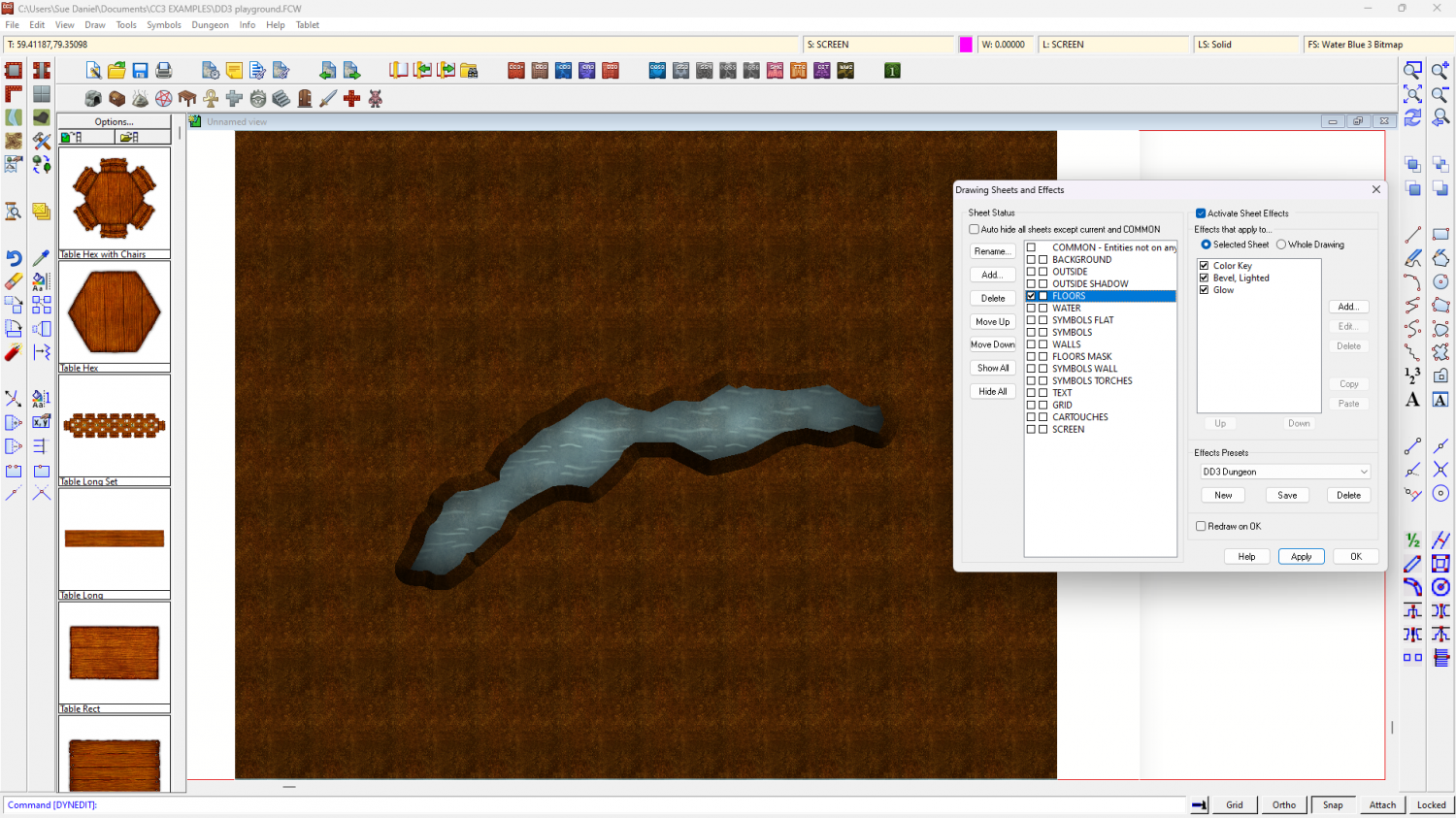
I made an example file using DD3 to show what I described above if you would like to have it.
The water is the background polygon, and the dirt is a polygon on the FLOORS sheet that extends beyond the edge of the map to hide the bevel where it appears on the outside edge as well as the edge of the crevice. If you hide the sheet called SCREEN you will see what I mean about hiding that outer edge.
I added 3 effects to the FLOORS sheet and drew the magenta cut out shape on that sheet. The first two effects were as I described above, and the third was a glow to enhance the illusion of there being a shadow cast on the water below by the edges of the crevice.

-
Help with lighting
When you use the command, what figure are you getting in response at the command prompt? Is is 4000000, or 40000000?
If it is only 4000000, type 40000000 and press enter to change the setting.
(I had to count those zeros several times! There are no commas to help you, but one is 4 million, and the other is 40 million)


-
Help with editing a landmass
Hello pabadger :)
The simplest way to do this is to Use the Land drawing tool to draw a third landmass that traces both of the existing ones.
1. First, ensure that both those landmasses are made of straight polygons instead of smooth ones by right clicking the Fractalise button |CC2FRX|and picking smooth to straight. Use the tool to turn both landmasses straight. This may make it look slightly different if they happen to be smooth, but you can reverse the process using Straight to Smooth from the same right click menu on the new landmass when you are done tracing.
2. Pick the land drawing tool (preferably the straight one if there is a choice) and click once on any point of the land, then press letter T on your keyboard to enter tracing mode.
3. Pick the coast not far away from where you started, and then start the trace with a second click between where you started the line and where you indicated the trace operation.
4. Drag the trace line to where the two landmasses join, making sure you don't trace any of that bit where it overlaps, and end the first trace by clicking there. Don't end the drawing. Just end the trace operation. Then press T again and start a second trace operation to trace all the way around the other landmass until you get back to the other side of the overlap.
5. Do a third trace to finish the job by completing the trace around the first landmass back to where you started. When you get there, that is the point where you need to end the third trace and then finish the drawing operation.
Once the single landmass has been drawn in that single 3 part tracing operation you can delete the 2 older parts, and turn the coastline back to smooth if you prefer it that way.

-
Objects completely invisible while being moved/rotated
Try hitting the TAB key while you are moving/rotating/copying the objects. It toggles their visibility on and off.

