


Loopysue
Loopysue
About
- Username
- Loopysue
- Joined
- Visits
- 10,361
- Last Active
- Roles
- Member, ProFantasy
- Points
- 10,117
- Birthday
- June 29, 1966
- Location
- Dorset, England, UK
- Real Name
- Sue Daniel (aka 'Mouse')
- Rank
- Cartographer
- Badges
- 27
Latest Images



-
[WIP] Recreating Thedas
CC3 draws the BACKGROUND sheet first, and then draws all the others on top of it one after another all the way down the list to the bottom. So if you have something on a sheet near the bottom of the list it's on top of most of the rest of the map in your drawing.
If you want all the entities on a particular sheet to be on top of everything else in the map you would need to move it to the bottom of the list. Take care to leave the border and screen sheets right at the very bottom, though.
The effects on each sheet affect only the entities on that particular sheet.
Usually a sheet with a name that starts with SYMBOLS... has symbols on it, and sheets that don't start that way have lines and polygons on them.

-
[WIP] Recreating Thedas
The scaling (or the default symbol size) is something that really should be set at the outset. But you've already done quite a lot of map. When you say it looks too small when you export it, are you exporting it always with this broad white border around it?
What export options are you using? These are controlled by the dialog that opens when you hit the Options button in the Save as... dialog.
Here is an example.
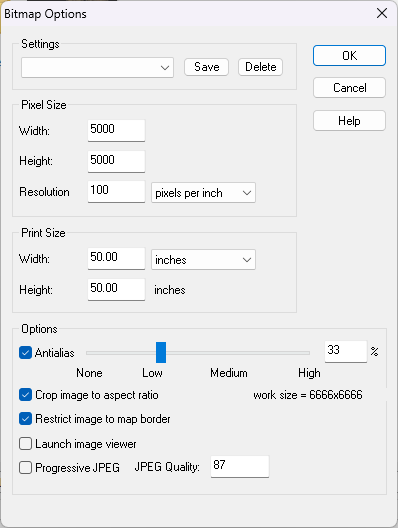
You can export the same map a lot larger by increasing either the Print Size or the Pixel Size. The settings above produce a much larger export than the default settings.
The Restrict image to map border checkbox should also cut out that large white border.

-
Scaling when Import new Bitmap
When in metric maps scale to the appropriate metric unit, which is km in overland and m in both city and dungeon
And in imperial maps scale to the appropriate imperial unit, which is miles in overland and feet in city and dungeon.


-
Live Mapping: Fantasy Realms Reimagined
Hi Everyone! :D
Hope you are having a lovely Christmas and a really great New Year!
In this first Live Mapping session of 2024, Ralf will be starting the year by demonstrating the first issue of the Cartographer's Annual 2024 . Come along and join in the chat here:
https://www.youtube.com/watch?v=99nldttTOo8
Or if you prefer you can watch it here (though there's no live chat on the forum)

-
start
You're welcome, Kevin :)
If you ask a specific question there is usually someone around to help, so don't get stuck simply because there seems to bo so much to learn. Also, if you've used the app before it comes back a lot faster than you might think.
-
Herwin Wielink + Perspectives = Jungle town Landscape
I think Herwin gradually moved on to photography more than fantasy art over the years, so while it would be nice to see these styles expanded I think it's probably not that likely to happen.

-
Herwin Wielink + Perspectives = Jungle town Landscape
@Royal Scribe The HW overland style is included with the core app these days.

-
Importing real world map
Not unless you wanted to separate each of them out into an image per district and trace them that way. When you get to that amount of work it could be faster just to import the image and draw the districts by hand.
Going back to the tracing job on the outline...
The result seems a little pixelated to my eye compared with the original. This can happen if the image being traced is too low in resolution or if the edge between the opaque parts and the transparent parts are not well defined. If you want to improve on that result see if you can make the image both larger (more pixels in a bitmap editor) and more sharply defined.

-
My Hex Crawl Symbols
You seem to be getting on really well. They are easy to read and attractive :)
-
Layering the Same Fill without pitting in Worthington Historical
I'm not able to explain it either, but I created a new sheet called "Backing sheet" and copied the polygon from TERRAIN MOUNTAINS 2 onto it with no sheet effects. It seems to be ok now. Let me know if it stops working, or doesn't work as well as I first thought.

