


Loopysue
Loopysue
About
- Username
- Loopysue
- Joined
- Visits
- 10,354
- Last Active
- Roles
- Member, ProFantasy
- Points
- 10,107
- Birthday
- June 29, 1966
- Location
- Dorset, England, UK
- Real Name
- Sue Daniel (aka 'Mouse')
- Rank
- Cartographer
- Badges
- 27
Latest Images



-
Way to copy effects?
The Copy and Paste buttons to the right of the effects panel, below the Add Edit and Delete buttons, will copy whichever effect(s) you have highlighted at the time, and then paste them in whichever sheet you have active.
The copy button is only active when you have at least one effect selected, and the paste button is only active once you have copied something.
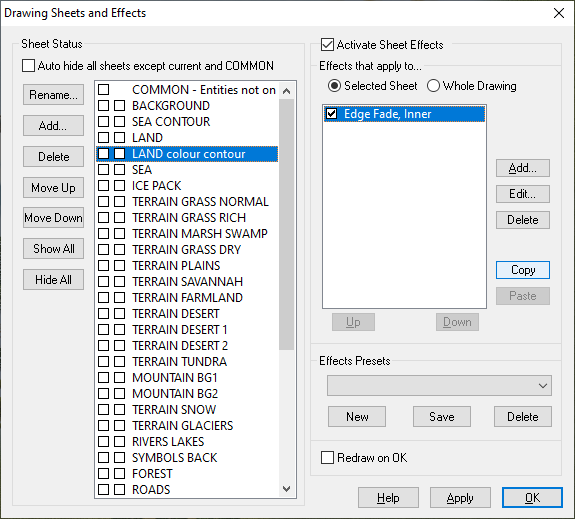
You can also copy and paste effects between sheets in different maps as long as they are open side by side. (I've never tried it by closing the first one and opening the second one).
-
Physical Manual and Essentials Guides
And here is another perfect example of how Remy and I quite often 'ninja' each other in responding to questions ?


-
Physical Manual and Essentials Guides
Unfortunately, owing to cost of production combined with the tendency for such things to be regularly updated and render physical copies out of date in a matter of months, I don't think PF do printed copies any more (though I might be wrong).
The only thing to do if you really must read on paper is to print these things out yourself. But be aware that updates are not done on nice convenient update sheets. Things are just generally updated, so eventually you will have to print the whole thing out again.
-
Project Spectrum - Part 2
Thank you, Jim. That's very useful ?
-
Fill styles arent being selected automatically. Bitmap has to be added manually. How do I fix this?
You have the Jon Roberts drawing tools, but the fills I can see in your map and the symbols are DD3. These are different styles.
While it is perfectly fine to mix styles there are a few issues you might encounter along the way. To solve the most likely ones...
- If you don't have the right drawing tools for the style open the drawing tool dialog and where it says CD3 Floorplan DD3 in the dropbox at the top in your last screen shot there, click the down arrow and pick the right style.
- If you don't have the right fills for the style you want to use, create a dummy file of the desired style and use Import file in the Draw menu to import the dummy file into your current map, but abort the operation just before you paste the temporary file into the one you are working on. This will import the bitmap fills into your map without pasting any other irrelevant stuff.
- If you don't have the right symbols you can navigate to the right symbol catalogue using the folder button at the top of the symbol catalogue pane. Be careful to open the catalogue file and not the actual folder containing the symbols. Catalogue files are .FSC files.
I hope that helps ?


