


Loopysue
Loopysue
About
- Username
- Loopysue
- Joined
- Visits
- 10,413
- Last Active
- Roles
- Member, ProFantasy
- Points
- 10,161
- Birthday
- June 29, 1966
- Location
- Dorset, England, UK
- Real Name
- Sue Daniel (aka 'Mouse')
- Rank
- Cartographer
- Badges
- 27
Latest Images



-
Tilkar map
That's lovely, Medio :)
-
Grimdark Fantasy (renamed "Darklands") - development thread
At the time I wrote that last comment I was just trying to work out what it meant as a result of being asked to do a grimdark version of one of my city maps for another member of the team.
Since then, however, I've started generating a few fills and talked a bit with Ralf about a Grimdark Fantasy overland style for next year's Cartographer's Annual. The basic colour scheme will probably be cream->dull green->dull purple with blue water and gold leaf border. Not sure about anything yet, though, so it might not be anything like that at all.






-
Live Mapping: Creating your own Symbols
Hi Everyone :)
Ralf will be doing this week's live stream, showing us all how to make our own symbols.
Please do come along and learn with us if you can. Click the link above and book your reminder on YouTube.

![[Deleted User]](https://secure.gravatar.com/avatar/c75d9a245b74d9c59be0999ea81ca541/?default=https%3A%2F%2Fvanillicon.com%2F92add7f8c954488718110edc4896ad39_200.png&rating=g&size=200)

-
October challenge: Bow of Promises (Street) WIP
That's better! The smokes looked odd with only one of them glowing :)

-
More Watabou Generators very useful to CC3+ mapping.
It's not really about art, but geometry.
Here is what I mean. If the pitch of the roof was the same all the way around the ridges would describe a taller triangle from above at the ends of a rectangular building so that the distance between the roof ridge was the same on all sides (X). But the rooftops in that last image are squashed triangles, meaning that the end roofs are much steeper than the side roofs (Y is much shorter than X). This is a strange way of drawing a roof. I mean, it would work, but why would you bother? It's half way to a gable end. One or the other is more usual, but not some kind of half way construction.
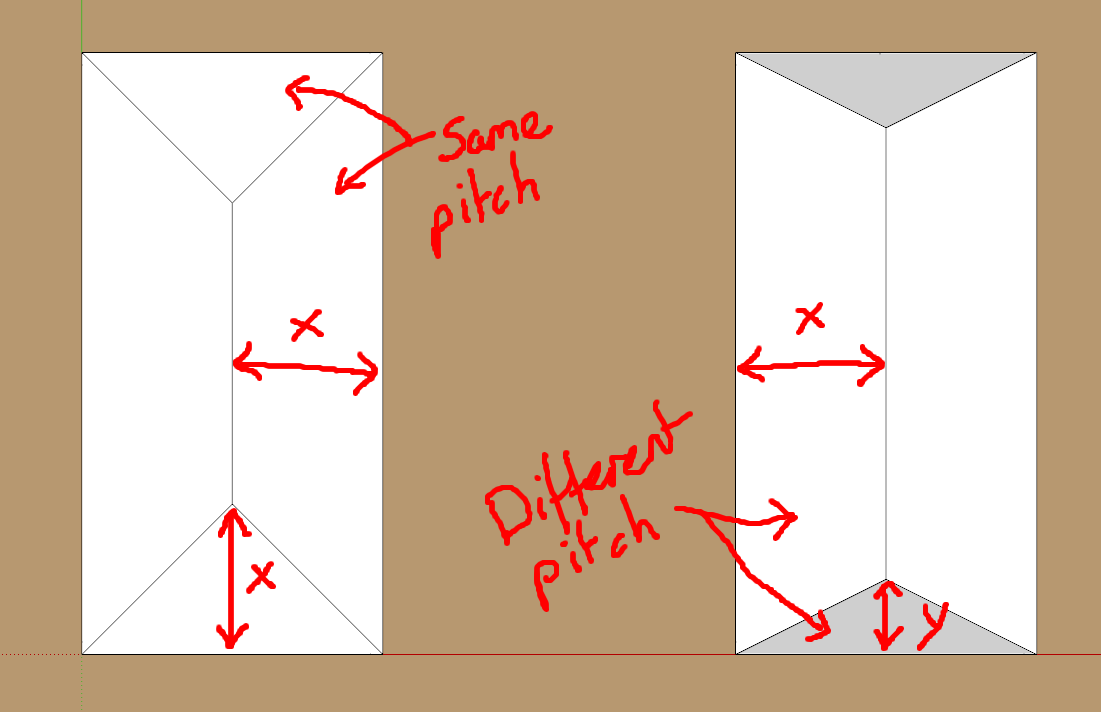
Let me be a bit more clear about why I'm pointing this out. I have seen many rooftops generated by Watabou that look rather strange, even in isometric view (which is by its very nature strange compared to full perspective). These roofs are not 'wrong' per say, but are just really rather odd. And I wonder if Watabou really understand the geometry, or if this is perfectly deliberate on their part.
I think it is important just to to be aware of this oddity, so that people don't forever go around thinking that this is how to draw a regular hip roof building with equal pitch all the way around.

