Loopysue
Loopysue
About
- Username
- Loopysue
- Joined
- Visits
- 10,354
- Last Active
- Roles
- Member, ProFantasy
- Points
- 10,103
- Birthday
- June 29, 1966
- Location
- Dorset, England, UK
- Real Name
- Sue Daniel (aka 'Mouse')
- Rank
- Cartographer
- Badges
- 27
Latest Images



-
Live Mapping: Jon Roberts Dungeon (multi-level)
In tomorrow's live mapping session, Ralf will be demonstrating how to set up a multi-level dungeon layout using the Jon Roberts Dungeon style.
Come join us live on Youtube here:
https://www.youtube.com/watch?v=-8mfzPylFtc (Date and time in the left forum margin)
Or watch it right here on the forum - though please bear in mind that we don't usually monitor this thread during the show.
If you miss the show but still have questions you can ask them below.




-
Live Mapping: Hand-drawn City
Ralf will be kicking off the 2026 live mapping series with the first Annual issue of the year: the Hand-drawn City style.
Come along and join in the fun on the day (date and time is shown in the left-hand margin of the forum)
https://www.youtube.com/watch?v=JzudARj7FLU
Or watch it here if you prefer, though this thread is not monitored during the live show.
Please add your comments and any questions you might still have after the live show below. Thank you.


-
Ferraris Hedgerow Bushes change scale
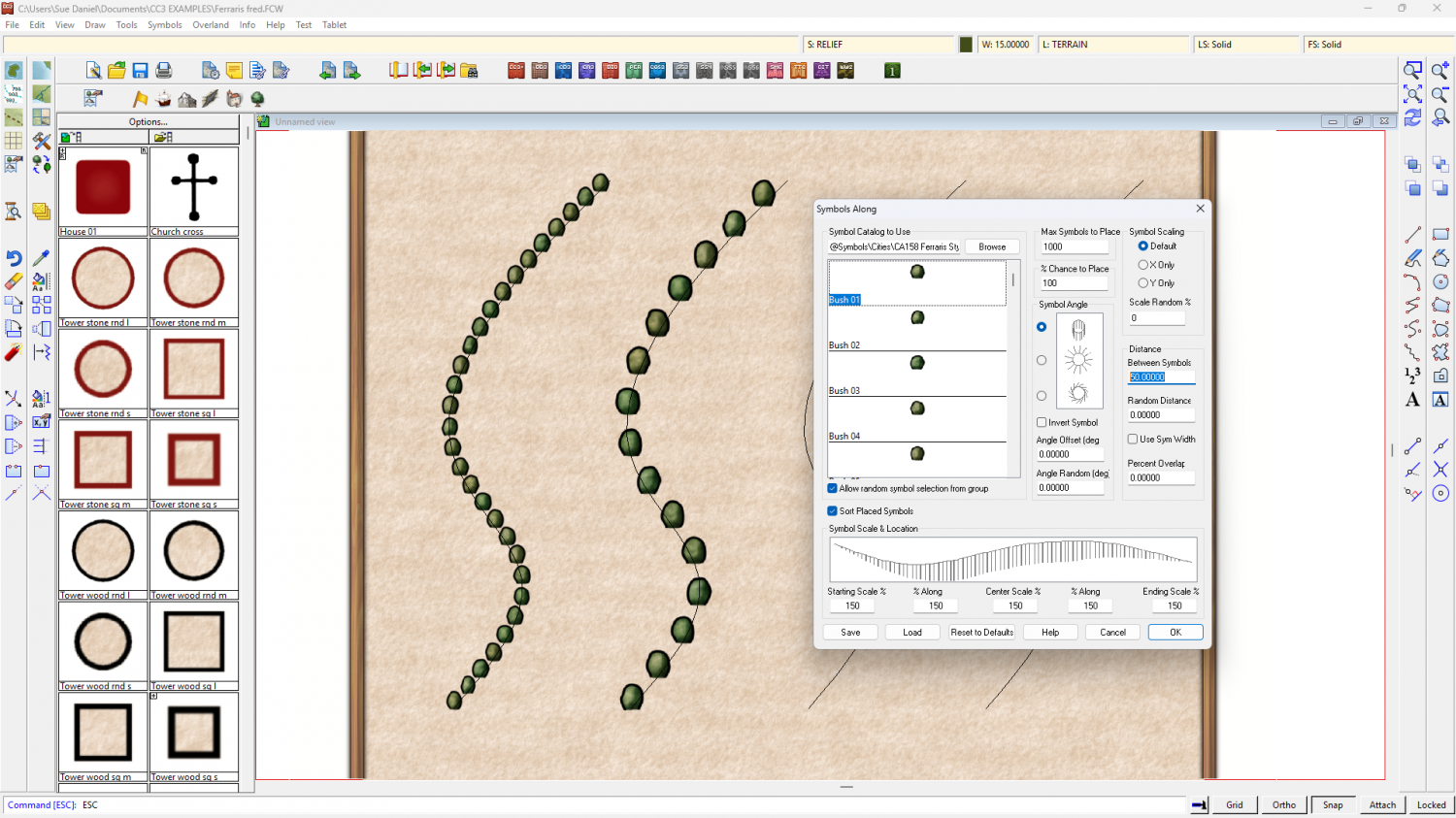
Once you have used that drawing tool once the settings file it uses will be the default option if you then use Symbols Along from the Draw menu.
Then you can pick your line and alter the settings for this set of symbols along. Here I have made all the symbols 150% original size and switched off Use Sym Width so I can put 50 (map units) Between Symbols in the Distance pane.
The left line of bushes is the original drawing tool, and the right line of bushes was created using Symbols Along as described.
-
My version of Lankhmar
That's a really huge job - especially turning them all different colours as well.
Looking good so far :)
-
Good Tutorials for this program?
Hi Baphomeat :)
No single video will ever be perfectly and exactly what you need to know for a particular map you are making, and even the best tutors will never be ideal for everyone because we all have different learning techniques.
Maybe it would help if you started a Work In Progress (WIP) thread here on the forum so you can just ask anything you like, and not have to go searching for videos?