


Loopysue
Loopysue
About
- Username
- Loopysue
- Joined
- Visits
- 10,413
- Last Active
- Roles
- Member, ProFantasy
- Points
- 10,161
- Birthday
- June 29, 1966
- Location
- Dorset, England, UK
- Real Name
- Sue Daniel (aka 'Mouse')
- Rank
- Cartographer
- Badges
- 27
Latest Images



-
How to add large symbols to a city map
You mean the line width?
You can either set the line width before you draw the line by clicking the little box at the top with W: in it, or you can use change properties once it's already drawn.
Another way, without altering the actual width of the line, is to add a glow to the sheet it is on that is the same colour as the line.

-
How to add large symbols to a city map
Ralf did a Live Mapping session just over a week ago where he covered most of the sheet effects. The Blend Mode is at 28:40 or thereabouts.
https://www.youtube.com/watch?v=4y9NRUm2jHg
Basically, the mode you pick from the dropdown box at the top of the edit dialog for this effect gives you a set of different ways to blend the pixels of the texture on this sheet with the underlying map. They are closely related to the kind of blend modes you might find between layers in a bitmap editor, so overlay and multiply will do exactly what setting them in GIMP or PS would do.
The opacity just controls how opaque the things on that sheet are.
-
A Command that Changes the Number of Passes when Rendering.
EXPORTSETMPPP
Try typing the same figure as you are given at the command line with an extra zero on the end of it, and hit Enter.
![[Deleted User]](https://secure.gravatar.com/avatar/c75d9a245b74d9c59be0999ea81ca541/?default=https%3A%2F%2Fvanillicon.com%2F92add7f8c954488718110edc4896ad39_200.png&rating=g&size=200)
-
How do I remove lines
Hi Aeludor :)
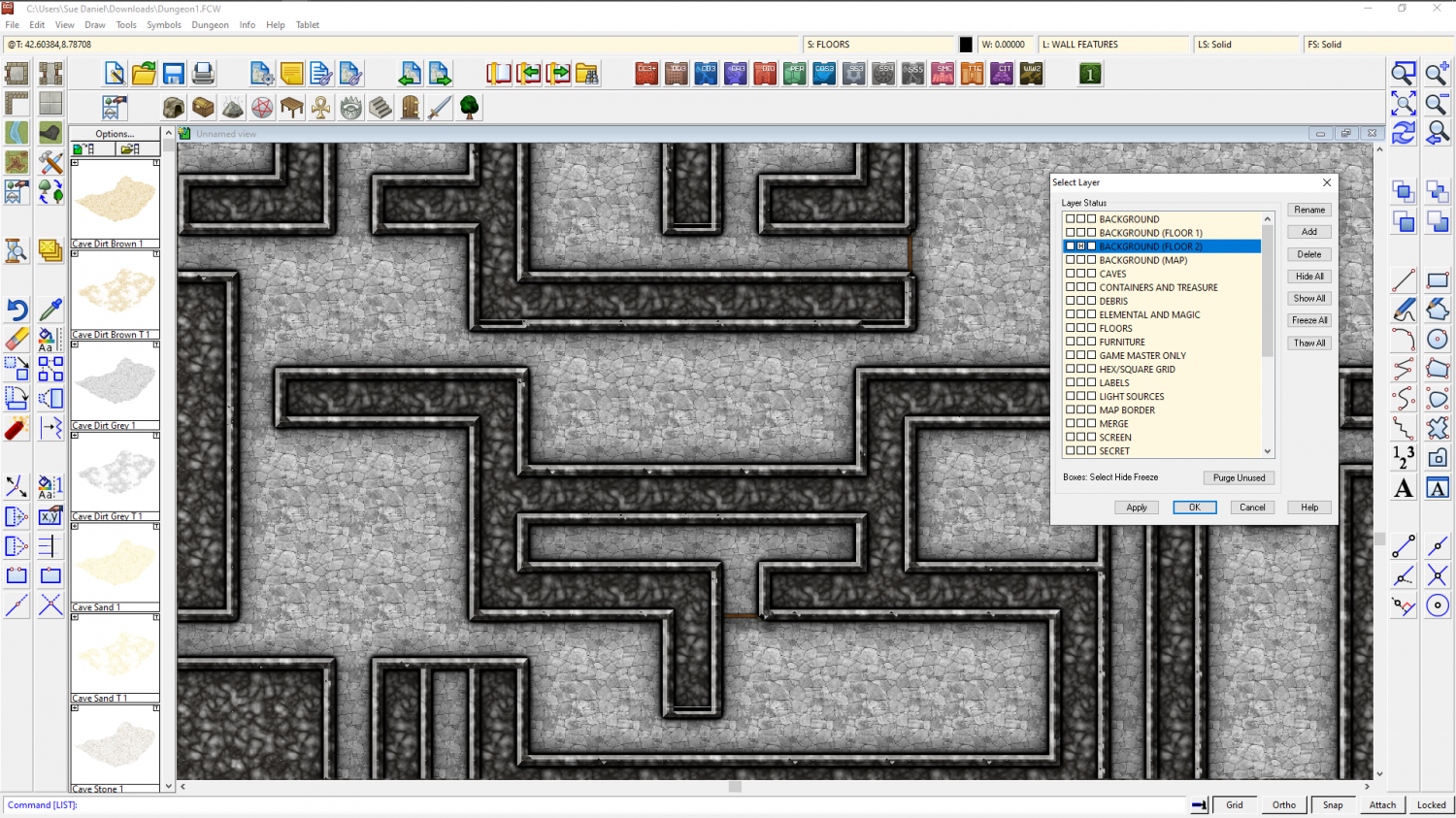
For some reason, probably to do with the style, there are 2 floors there instead of just the one floor.
If you hide the layer "BACKGROUND (FLOOR 2)" the second plain black floor is hidden from view like this

-
Inn/Tavern battlemap (WIP)
That's a really good map elezriata - and "Hi" from Sue Daniel ;)
Have you heard about the Vintyri Collections? These are huge collections of free third party art assets that might help with things like more variation of rugs and furniture.
The links for all the assets can be found here:
Where the Vintyri collections in particular are concerned please read the installation instructions really carefully.


