


Wyvern
Wyvern
About
- Username
- Wyvern
- Joined
- Visits
- 3,266
- Last Active
- Roles
- Member
- Points
- 5,584
- Rank
- Cartographer
- Badges
- 24
Latest Images
-
Loopysue Hits 10,000 Posts!
Apropos of nothing much beyond my spotting this, but I see @Loopysue has just achieved the milestone of 10,000 Forum posts here today, the first person to achieve this!
Round of applause for Sue, please!
👏👏👏
😁








-
Paper Modelling (October 2021 Cartographer's Annual)
Thinking further about this, it occurred to me it might be helpful to provide a list of manufacturers that produce, or have produced, downloadable card and paper models, with website links. I'll not pretend this will be fully comprehensive, but it may give some more precise pointers than simply advising people to go and hunt through the OBS sites and CWF. Where not noted, the scale is generally the "standard" 28 mm-32 mm used for most fantasy and science-fiction gaming (which of course isn't a true scale at all, but what can you do?).
Antohammer the Lonely Wargamer: Mostly 2D standee paper minis, with some 2D, 2.5D and occasionally 3D models as well (of terrain features, smaller structures and a few vehicles), fantasy and historical.
Arid Hills Gaming: A limited range of 2D, 2.5D and 3D fantasy and science-fiction gaming terrain and props (e.g. for dungeons and graveyards). Manufacturer has now though switched to 3D printer files only.
Avalon Game Company: Mostly paper minis (plus a massive collection of written RPG accessories, gaming floor tiles, tabletop print-and-play games and accessories), with a limited range of fantasy 2D and 3D scenery, e.g. for dungeons.
Black-Ronin: A small number of 15mm-18mm scale 3D exterior modern buildings and structures, and 2D floorplan textures, intended for historical wargames.
Crooked Staff Publishing: A VAST and increasing range of Pay What You Want texture packs for creating your own scenery. The guy who is the company, Kristian Richards, also produces regular short YouTube videos (59 so far!) on using these to make 2D, 2.5D and 3D models (attaching the texture to various types of card and foamcore first, very often), and has an enthusiastic Discord channel. Although not specific models as such, the PDF file textures could be easily converted and transplanted for personal use in CC3+ to draw specific models using them in Dioramas 3, for instance. The videos are especially to be recommended for new card model builders, and mappers particularly may care to view the, currently 4, "Tiny Terrain" videos, which are in essence 3D hexmaps!
DarekPages: A small, occasionally growing, range of 3D terrain models, some vehicles and 2D minis, for near-future/science-fiction settings (although some items will work for fantasy too), with comprehensive photographic instructions.
Dave Graffam Models: A huge, still growing, range of 3D, mostly exterior-only, models for fantasy and science-fiction settings, with 2D ground tiles as well. Instructions provided with each kit, many of which make heavy use of the PDF layers facility, so each model can be built in a variety of appearances.
Eddnic: All-free, more-or-less unique 3D paper minis, and some 2.5D and 3D fantasy prop models (HeroQuest-style, after the 1980s fantasy boardgame of that name). Not for beginners, as some can be very difficult to make, there are NO instructions, and searching through to find what might be of interest is a challenge in itself (as it's purely a blog site), but the models are often astonishing and - as mentioned - free + unique!
Epic Wargaming also known as Print and Play Fantasy: Primarily wargame-style 2D fantasy standee minis, but there are a couple of 3D models as well, notably a castle on the Wargame Vault site. A major website failure three years back has meant the ranges are still incomplete on the new site, although new minis are produced from time to time. Many of the minis are free, though some are Patreon-only items now.
Fat Dragon Games: A large range of mostly 3D buildings and terrain (for possibly the greatest number of biomes available anywhere in papercrafting), the later models often making use of the PDF layers feature to extend the options for how the final models can appear. Mostly fantasy structures, with some science-fiction, although the natural landscape terrain has many more uses. The owner has switched to 3D printed models only now, so the existing paper-model range is unlikely to expand further.
Finger and Toe Models: A large range of 3D building, structure and vehicle models for fantasy, historical and science-fiction settings. Mostly exterior-only models, and provided with illustrated instructions.
Haunted Dimensions: A host of horror-themed, free, 3D models, games and some minis. The models are chiefly exterior-only, though they do include the Bates and Amityville houses from their respective movies.
Helion & Company: Their Paper Soldiers range of hardcopy and PDF books each contain complete pairs of historical wargame armies of minis, basic rules and usually some 2.5D or 3D terrain features and miniatures, and come with full instructions. Two sets, "European Buildings" and "Castle Assault", are especially heavy on the 3D buildings side!
Hotz Stuff: A range of 1/300 scale historical naval wargame minis, including 3D ship and building/structure models, plus a range of 30 mm (1/60 scale) Wild West buildings and structures. No new items in more than a decade, however.
Kingsway Models: Mostly hardcopy-only OO-scale (roughly 1/76 scale) historical British railway model structures and buildings, with a few free downloadable PDF items. Some 1/43 scale (O gauge) items also available. Print quality on the hardcopy items is often not as good as you would hope, from personal experience, and this is true also of the PDFs.
Lord ZseZse Works: A range of 3D models (as well as lots of 2D ground-tile flats), primarily for fantasy settings, and including some terrain features as well as structures. Also a few 3D vehicles (historical Russian tanks). Unfortunately, after a very successful Elven Papercraft KickStarter campaign in 2014, the company ran into problems delivering all they'd hoped to from that, and although all their models remain available for purchase, no new models are likely, as the owners split-up in 2017.
Mystic Mountain Productions: A modest range of fantasy 3D buildings, mostly exteriors, though some with internal 2D floor plans as well, with comprehensive photographic instructions. Often makes use of PDF layers to enhance the final appearance options. No new models since 2017, however.
Okumarts Games: A large range of mostly 2D standee paper minis, but also produces some 2D, 2.5D and 3D models (dungeons especially in the latter type), mostly for fantasy and science-fiction settings, also some historical minis. Detailed photographic instructions are provided for the models, and the PDFs nearly always make much use of the PDF layers facility.
One Monk (also known as Mayhem in Paper) : Although One Monk produces chiefly 2D standee fantasy minis and a few 3D vehicles, their main website also hosts a huge repository for many free minis and models created over the years by the papercrafting community, in recent years via the Cardboard Warriors Forum's "Monthly Hoard" system, or produced by individuals outside that.
Papercraft Dungeon also known as Kev's Lounge: A range of mostly 2D paper standee fantasy minis, with a small range of 3D structures, the buildings coming with full external and internal artwork. The build mechanics can be complex for the structures, and although photographic instructions are provided, they work better for those with plenty of paper model-making experience. Tending to concentrate chiefly on standee minis only in recent years, however. In addition, not all the models are available via the OneBookShelf sites (the link above), and the owner's site, Papercraft Dungeon, while allowing easy paid-for and free downloads, will only let you download each item in your account a limited number of times - so make plenty of back-up copies!
Papermau: An extensive, very long-running blog, which serves chiefly to highlight some of the many paper model creations freely available across the Internet down the years. The blog's author also makes new, usually 3D exterior-only, models from time to time as well. Being Brazil-based, a few of the blog posts in the past two years have become rather politicised, which may be something to be aware of.
Paper Realms: A large and growing range of 3D exterior buildings, 2.5D/3D subterranean and ruin models for historical and fantasy settings, with some props sets and ground tiles, and some overground 3D terrain models, including options via PDF layers, and instructions.
Papier Schnitzel: A substantial and growing range of mostly historical 3D model structures and ships (Dark Age Europe and Medieval Asia, primarily), usually with full exteriors and interiors, making extensive use of PDF layers, and provided with detailed, photographic instructions.
PERMES: Chiefly a 2D standee minis producer (vast range; historical, fantasy and science-fiction), some of the sets do come with pieces of 2D or 2.5D terrain as well, and a few packs are chiefly of this sort. Instructions are not always provided, so some experience with paper modelling is necessary to get the most from these models.
Ravensblight: The "Toyshop" section has a substantial range of free horror-themed 3D exterior-only buildings, games and vehicles, including full-sized novelty items. Commonly added-to around Hallowe'en in most years, in some cases with RPG/story notes as well, plus separate PDFs with instructions.
Reviresco Tin-Soldier: A small range of mostly exterior 3D model vehicles, structures and buildings, making use of PDF layers to swap things around at times, and with useful, illustrated instructions.
Scalescenes: A growing range of British model railway structures, buildings and some vehicles, available in OO (1/72) and N (1/148) scales and with different exterior texture options (though only one scale, and one texture option, is provided in each paid-for downloadable model). Illustrated instructions come with each kit. Look out too for the free downloadable PDF scale rulers!
Stoelzel's Structures: A large range of highly detailed 3D models with full interiors and exteriors, often with props, and comprehensive instructions, suitable for near-modern and horror settings particularly, with some fantasy items (such as caves and dungeons). PDF layers are not used, so there are commonly huge numbers of pages per PDF, which can make it difficult to keep track of what to print when there are options available. Also relies on the use of foamcore to retain the correct wall thicknesses, so the walls are simply covers for that.
Tinkering Tom: A small selection of 3D building models, fantasy-historical in nature, complete with illustrated instructions.
Wordsworth Model Railway: A substantial range of British OO scale 3D exterior railway model structures and buildings, all free. Also a YouTube channel with a huge number of construction videos. Video 92 is recommended for beginners by the company, as a 10-minute general introduction to making card buildings.
World Works Games: A large range of 3D fantasy, horror and science-fiction model structures, buildings and some vehicles. Unfortunately, the range is no longer supported, so is unlikely to further expand. In addition, the kits are all available only through the company's own website, and it too is not regularly maintained, so in recent years, it has been frequently, and unpredictably, offline for unexplained reasons. As only a limited number of downloads are available from each purchase, be sure to make plenty of extra back-up copies of anything purchased from the site.



-
Community Atlas: Errynor - Meteorite Coral Cavern
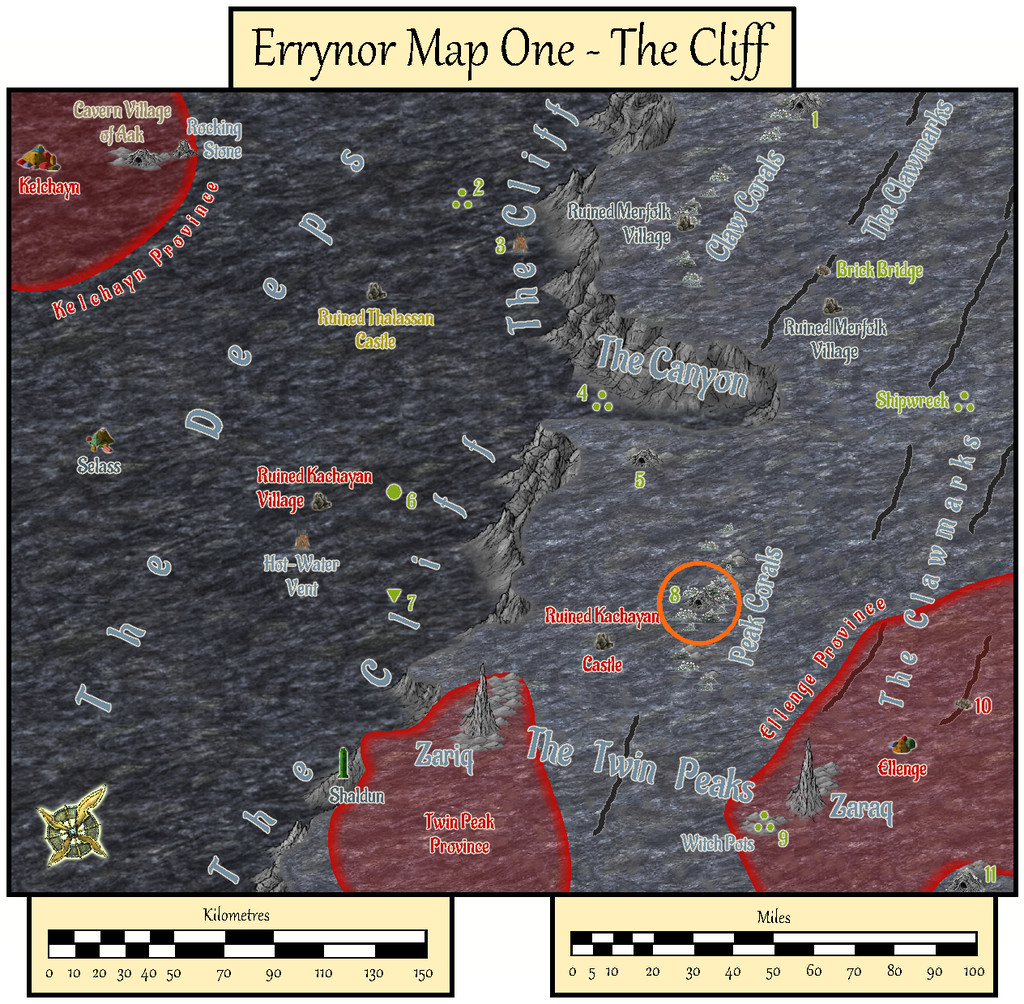
Having spent much of 2020 preparing detailed maps and descriptions that often took weeks at a time to complete for the Community Atlas, it seemed worthwhile to tackle a less involved map at this stage, for one of the smaller projects I'd long had in mind as part of Errynor Map 01. There, it had the prosaic label of merely "Cave 8", the lair for a giant octopus set among the Peak Corals:
However, for some time, I'd intended to make it a little more than simply an animal lair. Indeed my earlier planning for the maps to add detail to this Map 01 area had included others of the cave lairs elsewhere on it too. As time passed, I'd discarded that prospect as liable to become too similar, either because I'd end up frequently drawing small cave maps, or because I'd be struggling to make each one somehow unique. So this map ended up with a concentration of elements from some of those "cancelled" maps:
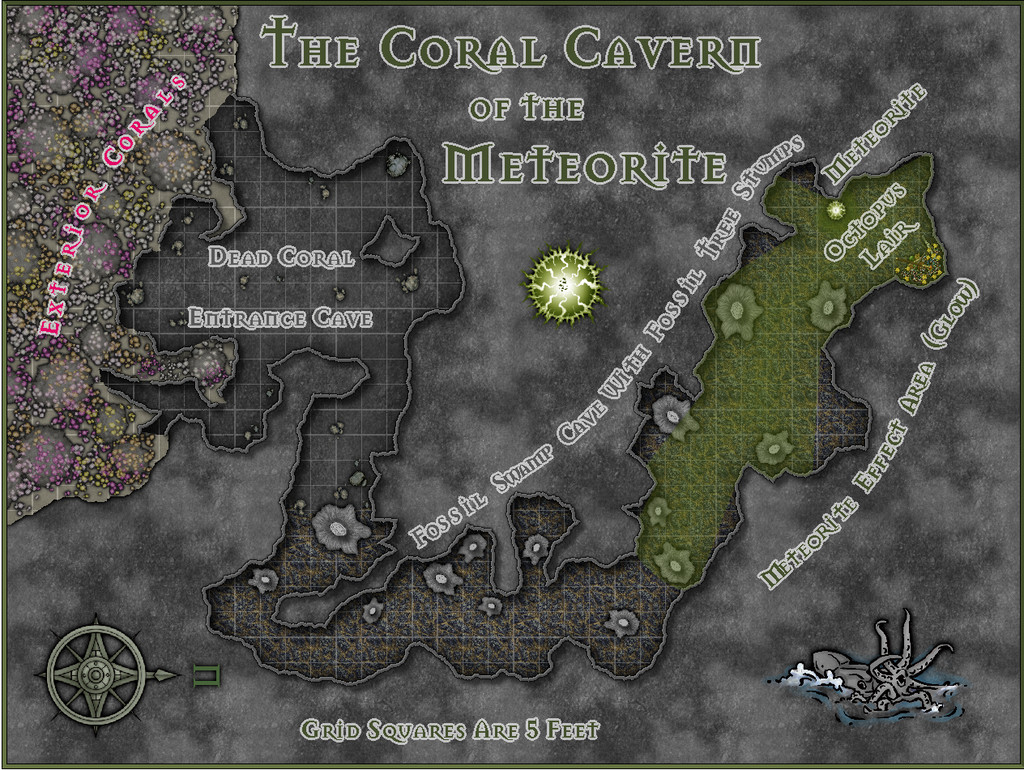
As the lair is set among the Peak Corals, it's not quite a "traditional" cave, as much of its entrance area especially has formed over time from gaps in the build-up of dead coral and other debris which has since solidified, with collapses and modifications by the more mobile creatures living on the reefs and within the cave system, along with the effects of nearby sea-bed gas escapes. Hence I decided not to use a mask to hide the outer edges of the walls here, and just let the shadow Effect from them fall where it might onto the normal Background Sheet, as a reminder the "walls" may not be really so defining as they might seem.
The inner parts of the cavern become increasingly weird. Despite being very far from land, in extremely deep water, and where the usual sea-floor rock is the typical once-molten black basalt, much of the cave floor is that of a very ancient, fossilised, swampy land surface, including numerous substantial fossil tree stumps. Once around the sharp angle, those with normal colour vision will be aware of a green light emanating from further north (north is to the right here for once). The origin of this glow is an even more ancient meteorite, embedded in the fossil swamp from when it was still a living swamp. It shines green, and is Not Entirely A Good Thing, shall we say. Its non-visual effects have led to the giant octopus that lairs here becoming tougher, longer-lived, more intelligent, and - as the substantial treasure hoard might suggest - far more acquisitive than others of its ilk. Much of its time, when not out hunting, is spent gazing contemplatively at the meteorite.
Much of the map was created from normal DD3 assets drawn over a random design from the Curufea's Random Cave Map Generator website, with a few tweaks. I did though add a couple of extras from the Mike Schley overland style - the octopus illustration and the compass rose - and labelled the whole using the Mason Serif Bold font that comes with CC3+. Before starting, I'd intended to use a lighting Effect for the meteorite's glow, but soon realised this would be impractical for the map to be useful as a GM's aid, so elected instead to use a simpler fading-glow look for the affected area, using sightlines drawn from the meteorite to establish where the "shadowed" parts of the inner cavern would be.
I added hand-sketched "tree-ring" lines to the tops of the DD3 stalagmites that were repurposed as fossil tree stumps, having already opted for the cooled lava fill texture to stand for the fossil swamp cave floor. The living coral masses outside the cave on the sea-bed were DD3 fungi and trees, including varicolor options, with added glow and transparency Effects to make them less fungal-floral. The overall look was chosen as deliberately near-greyscale and relatively dark, given the water depth here at over 750 metres (2,500 ft) is far below the depth to which sunlight can penetrate, in-keeping with my deep undersea mapping conventions, while hinting, with the limited use of colour, that things are also a little different here. And yes, naturally, the shadows are anomalous, despite being what the eye expects!

![[Deleted User]](https://secure.gravatar.com/avatar/c75d9a245b74d9c59be0999ea81ca541/?default=https%3A%2F%2Fvanillicon.com%2F92add7f8c954488718110edc4896ad39_200.png&rating=g&size=200)


-
Community Atlas: Errynor - Selass Town
While working on the Ellenge Town map for the Kachaya, I'd also prepared some random tables for designating shops and facilities suitable for Merfolk settlements, given that all undersea civilisations will have a degree of similar requirements for places to live. As I wanted to provide some ideas to the Community Atlas more generally too on developing undersea settlements for all the main races I'd situated in Errynor's oceans, from what had been decided for the Map 01 area, the logical next map was a Merfolk settlement. Of the two still-inhabited ones on Map 01, the Shaldun castle stronghold set in the line of The Cliff itself seemed too similar a location to what I'd already explored for the Shark Bridge area, so I opted instead for the town of Selass out in The Deeps:

I'd already established that Selass was going to be a kind-of independent frontier town, towards the edge of the abyssal plain of Nibirum's greatest ocean, and that the abyssal plain itself would be an area likely to attract adventurers and prospectors. Selass would then have grown to serve their needs in this area. Not wanting to simply drop the settlement onto the routine, flattish, deep ocean floor (the sea's about 3,600 m, nearly 12,000 ft, deep here), and having already worked with some undersea uplands (the Aak Hills), I thought a hollow would be more interesting here. This had the added advantage I could try out @Loopysue's City Cliffs set from the 2020 Cartographer's Annual (CA 165).
Using my random tables, I worked out the size of Selass, and rolled-up what its main features were going to be. The population involved needed two modest villages of agricultural workers and hunters to support it, and them, and dicing for their locations placed one very near Selass, like a "suburb" perhaps, the other a couple of kilometres/a mile or so to the southwest. This meant Selass took on a somewhat elongated look overall, and doodling shapes around this layout brought me to the realisation both Selass + "suburb", and its neighbouring village, could be set into rounded areas where the sea-bed had partly collapsed - when a small magma tube had fallen-in, say, or an especially gassy magma emplacement had led to the sea-floor fracturing in a similar way - places that could have plenty of cliff-opening caves afterwards, suitable for occupation and expansion. Two such places relatively near one another would thus have been ideal for the Merfolk's uses, and included an explanation for why one village had ended up so close to the town, yet could be thought of still as loosely separate from it.
One minor drawback was that the City Cliffs set is intended to work best with the CD3 Bitmap A symbol sets, which are not black-and-white, the overall colour scheme I'd been trying to use for all my undersea settlement maps, due to deciding that while the deep-sea humanoids can all see normally despite the eternal darkness of the deep oceans, their vision without a light source is purely monochromatic. That though was easily overcome by simply applying an RGB Matrix Process Effect set to "Gray" to the entire map. I did have to keep turning it on and off along the way to ensure whatever was being added in colour still worked in greyscale, of course.
Merfolk architecture as I'd envisioned it is pretty eclectic on the whole, so aside from cave-dwellings, a mixture of sea-floor-surface building styles - even some that look remarkably like their land counterparts - would be perfectly reasonable. What seems to be a chimney might be really a vent of some kind, though it could be equally a rooftop accessway, for example. So I drew on all the CD3 Bitmap A symbol sets available, including @ScottA's Celtic houses and @Loopysue's City Domes, to provide an appropriate mix. The switch to greyscale became helpful in another respect, because I needed three shipwrecks, reused as buildings, and the Bitmap A symbols have no ships at all. Luckily the original CD3 vector symbols do have some - not perfect for use as wrecks, but clearly boat-shaped - a difference the use of greyscale helped conceal!
The settlement outlines were to be traced from my hand sketch, once scanned and imported into the CC3+ template, and rescaled to fit the proper area. Using this, I constructed the cliff-lines for both Selass + suburb, and the separate mile-distant village. This took a few tries to get right, as I'd not realised individual segments of the connecting-symbol cliffs couldn't be swapped-out for replacements. After that though, it was easy enough to complete the cliffs.
In order to have the buildings and caves placed randomly - no streets needed on the deep sea-floor, after all - I'd always intended to use the Symbols In Area command to set-up these layouts. So I added basic coloured circles for the relevant Areas within the outer cliff-lines, and populated them with the correct numbers of identifiable symbols of different types for the different surface building shapes chosen, using just the standard Geometry.FSC set from CC3+ at this stage. Once the random patterns were established, it became possible to identify what should go where from the selected properties and places lists randomly determined earlier. The Cave Entrance symbols were moved in places to their nearer cliff-lines, and a few other minor adjustments made, before replacing those except the cave symbols with their final CD3 Bitmap A ones. The most significant change made during this process was to add a cliff stack feature around the southern border of Selass near where it met with that of the adjoining village area, where a particular cluster of symbols had chanced to lie.
Labels and keys were added, along with other surface features in and around the settlements to give them a little more "life", after which an area map was constructed to show the relative locations of the settlements to one another on the sea-bed. For this latter drawing, the cliff-lines from the town and village maps were simply copied and rescaled accordingly. The provided distance scale symbols proved a little too small and unclear when added to the maps, aside from the need to relabel those for the area map, so after adjusting and adding some suitably sized Grid options, fresh scales were produced for these by hand instead.
Hence the final combined map looks like this:
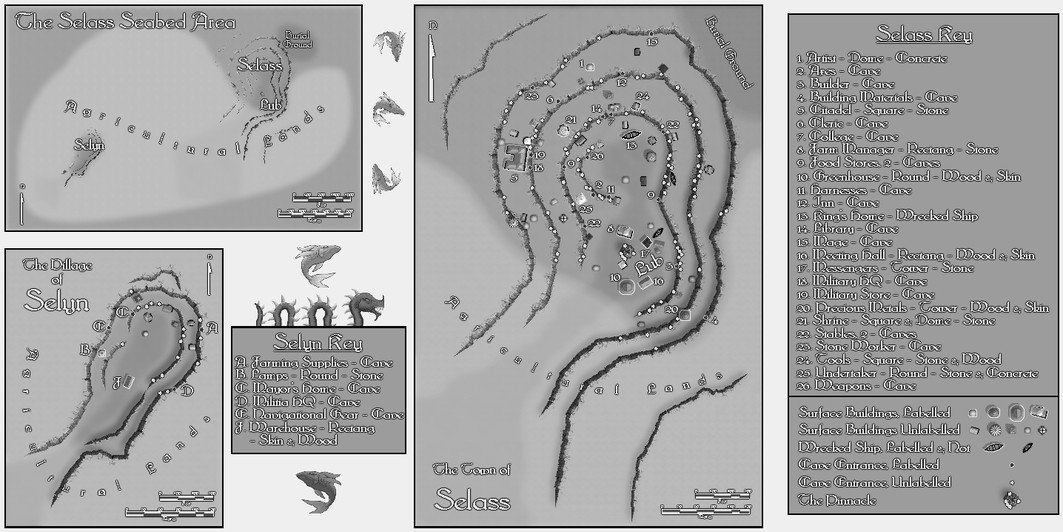
This isn't very clear at the usual Forum resolution, so this is a closer view of just the left half:
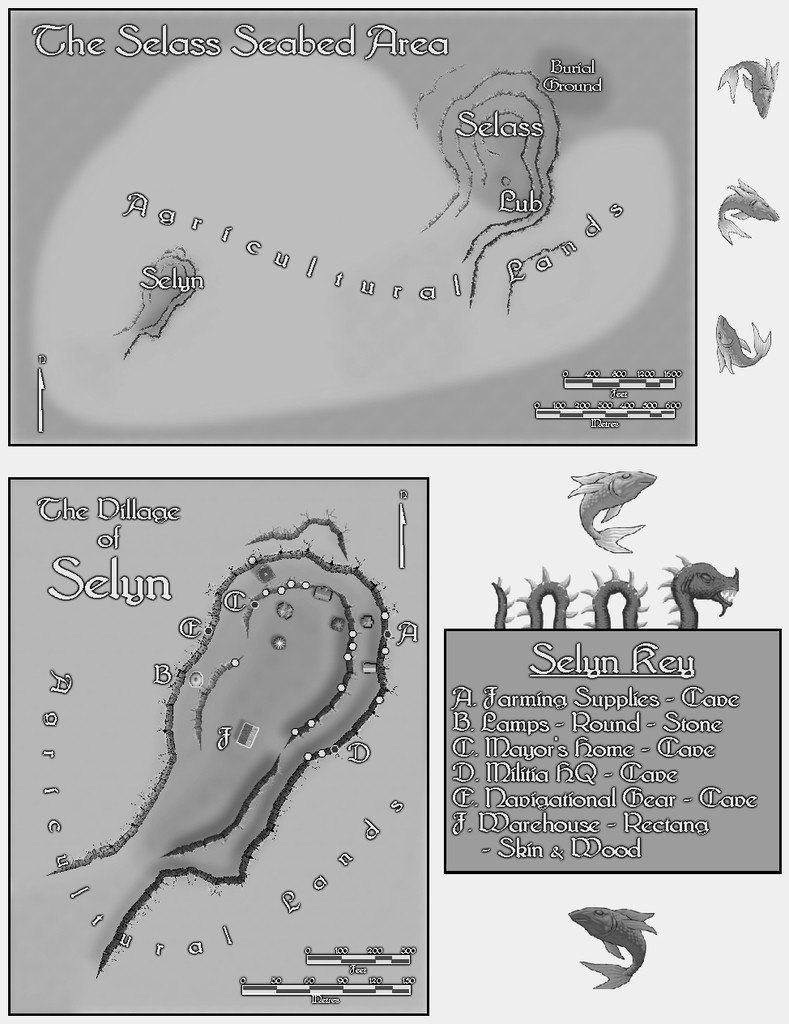
And this is the right half:

As usual, a detailed set of text-file and PDF notes was drafted to accompany and explain more about the whole mapped set-up here.


-
Community Atlas: Errynor - Ellenge Town
Thanks @Monsen! We seem to have amassed a lot of maps recently, given we were just at 500 back in early March! Much of that's down to the efforts of JimP and Quenten, plus other contributors, of course, so it's really congratulations all-round!
