


Loopysue
Loopysue
About
- Username
- Loopysue
- Joined
- Visits
- 10,417
- Last Active
- Roles
- Member, ProFantasy
- Points
- 10,163
- Birthday
- June 29, 1966
- Location
- Dorset, England, UK
- Real Name
- Sue Daniel (aka 'Mouse')
- Rank
- Cartographer
- Badges
- 27
Latest Images



-
Edge Fade and SS4/5
You're welcome :)
This is one of the only ways for now.
There are possible solutions in the pipeline, but they are quite a long way ahead just yet.

-
[wip] d&d Basic/Expert set of maps
Interesting but otherwise useless fact: There may be a discrepancy between what Americans call mold and what Brits call mould. To me, a mould is never green, being more like a slime mould or fungus. Anything green is algae, lichen or moss.
![[Deleted User]](https://secure.gravatar.com/avatar/c75d9a245b74d9c59be0999ea81ca541/?default=https%3A%2F%2Fvanillicon.com%2F92add7f8c954488718110edc4896ad39_200.png&rating=g&size=200)
-
Tangram Heightmapper
I've no idea if anyone else has already shared a link to this site, but if you are looking for heightmaps to use in Wilbur or FT3 to generate real world relief shade maps this might seem to be a good place.
The only drawback is the Mercator projection, which grossly distorts anything in the extreme north and south.

-
WIP Morwara (Erdan Worlds of Wonder style)
That's why I suggested it, but the side effect is that Medio won't be able to take land feature textures and shading right up to the edge of it like they are right now.

-
How would you create a fantasy port/harbour rpg battlemap?
Sometimes the shadows need to be reasonably strong if you have a contrasy texture like those slabs, coupled with a sharp and highly visible grid like that. I would say the shadows you have are right on the edge of being ok. I wouldn't go any lighter than that or nothing will pop.

-
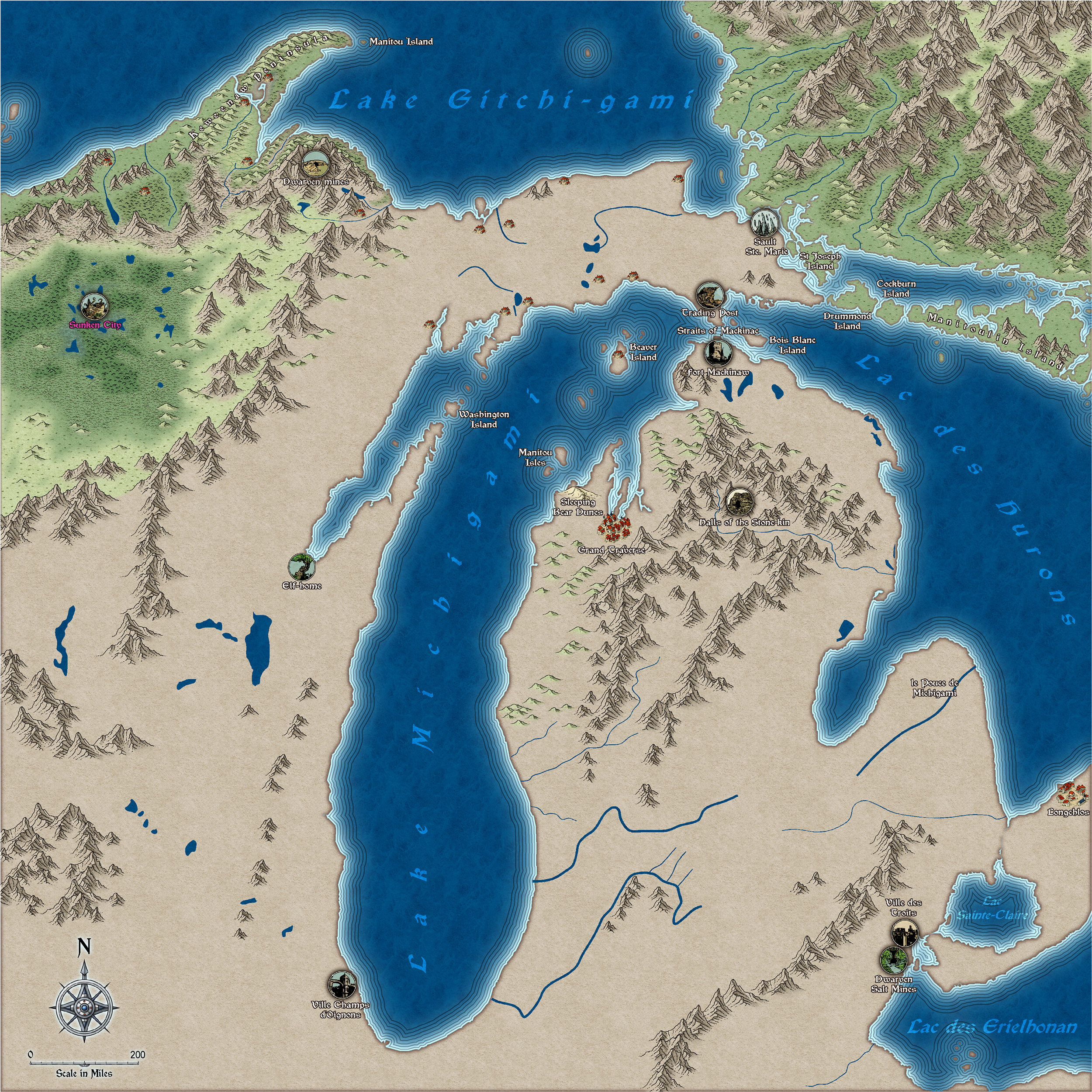
The Lakes of Michigami (Jerry's Map) - WIP thread
I'm really loving this style. I can't think why I never tried it before. But if I had you might not have had Spectrum.
Here is a bit more work. I've added quite a few more places from Jerry's notes, and attempted to sort out that north east block of higher land. I know it's not really a mountain rage, so I can take it out again if you don't like it, Jerry :)
This image is 2/3 full size and slightly more compressed than is usual for a jpg, so apologies if there are any artefacts.
-
WIP Commission, Ancient Tombs
One sheet, about 30 minutes.
I drew a circle, traced it with one of the drawing tools, fractalised it... (you can't fractalise a circle)... then changed it's properties to Solid 20 Bitmap fill and drew a step on top of it touching the edge. I grouped them together, then used circular array to make 10 in a ring (rotation centre in the middle of the irregular circle), and picked them one by one to make each successive rotated step a bit smaller than the previous one - starting at the visual second step down in the series.
Here is the FCW.
I don't mind if you just copy it.

-
How would you create a fantasy port/harbour rpg battlemap?
That's a really great map - well done :)
Just so you know for future reference:
A sheet called SCREEN usually has a masking white polygon designed to hide symbols that fall partly outside the rectangular extent of your map so that it looks better on the monitor. If you have symbols poking out all the way around the map it can also help to visually define the edges of the map. The white polygon on this sheet is also quite often on a layer called SCREEN, so that it can be frozen and largely ignored, since freezing it prevents it from being selected. The screen entity is also really useful when you are doing what you describe you are about to do with adding patches of muddier water to the existing water. Your new sheet will presumably have an Edge Fade, Inner sheet effect on it to blend the two textures together. So then it becomes necessary to extend the patches on that new sheet beyond the edge of the map so that your texture patches don't fade in from the edge with straight lines and corners. Don't worry if you have deleted the sheet, just add a new SCREEN sheet and draw a white shape around your map using the snap grid to position it precisely. A lazier way is to create a new map of the same size and just copy and paste the screen to your existing map, which will also create the SCREEN sheet for you.
A sheet called FRAME (or close variations) usually has any decorative framework, which may also be on a layer by the same name for the same reasons as described above for the screen.
A layer (not a sheet but a layer) called MAP BORDER is critical for controlling many types of bitmap output, and the four bounding lines on this layer should be left alone. It is normally frozen, but sometimes there are templates where this is not the case. The four lines on this layer are normally located on the BACKGROUND sheet, and are bright green.
I hope that helps :)
-
How would you create a fantasy port/harbour rpg battlemap?
You're welcome :)
To enable drawing outside the map border with any given drawing tool you will have to edit the drawing tool and uncheck the checkbox called "Restrict to map border". The procedure is as follows. Click the crossed hammer and pencil button on the left, click the Advanced button at the bottom of the Select drawing tool dialog, pick the drawing tool you want to edit from the list in the Custom drawing tools dialog, uncheck the aforementioned checkbox, save the tool and OK to draw your shape.
Some people frown on saving the altered tool and think it is better to miss out the Save and just click OK to draw with the tool unlimited. The tool will then revert to being restricted to the map border the next time you use it. It depends on whether you find you are always having to do this or not.
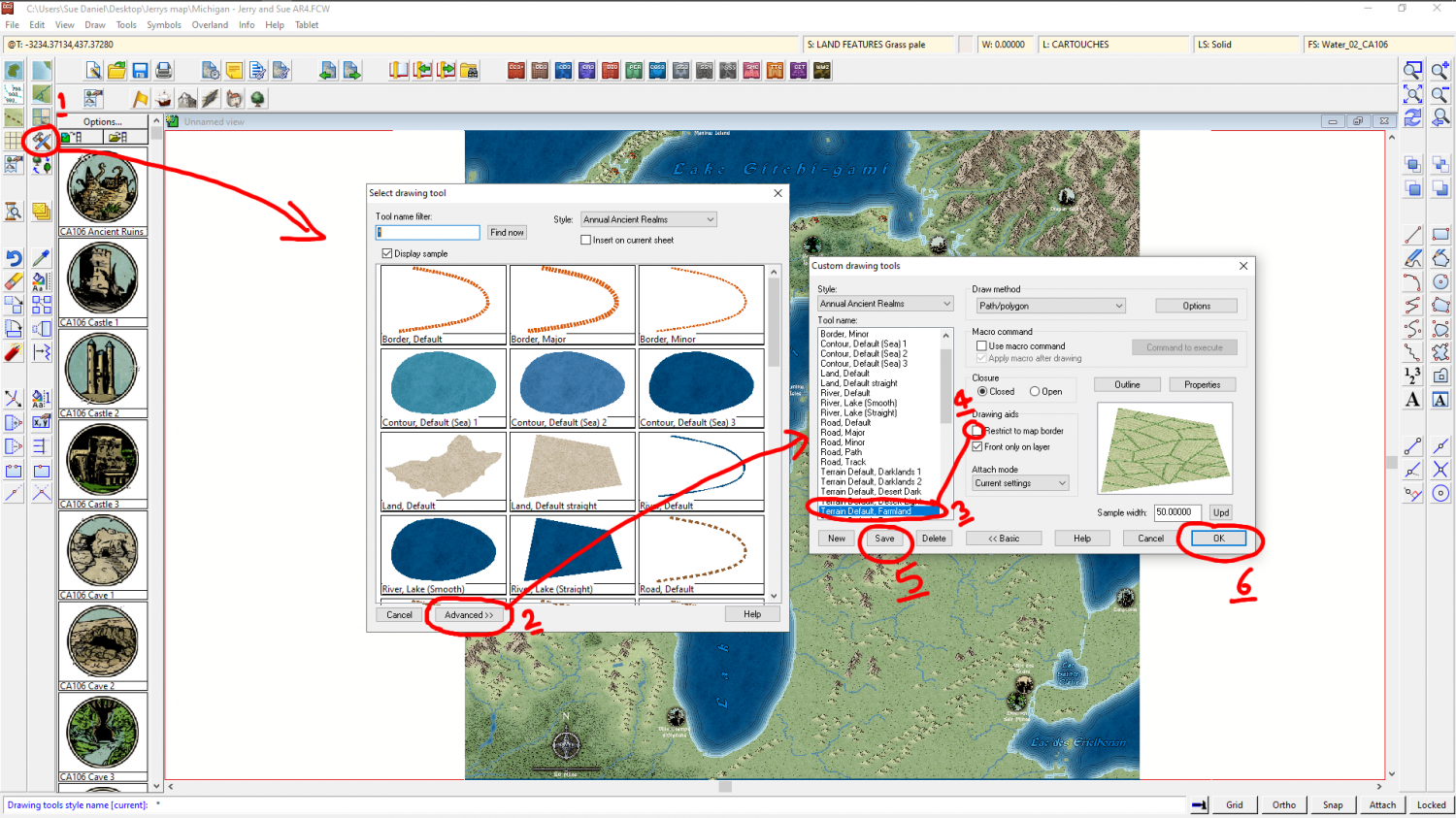
This is a very simple tool edit. For more complex and permanent edits most of us would pick the tool and then use the New button to generate a separate drawing tool while preserving the original in its original state.
-
How would you create a fantasy port/harbour rpg battlemap?
Maybe the blur factor needs a little upward adjustment. I think adding transparency will make the piles transparent as well.

