


Loopysue
Loopysue
About
- Username
- Loopysue
- Joined
- Visits
- 10,416
- Last Active
- Roles
- Member, ProFantasy
- Points
- 10,161
- Birthday
- June 29, 1966
- Location
- Dorset, England, UK
- Real Name
- Sue Daniel (aka 'Mouse')
- Rank
- Cartographer
- Badges
- 27
Latest Images



-
WIP - first crack at a larger scale city
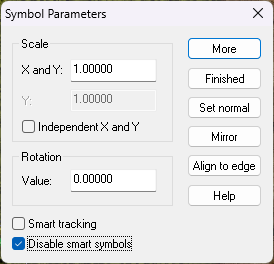
They only really work at the default scale of 1.
You can use them at other scales, but not as a connecting symbol. To do that you would need to right click on the map while you have the symbol on your crosshair, and set the bottom two checkboxes like this, then paste them individually.


-
Where are bitmaps 'CA51' please
The location of any bitmap file is given in the Fill Style dialog box in the 'file' window.
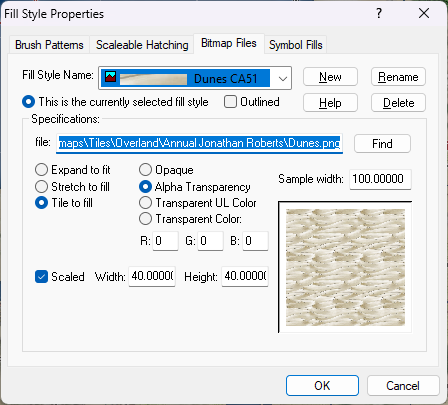
If you want to add them to another map it's probably easier to use Insert file in the Draw menu, and pick the old map you mentioned but press ESC just before you paste it. Doing it that way will also import the correct scale from that old map.

-
WIP: The Battle of the Lines
Do you mean this one?
It's very old now, and the PDF is probably not that easy to follow. It was written in a terrible rush to solve a particular problem someone else was having. However, if this is what you meant it should be possible to translate the use to straight stairs.
I just checked the link in the pdf - still working. I did all of this 5 years ago, so I had to make sure.

-
[WIP] Playing around with Sinister Sewers
There's a very subtle difference. You can see the edge of the water a little more clearly.
How about just a plain old black polygon with one EFI set up like this?
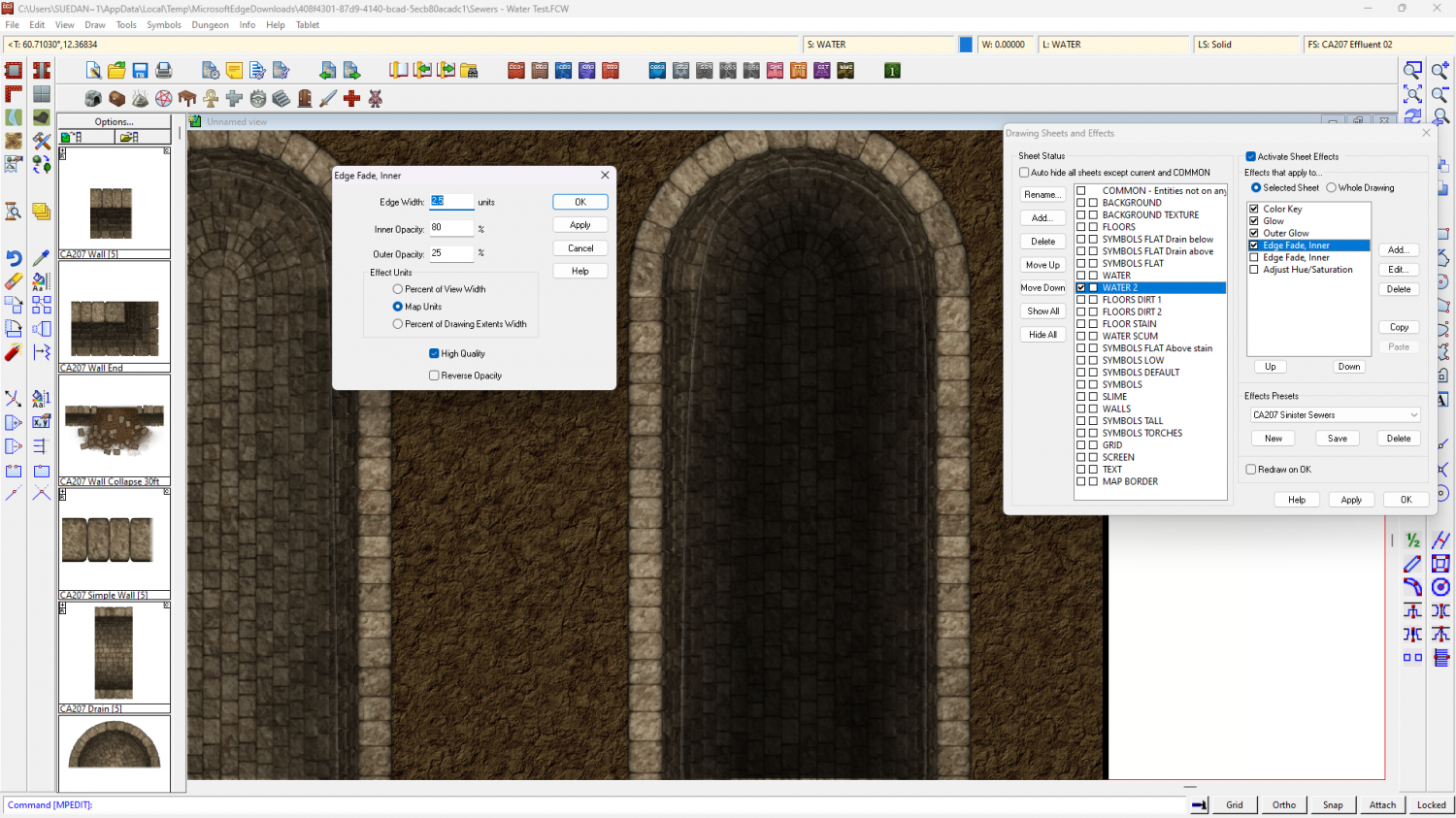
Or even that plus the Glow Blur Radius doubled to 0.5?
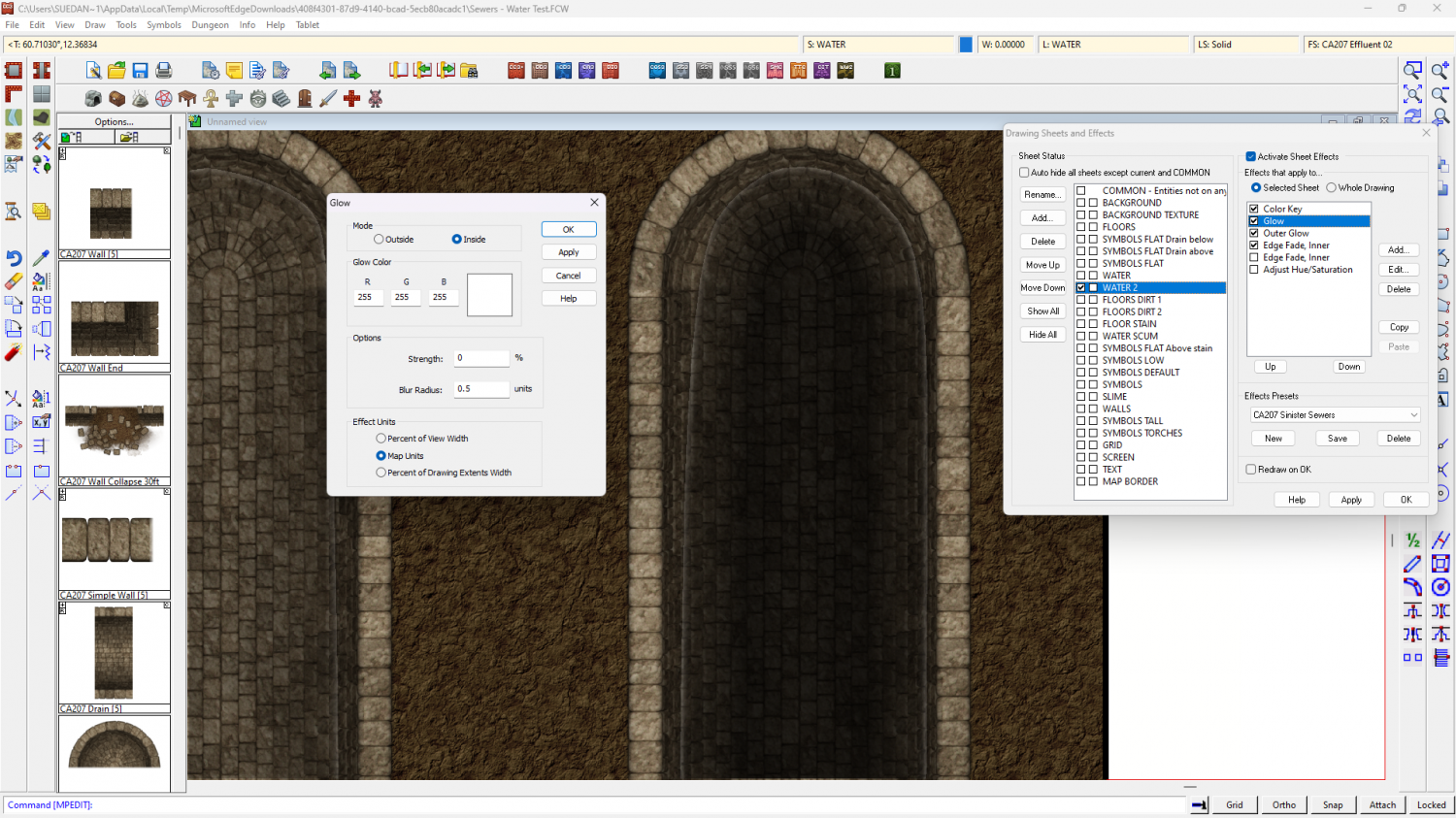
Alternatively, how about importing the water texture from another dungeon style?
-
Question about Layers with Sinister Sewers
Sinister Sewers doesn't use the usual wall cutting tools, so I think you would be all right doing that - as long as you realise it would become quite difficult to separate entities by layer. You would have to separate them by sheet instead.
However, to separate the levels you might wish to have separate sets of sheets instead of layers, so you can cast a shadow (for example) on the lower levels from the upper ones. Layers don't give you that power.
-
Wondering about new file extensions
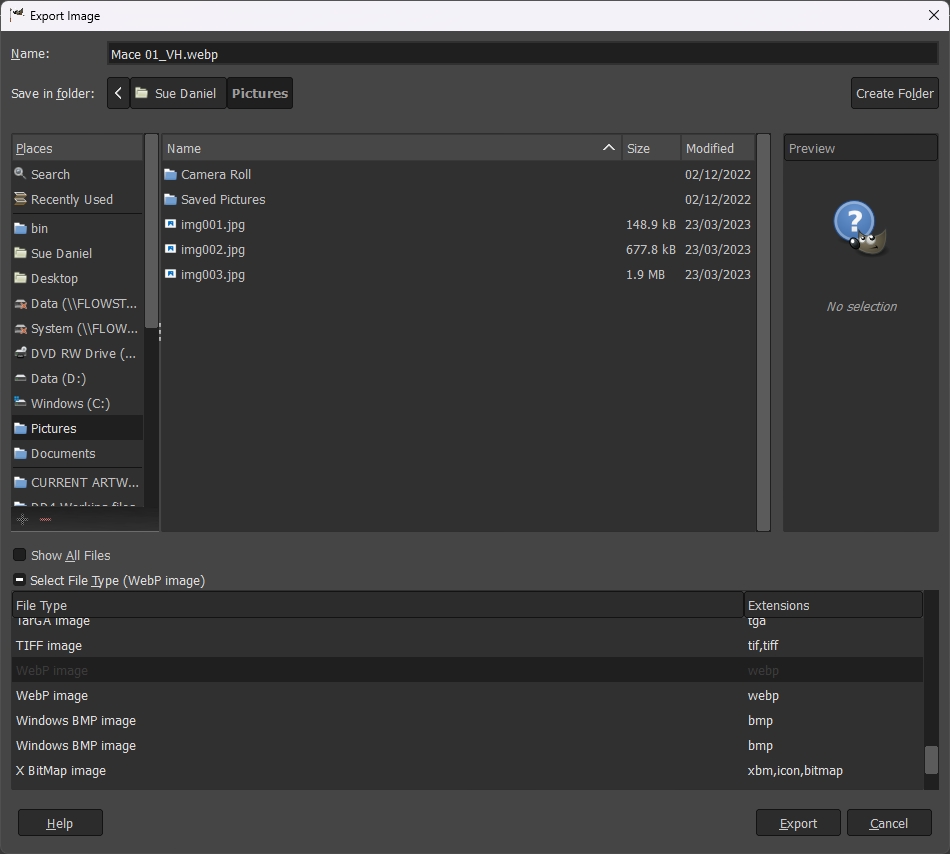
It's possible this might be considered in developments in the future if there is more demand for it, but in the meantime you can very easily convert any of the bitmap exports from CC3 to WEBP format in GIMP, which is free software you can get here.
Open the bitmap in GIMP and then go to Export as... in the File menu, and pick your export file type from the dropdown Select File Type, name it, and away you go.
-
Live Mapping: Hex Maps
Hi everyone! :D
Ralf has decided that it's time to get out of his comfort zone and create a type of map he rarely does: hex maps. Join us in tomorrow's live mapping session and join in the chat as Ralf explores CC3+'s hex-based functionality.
Alternatively, you can watch it here (below), but there's no live chat on the forum.

-
Getting Symbols and Random Streets to Match
Varicolour symbols aren't perfect and usually used only for a bit of variety, so they might well be not as heavily shaded in some situations as the regular non-varicolour symbols. The situation with building entities is similar. They are used mainly as infill in large cities and don't always perfectly match the regular symbols.
There's also a mismatch in the scaling of the symbols and the roof fills used on the buildings, in that the buildings are twice the default size, having been pasted at a symbol scale of 2 rather than 1. That's not a problem in itself, but it does mean that all the tiles on the buildings you draw will look only about half the size of the tiles on the symbol roofs. The solution to that part of the problem is to double the scale on all the roof textures in the Fill Styles dialog.
In this shot I have rescaled the appropriate roof texture and drawn a new building in the "SS5C Rounded Shingles Grey..." style. I've also used different sheet effects to the ones you had set up - switching the existing set to inactive and copying across the shadow effect from the SYMBOLS sheet.
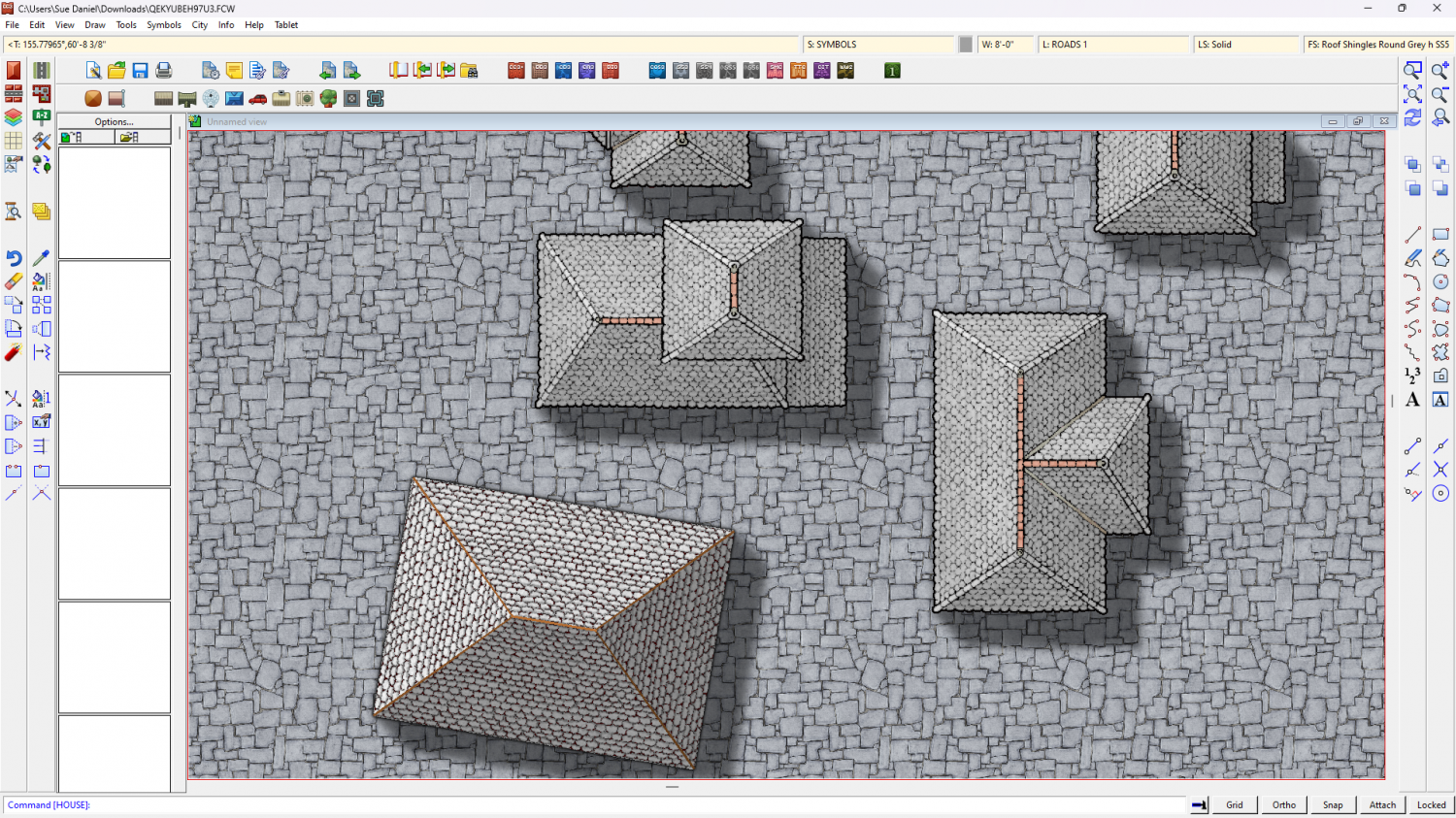
The beauty of sheet effects on the BUILDINGS sheet is that you can add colour altering sheet effects and the buildings will respond. I've added an Adjust Hue/Saturation sheet effect to make the buildings paler.
Here is the setup I used if you want it. Only that one roof texture has been rescaled from 40' to 80'. The rest have yet to be done.
EDIT: sorry, for some reason I accidentally deleted the very first paragraph before I posted it the first time. It's back now.
-
Assistance with Map Overview Export
I agree with Kertis
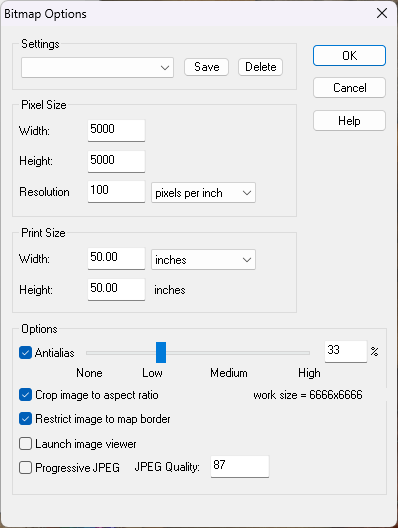
These are the settings I use to export the largest of my example maps as JPG files. The file size resulting is usually around 5.7MB and visually no different to a png file.
Notice the Antialias setting, and also keep tabs on the "work size" shown lower right. More antialias is a smoother result, but it also increases the work size. Try to keep that no larger than 10,000 x 10,000.
Incidentally, with this setup you can export the map as JPG without having to use the rectangular section options. The export will be automatically trimmed to the map border so that the longest side is 5000 pixels. These settings also do away with the white space around the map.
-
Live Mapping: Parchment City (CANCELLED)
Hi everyone! :D
In this week's live mapping session Ralf will be presenting the latest Cartographer's Annual style: Parchment City by Pär Lindström.
Come and join in the live chat on YouTube here:
https://www.youtube.com/watch?v=nvLxTlK_Os4
Or you can watch it here on the forum if you prefer (though there is no live chat on the forum)
