


Loopysue
Loopysue
About
- Username
- Loopysue
- Joined
- Visits
- 10,414
- Last Active
- Roles
- Member, ProFantasy
- Points
- 10,161
- Birthday
- June 29, 1966
- Location
- Dorset, England, UK
- Real Name
- Sue Daniel (aka 'Mouse')
- Rank
- Cartographer
- Badges
- 27
Latest Images



-
How to blend and shadow
It sounds like the effect you need is the Edge Fade, Inner. Make sure your red polygons are on a sheet of their own and add this effect to that sheet. If you can't see any difference you might need to edit the effect to change the distances involved.

-
How to blend and shadow
A Bevel, Lighted sheet effect might be better than any of those, since a shadow will appear at the base rather than shade the sides. The effect will need some editing, but playing around with effects makes learning how they work a lot faster.
-
Questions about Blueprints (SS3)
If all the symbols are massive to the same extent it may be time to check the size of your map and make sure you have it correct to the scale of 1 foot = 1 map unit, or one metre = 1 map unit.
With a style like this one it is easier to make your own new symbols, such as dimensions, by drawing the first one and making a symbol of it. However, if they are all going to be different non-standard lengths you might want to draw them as lines in the map.

-
Sinister Sewers - Style Development Thread (CA207)
Notwithstanding the subject matter those are beautiful models.
And a movie recommendation too!
Thanks Wyvern :)
-
Creating weather tables using Fractal Terrains data?
Not that I'm aware of. The climate data for Fractal Terrains doesn't take Coriolis, wind or geography into account, so I don't think anyone has ever used it that way. The most common use is just to indicate general climate.

-
MY MUNDI IS READY!
You get an awesome for that mammoth task :)

-
Understanding Fog of War Effects
Have you followed the video or done your own thing?
If you followed the video, when you added the Wall Shadow, Point Light Finalize sheet effect there was an option to pick an alternative colour for the shadow. In the video Ralf picks a dark blue shade instead of black. At around 9.19 minutes in that video Ralf then turns the shadow transparency up to 50 percent the The sun settings, which you can get to by right clicking the hourglass on the left and picking Global Sun.
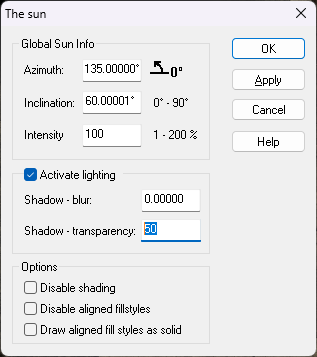
Have you done it that way, or a different way?
-
Do I have to use FaceBook to access community content?
I'm not sure where you have got that impression from, but we don't provide community content on FB.
All content is accessed either through this forum, or via the Profantasy webpage.

-
Create maps with my own graphic elements?
If you don't need to do anything more complicated than what you just described in your last comment, Remy (Monsen) is right. There should be enough information in the User Manual.
The Tome would only be necessary if you wanted to make symbols that were considerably more complicated than that.
The User Manual gives you the basics. The Tome provides the masterclass.

-
Sinister Sewers - Style Development Thread (CA207)
Thanks Autumn! :)
I know about the green water, but the truth is if you look at all those other sewer maps out there, for some reason everyone seems to think it's green. Never mind. I've a range of colours.
