


Loopysue
Loopysue
About
- Username
- Loopysue
- Joined
- Visits
- 10,418
- Last Active
- Roles
- Member, ProFantasy
- Points
- 10,163
- Birthday
- June 29, 1966
- Location
- Dorset, England, UK
- Real Name
- Sue Daniel (aka 'Mouse')
- Rank
- Cartographer
- Badges
- 27
Latest Images



-
Project Spectrum - Part 2
Yes :)
Just like any other symbol. You right click while you have the symbol on the crosshairs, and click Separate x and y values, then enter different values in the boxes.

-
Curse of the Crimson Crown (Pathfinder Adventure Path)
You're welcome

-
Curse of the Crimson Crown (Pathfinder Adventure Path)
Ingenious
Now I'm really looking forward to the rest of it. -
[WIP] Community Atlas - Topographical map of Nibirum with ocean currents
You've done a really great job with this map
Does any world map need a scale? I sometimes draw one, but I often wonder why, since the scale can only be accurate at the equator on an Equirectangular projection - which I am usually careful to point out by calling it the Equatorial scale. As for the rest of it - I'm totally all at sea! I only know what I learned from Geoff's Climate Cookbook. I'm more of a geologist and biologist.

-
[WIP] Community Atlas - Topographical map of Nibirum with ocean currents
Use away, André. That's what the stuff in the annuals is forWeathermanSweden said:Thank you Sue and Remy for your input.
On Shessars world map there is a scale - I will adapt it in some way in my map. I like the scale on your world Jerion - @Loopysue - maybe I can use that one? Or will my map then look to much like a copy of yours?
What do you think - should the map also contain the names of the continents and should major drifts be named?
For the latter, however, I have to admit that I lack the creativity for creating fantasy names...?

-
How do I find out a symbols current color?
You can find that and a lot of other information as well by using the List command in the Info menu.
Pick List, and then select the symbol and press D for do it. That will bring up a blue window with all the relevant details.
-
Howdy ! from Jim P
Another pretty awesome profile!
I feel like I've done nothing with my life in comparison with others now! LOL!
Thank you for sharing, Jim :D
-
Colour palette sharing
Thanks, Remy
I had a feeling you would say that. I was hoping there would be a much easier way to share - especially for newbies who aren't so familiar with the way CC3 works. I know that when I first started it took me forever to even realise I could change the palette - never mind transfer it from map to map by saving it as the custom palette.
Next time Ralf or Simon ask for suggestions I'm going to ask if it would be possible to make CC3 load named palettes - the same way you can load named altitude palettes in FT3
EDIT: and also to be able to save palettes by name - eg "Brown", "Gold" etc. -
Project Spectrum - Part 2
Thanks Mike. That makes sense - a bit like a lawn goes brown in the dry weather but doesn't actually die (unless you are very unlucky).

-
Way to copy effects?
The Copy and Paste buttons to the right of the effects panel, below the Add Edit and Delete buttons, will copy whichever effect(s) you have highlighted at the time, and then paste them in whichever sheet you have active.
The copy button is only active when you have at least one effect selected, and the paste button is only active once you have copied something.
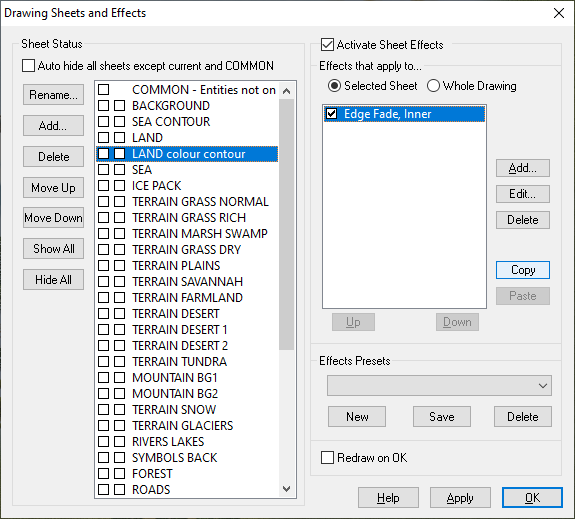
You can also copy and paste effects between sheets in different maps as long as they are open side by side. (I've never tried it by closing the first one and opening the second one).
