


Loopysue
Loopysue
About
- Username
- Loopysue
- Joined
- Visits
- 10,418
- Last Active
- Roles
- Member, ProFantasy
- Points
- 10,163
- Birthday
- June 29, 1966
- Location
- Dorset, England, UK
- Real Name
- Sue Daniel (aka 'Mouse')
- Rank
- Cartographer
- Badges
- 27
Latest Images



-
Live Mapping: Cosmographer System Map *** NEW second attempt ***
About those line styles...
There was a blog, and I wasn't just imagining it, but it was a kind of advert for one of the Commands of the Week by Remy. So here is the link to that thread:


-
Node Spikes
SIMPLIFY should do the job, but you must do it to the land mass as well as the coastline, or they may not match perfectly afterwards.
I don't recommend using Explode for any reason other than to disassemble a multipoly. That's a complex polygon made up of several single polygons fused into one entity such that a large polygon may have a hole in it. Since these are rare, and usually a result of exporting contours from Fractal Terrains to a CC drawing, Explode is hardly ever used. There are many other more suitable tools.

-
Node Spikes
That's great. It was a suggestion option, but I chose SIMPLIFY because it's guaranteed to get rid of most of all those problems all in one go.
Well done for succeeding with the more tricky solution.

-
Fill Style Questions (Rivers vs Sea)
Hi Olaf :)
Please can you attach the FCW so I can see how the drawing tools are set up and what sheet everything is on?
You should be able to attach the .FCW file to a comment on this forum using the paperclip symbol at the bottom of the comment.
-
Graphic Drawing Tablet & CC3+ question
Hi and welcome to the forum :)
CC can work with graphics tablets. There are people who can map on screen tablets with CC that I know of. However, I use a mouse when I'm working in CC - even though I use an Intous Pro (that's a non-screen tablet) for all my other work as a ProFantasy asset creator in other apps, like Affinity V2 (no longer available), GIMP, Krita, etc. I don't use Inkscape at all.

-
Tools (Symbol Set 1 and Symbol Set 2)
Hi Zov :)
This is perfectly normal, as you can see from my list.
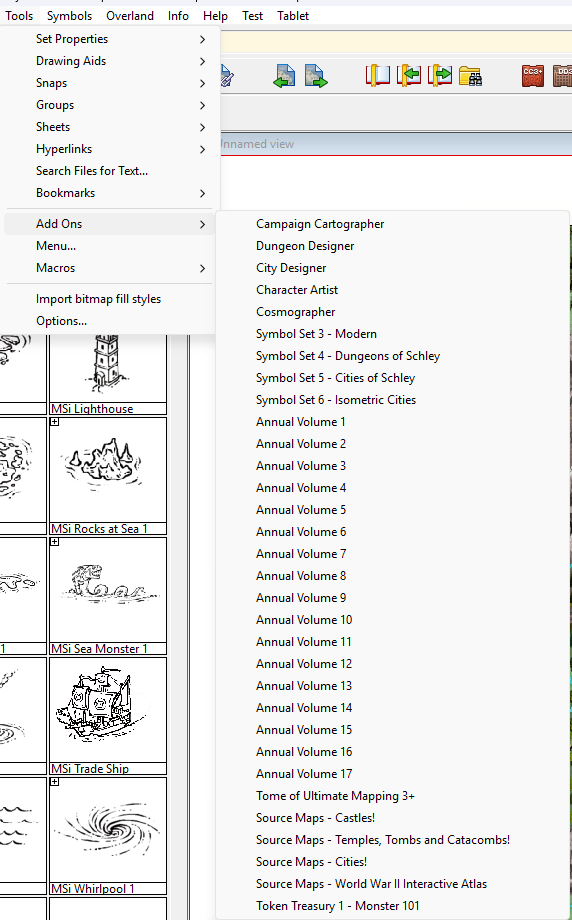
There are no icons for either SS1 or SS2.
This is because both these sets add additional styles to CC3+ and DD3 respectively. They are extensions rather than stand alone add ons.
EDIT: In addition to that information you could be forgiven for thinking that I don't have all the annuals. I appear to be missing Annual Volume 18 and 19 (this year's annual), but that is probably because I have installed all the monthly issues and not the full end of year installer.
There is a second Token Treasury, but I've never needed it so it's not currently installed.
-
Tools (Symbol Set 1 and Symbol Set 2)
You can purchase the annuals either through the selling pages here, or by picking them from the list of Offers when you log into your registration page.
If you buy the current year's annual it will not yet have been compiled into a single download, so you will have all the separate installers - one for each month.
-
Symbols Catalogue Wonky
It's important that none of the Profantasy assets are moved or renamed, but I don't think that's what you are talking about.
Are all your custom symbols in folders that live inside the "ProgramData\Profantasy\CC3Plus\Symbols" folder? Possibly in a subfolder of the Symbols folder called User (or some such appropriate name for things that are not part of Profantasy's asset collection)?
EDIT: If they are and that's all correct, have you moved the FSC (the symbol catalogues you made) relative to the symbols - ie, moved them to a different position in the folder hierarchy. That will also break the references.

-
Live Mapping: Hand-drawn Outdoors
This week in Live Mapping Ralf will be looking at the December Annual issue and its expanded outdoor battlemap options.
Come join us on Youtube here:
https://www.youtube.com/watch?v=g7azavUE1_A
Or watch it here if you prefer.
This thread is not monitored during the live show, but you can put your comments or and ask your questions here any time.
-
Community Atlas - Torstan Holy District - Happy Fiddler's Inn - a joint collaboration.
It looks like a seam between separate passes of the export where the sheet effects are wider than a single pass. CC only sees the effect if the polygon or symbol causing it is visible in the same pass.
Type EXPORTSETMPPP and hit ENTER on your keyboard. In the command line you will find the default setting, which I believe is 4000000 (4 million). Type 40000000 (40 million) and hit ENTER. Then try another export.
The "MPPP" part of that command refers to the maximum pixels per pass, so you are increasing the depth of each pass by a factor of 10. This should get rid of most if not all of those artefacts.

