


Loopysue
Loopysue
About
- Username
- Loopysue
- Joined
- Visits
- 10,419
- Last Active
- Roles
- Member, ProFantasy
- Points
- 10,163
- Birthday
- June 29, 1966
- Location
- Dorset, England, UK
- Real Name
- Sue Daniel (aka 'Mouse')
- Rank
- Cartographer
- Badges
- 27
Latest Images



-
Live Mapping: A Not-So-Peaceful Village
Hi everyone! :D
Ralf will follow in Remy's footsteps in tomorrow's live mapping session, and create a village map for the Community Atlas 1000th map Competition.
Come join us live on Youtube and join in the chat here:
https://www.youtube.com/watch?v=Al6R2xhqfl4
Or watch it later here on the forum.
We look forward to seeing you in the chat :)


-
Dialog sizes
Oops!
Guilty...
Sorry!

-
Live Mapping: A Not-So-Peaceful Village 2
Hi Everyone :)
In this week's live mapping session Ralf will continue working on his village map for the Community Atlas Project and its 1000-maps celebration.
Come and join in the chat with the live session on YouTube here:
https://www.youtube.com/watch?v=PBzOFXIk1Wk
Or you can watch it here later if you wish:
Date and time shown in the side bar of the forum, or on YouTube if you follow the link.
-
[WIP] Community Atlas - Eknapata Desert
It's looking good so far.
The glows don't have to be really loud to work. As long as they make the text clear enough to read that is fine. With the labels 2 different colours this can be a bit tricky, but I assume that the brown labels are not as important as the black ones, so they don't have to be as eyecatching.
So, how about this?
I switched off the effects on the Text Outlined Light sheet because the text itself is so large and so pale it doesn't really need a glow.
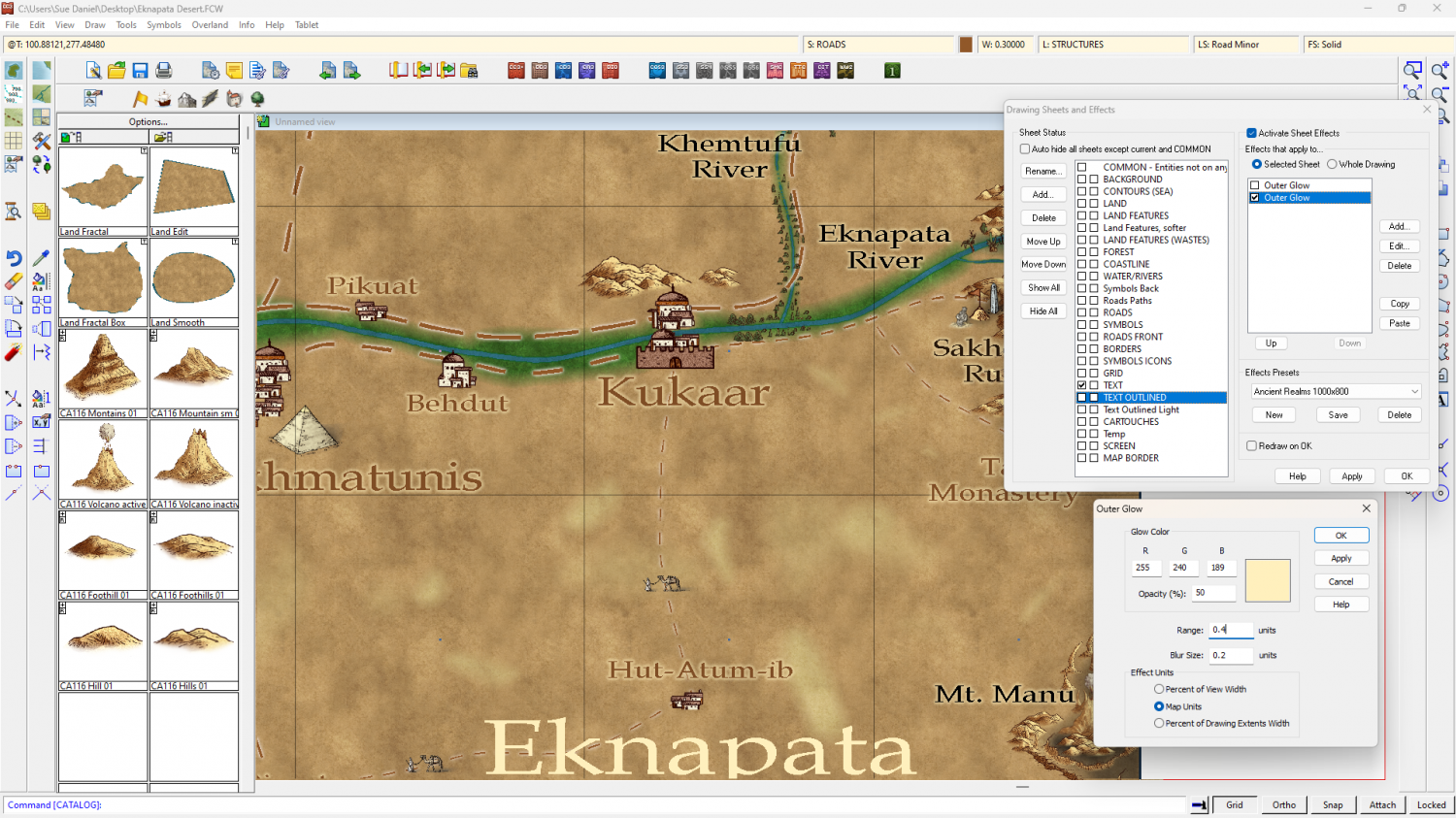
You might want to make them a little more opaque, but that's part of personal taste.
A little tip: Using a ranking system of different sizes is ok, but try not to use too many different sizes if you can avoid it.
-
1000th Map Competition: Ober, Southern Scar
Here is a general view of some English fields for comparison.

-
1000th Map Competition: Ober, Southern Scar
I found this interesting article that sort of explains the existence of hedgerows in the UK. They're basically part of our culture inherited from the Bronze Age, so I guess it all depends what was going on in your part of the world 3 or 4 thousand years ago.
-
[WIP] Order of the Fist Monastery
Looks like a great start :)

-
how to create fills from square .pngs
You can do it using GIMP.
When you get to the point in the video half way through, you don't need to go any further saving it as a pattern in GIMP. Just export yourself a png file to your User folder.
It works better on some images than others. Try not to pick images that are vastly different on either side or top and bottom.
If you can draw your own pattern you could use Krita (another free bitmap editor), which has a wrap feature to give you an endlessly repeating canvas to draw on. This video talks about saving a pattern within Krita, but he does say about 90 seconds in that you can just export it to png the moment you're happy with the drawing. (this video does go a long way off track the further through you go)
-
[WIP] Kingdom of Gongodûr
That's a nicer font, but it still looks quite spidery.
How about making the labels a little larger, or using the bold version of the font?
Do you have a drop shadow on that sheet? It may not be helping.
You could also try making the glow a little more definite?
These are all just suggestions.
-
[WIP] 1000th Map Competition: Elkton, Alarius North Central
Hmmm.
Considering whether some kind of wake can be shown behind a tree...

