


Loopysue
Loopysue
About
- Username
- Loopysue
- Joined
- Visits
- 10,419
- Last Active
- Roles
- Member, ProFantasy
- Points
- 10,163
- Birthday
- June 29, 1966
- Location
- Dorset, England, UK
- Real Name
- Sue Daniel (aka 'Mouse')
- Rank
- Cartographer
- Badges
- 27
Latest Images



-
Hedge Tool
Be aware if you do that, that those symbols are city scale, which means they will pixelate if you scale them up too far. City symbols are less than half the resolution of dungeon symbols.

-
Color key isn't working again
The Colour key works as long as you have these three things set up correctly:
- The cut out shape is on the same sheet as the thing you want to cut.
- There is a Color key sheet effect on that sheet, and its set to the same colour as the cut out polygon
- The sheet effects are turned on.
If you want to cut the same hole in other sheets, for example you've cut a hole in your land that you want to cut in the terrain that lies on it, then you will have to set up the same thing for that sheet as well. It doesn't work for multiple sheets, but only the one its on.

-
Color key isn't working again
A Color Key only works on the one sheet that it's on. If you want to cut things on other sheets you need to make a new Color Key on that other sheet and add new colour cut out polygons to that sheet above the polygons you are cutting.
I actually missed a point above. The cut out shape must be on top of all the other shapes on that one sheet.
-
Do any styles have East European Symbols?
East Europe is a pretty large area. Which part of it? I can then go and have a google street view at what you mean to compare with what I know about existing styles.
-
How to light caves without entire outside being dark
You don't have to make them one. Trace the bit that you want for each one and then restart the trace for the next part on the next polygon.
-
How to light caves without entire outside being dark
Yes. There are 2 ways you can do it. One is to make your own drawing tool so you can use the trace function, and the other is to use a Color Key sheet effect. I prefer the drawing tool method.
If you have modified or made your own drawing tool before you will already know how to do this, but if you haven't it's not too difficult to do. Open the drawing tools dialog and click the advanced button. Pick a simple tool that draws a straight polygon from the list of those available. Although your cave has fractal edges a straight drawing tool will do the best job for tracing it. Then click New and give your new tool a name. Ok and then click the Options button. That will open the Custom tool properties dialog like this one below. The settings you make here are how you make your tool do what you want it to do. So pick the right fill, layer and sheet and ok the settings. (This is just a random drawing tool for illustration purposes and won't have the right settings for your tool)
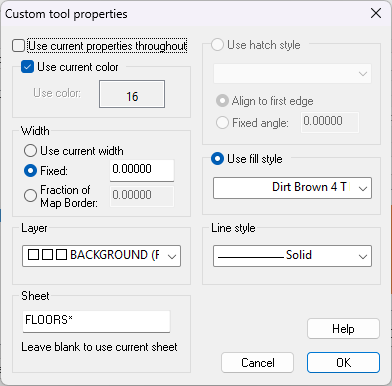
The next thing you need to do is Save your new tool. Once that is done click Ok and you should be able to use it to draw the desired shape using the trace function of the drawing tool to trace around your cave in a few seconds.
-
How to light caves without entire outside being dark
When you want the background to be above the lighting you need to move it above the lighting, or below all the lighting sheets in the sheets and effects list. It actually ceases to be a background and becomes a foreground of sorts.
To get it that way the 'background' has to be drawn as a polygon on a sheet above the rest of the map (but normally below the SCREEN and TEXT sheets). Basically it will be a polygon that covers everything that isn't part of the cave.
-
City Designer 3 options empty
Hi Ian :)
Here's my checklist:
- First, check that you installed CD3. With multiple installers it's easy enough to forget to run one of them, so that's the easy check. Right click your Start button and pick 'installed apps' from there. If CD3 doesn't appear in the list of installed apps it's not installed.
- If CD3 is there, and while you have that list open also check that you have CC3+ installed and not just CC3.
- Run the latest CC3+ update again and see if that puts things right.
Please let us know if there's still an issue once you've done that.
-
A question about the Global Sun
If you want any particular sheet to be unaffected by the lighting it needs to be above the sheet with the Wall Shadow, Point Light Finalize effect on it. Then you can control how that sheet appears the normal way using colour adjusting sheet effects like Colorize, or Adjust Hue/Saturation.
When I say 'above' I mean as you are looking at the map. In the actual Sheets and Effects dialog that would be below it in the list.
-
World Map or Regional Map
If you will only be playing in that region for a while I'd do a regional map and be working on a separate world map in the background while they're busy fighting for their lives in the first region.
Then when they get to the edge of that first region I would do a third map of the region they are moving into, based on the layout of the world map.

