


Loopysue
Loopysue
About
- Username
- Loopysue
- Joined
- Visits
- 10,417
- Last Active
- Roles
- Member, ProFantasy
- Points
- 10,163
- Birthday
- June 29, 1966
- Location
- Dorset, England, UK
- Real Name
- Sue Daniel (aka 'Mouse')
- Rank
- Cartographer
- Badges
- 27
Latest Images



-
Simulating a hand-drawn line
Or... you can use the freehand drawing tool on a sheet with a slight Displace effect, followed by a subtle Blur effect to knock off the edges. Give yourself a bit of a line width as well. No pen or pencil has zero nib width like a vector line.
Possibly the best psuedo-hand drawn lines I've seen are the ones that @Lillhans draws ;)

-
Western Baja California
Those are beautiful Ricko, and don't really need any further embelishment like a parchment, but for future reference...
The fills you have just imported can be accessed in the Fill Style Properties dialog when you click the Fill Style window in the top bar.
I don't have the parchments loaded in this map because I don't need them, but you can see where they would be from this screen shot.
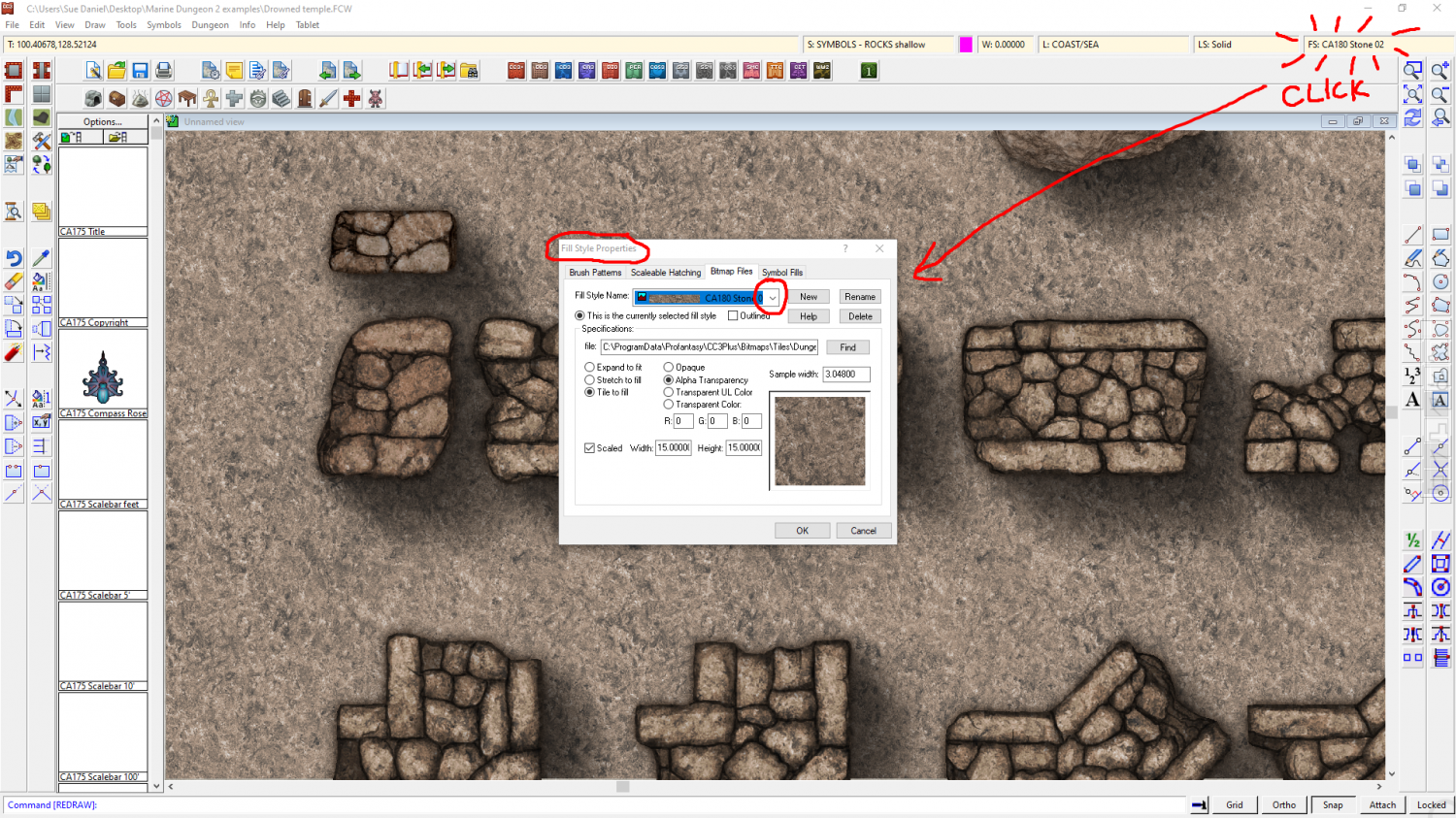
Once you have the dialog open make sure you are on the Bitmap Files tab, and click the Fill Style Name dropdown box to find the parchment you want. Having selected the fill so that it is the active fill, you can then use the tools on the right hand toolbar to draw new polygons with the active fill. Remember to chose the right sheet.
I hope that helps.

-
Marine Dungeon - further developments
Thank you, Elfling :)
I just hid the water to show the walls without it, but now you mention it I probably didn't even think about them because I sometimes have dreams where the atmosphere is still air, but the creatures of the sea swim through it like an ocean. It's probably because an early geography teacher of mine once impressed upon the class that the atmosphere is really a gigantic ocean of gas...


-
CC3+ version 3.96 - Public Beta
Thank you very much, Profantasy :D
Will Remy be tempted to write one of his wonderful blogs about all the new toys, I wonder...

-
Western Baja California
The white screen can be hidden by hiding the SCREEN sheet, in the Sheets and Effects dialog.
You can show or hide any of the map parts by showing or hiding the sheet those parts are on. If you aren't sure what sheet something is on you can find out using List in the Info menu.
If you want to align the map with the scroll a bit better once you get rid of the screen, I would move the scroll rather than the map. You can do that using the Move tool |CC2MOVE|
-
Frozen arctic lands
It looks really good, though I would try to make the dividing line between temperate and arctic a little less defined and perfectly horizontal.
In the real world, that line is broad area of transition that can be bent further north or south than usual by warmer or colder ocean currents, prevailing winds and mountain ranges. It's a whole lot more irregular than you might expect. The UK, for example, should be as freezing cold as Labrador, but we bathe in the warmth of the Gulf Stream bringing heat up from the Gulf of Mexico.

-
Community Atlas: St. Cei the Beloved's Cathedra, Torstan, Peredur
That thing with lines and polygons turning mostly invisible during a move is standard behaviour. Things are a little better with bitmap symbols.
-
Community Atlas: St. Cei the Beloved's Cathedra, Torstan, Peredur
TRACED draws around the outside of the entity being traced, which means the walls will have become polygons rather than lines.
-
Using CC3 Over Graphic Terrain Maps
When inserting a bitmap in CC3, bear in mind that CC3 is a vector app, and will not be able to edit a bitmap. So the inserted file can only serve as a background image.
First, choose which map style you want to use to embelish your existing map, and make a new map in that style. It probably won't be the right size, but we can sort that out once you have imported the png image.
If you are aiming to use the bitmap as the background map, create a new sheet just below the BACKGROUND sheet and call it MAP, or some other such suitable name. Create a new layer with the same name and make sure both the sheet and the layer are active.
Then use Insert file from the Draw menu, and pick your png image to insert. So that you have the bottom left corner right on the origin, place it by typing the coordinates, 0,0 and hitting enter on the keyboard. Then you can stretch out the map to whatever size is correct for the scale (remember a map unit is equivalent to 1 mile or 1 km in an overland map, or 1 foot or 1 metre in either a city or dungeon map), or type the coordinates for the top right corner, if known.
Once you have finished inserting the map you can then use Resize Drawing Area in the File menu to make the map the right size to fit the inserted map.
-
Annual No 1 issue 12 - Making a new style.
The drawing tool macro for aligning fields can be found in the Ferraris Style, and in the more recent Darklands City style.
I'll pass on the rest.
![[Deleted User]](https://secure.gravatar.com/avatar/c75d9a245b74d9c59be0999ea81ca541/?default=https%3A%2F%2Fvanillicon.com%2F92add7f8c954488718110edc4896ad39_200.png&rating=g&size=200)
