


Loopysue
Loopysue
About
- Username
- Loopysue
- Joined
- Visits
- 10,417
- Last Active
- Roles
- Member, ProFantasy
- Points
- 10,163
- Birthday
- June 29, 1966
- Location
- Dorset, England, UK
- Real Name
- Sue Daniel (aka 'Mouse')
- Rank
- Cartographer
- Badges
- 27
Latest Images



-
Random City Generator
I can't remember off the top of my head if you can change the road texture while you are using the Random City Generator, but you can change the properties of the roads afterwards using the Change Properties tool |CC2MCHANGE|. It is probably best to do this after you have hidden all the sheets except the ROADS sheet, so that you only get the roads.
You can use the Change Properties tool to change the properties for any polygon, but if the walls you are referring to are symbols it won't work like that. Have you got a screen shot of your map so that we can see what you are doing?

-
Grimdark Fantasy (renamed "Darklands") - development thread
@Autumn Getty - the page header on this webpage is a beautiful picture of the heath for you :)

-
Grimdark Fantasy (renamed "Darklands") - development thread
Well, aside from the colour, it doesn't really have anything in common with Viper's Bugloss (which is what we call that weed).
Heath is a mixture of Erica and Calluna species (heathers), Ulex (gorses) and lots of grasses and other plant species all mixed in together. Its a naturally evolved ecosystem that supports a large number of increasingly rare fauna in the British Isles, including the the Silver-Studded Blue...
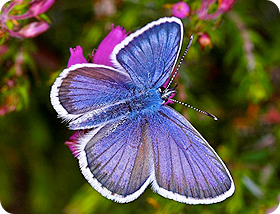
...a butterfly that has Protected status here in the UK. 'Heath' is the lowland cousin of the Scottish moors. Much of Wimbledon Common once used to be a heathland.
It's not a sterile monoculture of a single invasive weed.
![[Deleted User]](https://secure.gravatar.com/avatar/c75d9a245b74d9c59be0999ea81ca541/?default=https%3A%2F%2Fvanillicon.com%2F92add7f8c954488718110edc4896ad39_200.png&rating=g&size=200)
-
Grimdark Fantasy (renamed "Darklands") - development thread
Thank you, Winterblight :)
These are useful insights.
I think I will be changing the name of this style since it seems to be a shame to lose what I have right now by trying to morph it into something it's not quite managing to be. The beauty of CC3 styles is, however, that you can personalise them by changing colours and effects or bringing other symbols into them, so you might be able to use it to make your own Grimdark style anyway.
-
WIP: Community Atlas Competition, The Lost temple of Ankun-za
If you right click the polygon tool on the right you will find "Shaded Polygon (Angle by edge)"
Use that tool, and click the edge you want to align the fill with.
This will also cause the polygon to be shaded like a pitched roof. You can get rid of the shading but keep the fill alignment by typing EDITSHADING and hitting enter. Check the command line. It will ask you for the entity to edit. Click your polygon and a dialog will pop up. Don't be put off by all the controls. The only thing you need to do there is check the little box called "Shade Only Copy", and OK.
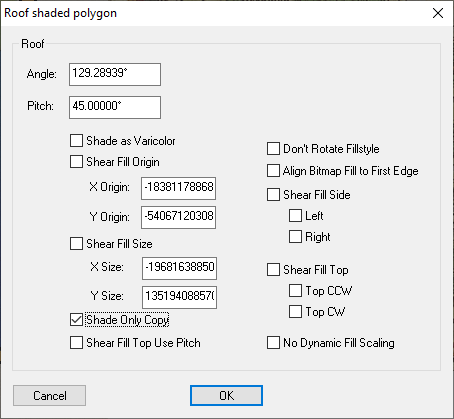
Once you have done that you should be ok.

-
WIP: Modern Ruined Buildings
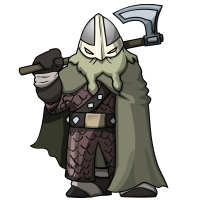
I think it will be necessary to remove the background, but these are lovely. Thank you :)
-
Trace not selecting entity
Enixine, if you are ending up with that situation it may be that you are clicking in the wrong place just after you hit T.
Hit T, then click somewhere in the middle of where you want to trace, then back up to start the trace where you wanted to start it and click your second click to start tracing.
Until you cross the point where you first clicked the section the trace will appear to be going in the wrong direction, but as soon as you cross over that point it will flip to the right direction.
EDIT: ninjad by Remy :)

-
Live Mapping: Fantasy Town
I made a very amateur video on how I would create a connecting symbol from one of the walls and will post it here for you, Quenten, when it's finished processing on YouTube. But now that I have read Remy's comments I don't know if they will be suitable for the Atlas, since I make use of cloned symbols to rename them with a chosen length.
@Monsen - will renaming the clone in the Symbol Manager make them unusable in the Atlas?


-
WIP - Cahokia symbol collection
Stairs are always difficult. I think the first one is best.
-
Can I copy over materials from Dungeon Painter Studio?
Wherever you get your textures from it is best to put them in a new subfolder of C:\ProgramData\Profantasy\CC3Plus\Bitmaps\Tiles
I put personal textures that aren't part of my PF installation in a subfolder called User, which allows CC3 to reference the textures in a normal way.
Never put your own textures in existing subfolders or you may end up permanently confusing yourself about which are yours and which are PF ones.
In case you are wondering - I have a whole range of sub-sub-folders within my User folder that further classify the fills into things like City, Overland and Dungeon, which are then further subdivided into things like Grass, Mud, Trees etc.

