


Loopysue
Loopysue
About
- Username
- Loopysue
- Joined
- Visits
- 10,417
- Last Active
- Roles
- Member, ProFantasy
- Points
- 10,163
- Birthday
- June 29, 1966
- Location
- Dorset, England, UK
- Real Name
- Sue Daniel (aka 'Mouse')
- Rank
- Cartographer
- Badges
- 27
Latest Images



-
Introduction & my current map
In addition to Remy's explanation of the first point, and as a suggested alternative cure, you could move the frame you've added to the MAP BORDER layer, and make sure its on a sheet of it's own at the very bottom of the sheet list.

-
1876 Centennial Campaign Map
It looks good :)
Hachures are something that can't be drawn automatically in any app. Well, not true hachures anyway. Most hachures are not done properly when they appear, but are only used as rough indicators of slope.
When I was at college many years ago, one of the 'units' I did as my course was The History of Cartography. It was pretty dry and surprisingly uninteresting for the most part because we didn't look at any actual history or even individual cartographers and maps. I didn't even know about the Ferraris Map until quite recently. Instead it was all technical 'how this was done', 'how that was done'. Hachures I remember well. Their length, width and density all depend on length and steepness of slope. I'm not even sure I could do a hachured map, even though I know the precise theory and have the ability to draw. It is a seriously skilled piece of work to do a single slope, never mind a whole landscape. Hat's off to those Swiss cartographers who made them so famous!
So don't feel bad about not doing hachures. Never feel bad about that. Doing hachures the right way is like painting the Mona Lisa. Dead difficult, and there are a thousand easier ways of doing it that look just as attractive in their own way.

-
Live Mapping: Sheets and Sheet Effects (Part I & Part 2)
Hi Everyone :)
Ralf will be discussing and demonstrating sheets and sheet effects in tomorrow's Live Mapping session.
You are all very welcome to come along and join in the live discussion, or maybe watch it later if you can't make it.


-
WIP Commission, Ancient Tombs
If you want to know how to make the shaft look like a hole, there is this video by Remy - towards the end of it:

-
Live Mapping: Sheets and Sheet Effects (Part I & Part 2)
Part 2 of this Live Mapping event is set for 1700 UTC tomorrow (21 January)
Please feel welcome to come along and join in :)
![[Deleted User]](https://secure.gravatar.com/avatar/c75d9a245b74d9c59be0999ea81ca541/?default=https%3A%2F%2Fvanillicon.com%2F92add7f8c954488718110edc4896ad39_200.png&rating=g&size=200)
-
Suggestions for a Map and Vintyri
It would be worth checking with copyright owners where possible, for some 'free' things are not as free as they give the impression they are. Most are free to use, but not necessarily commercially as (for example) VTT tokens for redistribution.
I'm not trying to put a damper on your project. Only concerned that you shouldn't accidentally fall foul of people who can turn out to be unexpectedly nasty. I've had experience of that kind of thing. A completely innocent mistake on my part was loudly and very publicly declared to be blatant theft and I was compared with a very real and rather infamous map thief! Fortunately for me the accusation was transparently a laughable exaggeration, but others have not been as fortunate.
My accusers have continued to make my life pretty uncomfortable on other forums ever since, so please don't do this to yourself - not by mistake at any rate. I've been persecuted for so long that sometimes I almost wish it HAD been deliberate, because then at least I would deserve it.

-
How do I remove lines
Hi Aeludor :)
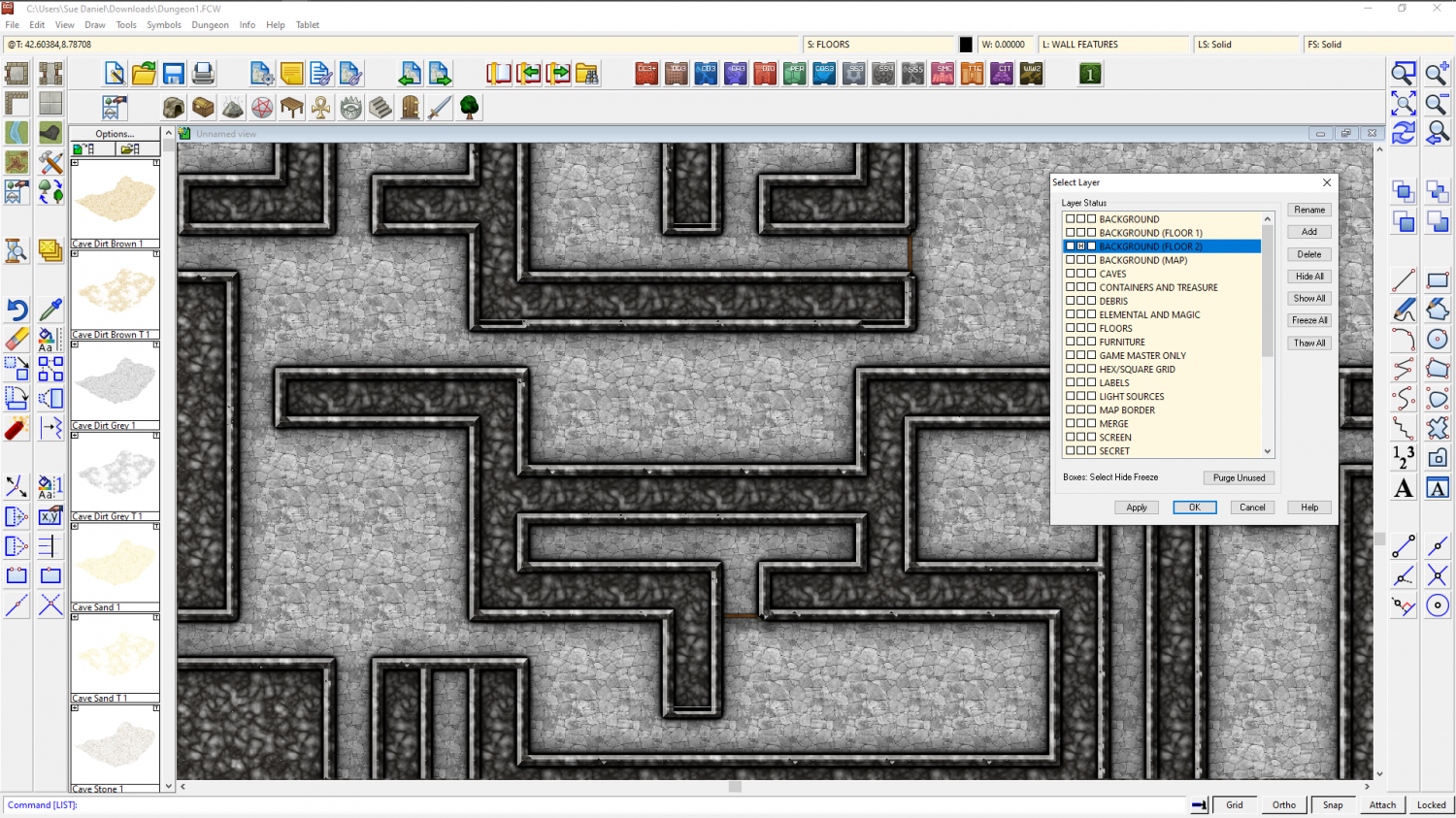
For some reason, probably to do with the style, there are 2 floors there instead of just the one floor.
If you hide the layer "BACKGROUND (FLOOR 2)" the second plain black floor is hidden from view like this

-
Is outer glow the best way to darken symbols?
Hi Julian :)
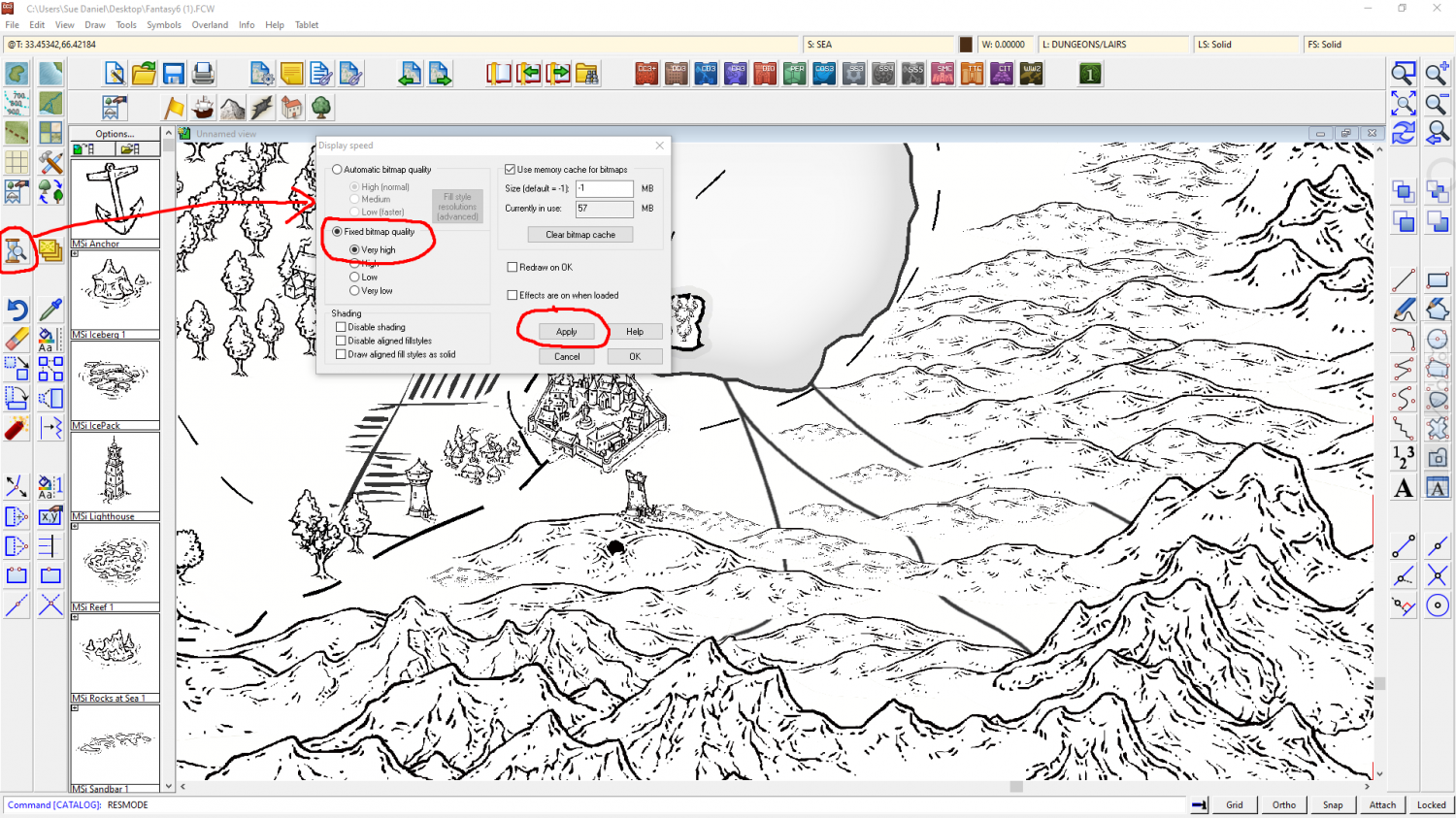
It might be that you are seeing the mountains at a slightly lower resolution, which will slightly blur the sharp lines into the white area around them. Try opening the Display Speed dialog and picking Fixed Bitmap Quality to set it to Very High, and then Apply the change. This should give you sharper and hopefully blacker mountains.
I hope you don't mind, but I have demonstrated this here using a view from the FCW file you uploaded on your other thread, as I didn't have an example of my own in that style to hand.

-
How to add large symbols to a city map
Ralf did a Live Mapping session just over a week ago where he covered most of the sheet effects. The Blend Mode is at 28:40 or thereabouts.
https://www.youtube.com/watch?v=4y9NRUm2jHg
Basically, the mode you pick from the dropdown box at the top of the edit dialog for this effect gives you a set of different ways to blend the pixels of the texture on this sheet with the underlying map. They are closely related to the kind of blend modes you might find between layers in a bitmap editor, so overlay and multiply will do exactly what setting them in GIMP or PS would do.
The opacity just controls how opaque the things on that sheet are.

-
How to add large symbols to a city map
You mean the line width?
You can either set the line width before you draw the line by clicking the little box at the top with W: in it, or you can use change properties once it's already drawn.
Another way, without altering the actual width of the line, is to add a glow to the sheet it is on that is the same colour as the line.
