Loopysue
Loopysue
About
- Username
- Loopysue
- Joined
- Visits
- 10,419
- Last Active
- Roles
- Member, ProFantasy
- Points
- 10,163
- Birthday
- June 29, 1966
- Location
- Dorset, England, UK
- Real Name
- Sue Daniel (aka 'Mouse')
- Rank
- Cartographer
- Badges
- 27
Latest Images



-
Would anyone like to colourize some B&W maps from PDFs for me?
Hi alloowishus :)
CC3 is a vector-based app and and can't edit bitmaps, even though it produces them as an output end result.
There are a few mappers and artists here who also use bitmap editors like PS and Affinity or Krita, but if you are looking for somewhere with an abundance of artists who work with bitmap apps and who are also quite conveniently for you looking for work you might like to try asking the same question at the Cartographer's Guild.
This is the "Mapmaking Requests" subforum.


-
Can you *elongate* polys once they are drawn?
The window is a box select of the nodes you want to move. Pick one corner of the imaginary box that contains all those nodes and no others, then pick the diagonally opposite corner of the box. That should select all the nodes. The next move is to click an origin point for the stretch, and then move the cursor to move the nodes you've selected to a new position. Then click to fix them there.
-
Scale issues
You mentioned Control earlier. I'm guessing you mean the CTRL key. On it's own the CTRL key scales symbols on the fly - larger or smaller depending on which way you move your mouse.
The SHIFT key on its own is used to rotate the symbol in 15 degree stops.
If you hold the SHIFT key down and then the CTRL key as well you can free rotate the symbol by moving the mouse.
Sometimes accidental scaling results when you press the CTRL key before the SHIFT key. That may have been the cause of this problem but it is only you who can say whether that is the case or not.
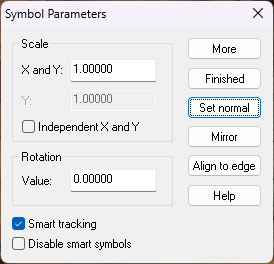
If you do end up with a strange scale at any point just right click while you have the symbol on your crosshairs and either click "Set normal" or manually set the scale to 1.
-
Live mapping - Pausing for the next two weeks
That's a really good idea, Jim.
If anyone else wants to do the same all the live mapping sessions are here:
-
Arce Ursi
That old hatched stone fill seems to be stuck in the DD3 repertoire, but there are other alternatives around. If you are looking for something reddish you could use one of the Dirt fills instead, or maybe the "Stone Lava Cooled" and a sheet effect to change it's colour to something more reddish.
If you have other add ons there's no reason you can't use a fill from one of them if there's one you would prefer. How you do that is use Insert File in the Draw menu and pick a pre-prepared blank map of that style (or the actual template file .FSC) and press ESC just before clicking to place it in your map. That will import just the fills for that style which you can then use in your map.