Loopysue
Loopysue
About
- Username
- Loopysue
- Joined
- Visits
- 10,414
- Last Active
- Roles
- Member, ProFantasy
- Points
- 10,161
- Birthday
- June 29, 1966
- Location
- Dorset, England, UK
- Real Name
- Sue Daniel (aka 'Mouse')
- Rank
- Cartographer
- Badges
- 27
Latest Images



-
WIP: Egyptian Floral Motif Column
The stone I've made isn't great, but I've done a wood texture I'm pretty pleased with, and which I can use to make things like wrecks (eventually). This is the best one I've done - combining things from 3 separate tuts by different people. They all think they have the best way of making wood, but it depends really on the scale and the application. Don't let this frighten you! It's not as complicated as it looks. I just had to squish all the nodes together so you could see what was there and the settings.
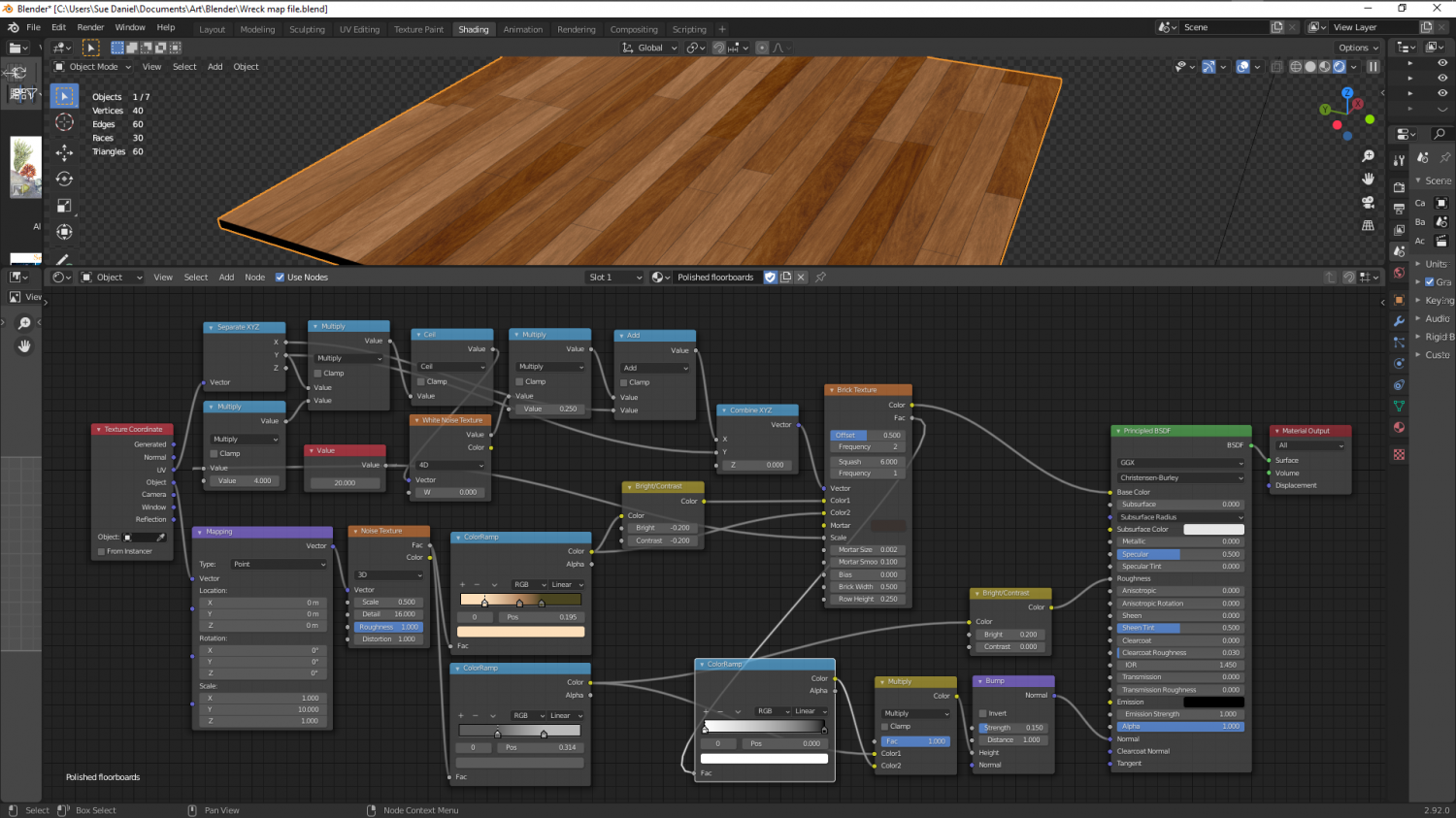
Most 'procedural' stone isn't procedural at all, but uses bitmap textures applied procedurally. Stone is a lot more simple than wood, which requires planks and a direction, and random variation of tone.
Still working on a true procedural stone...

-
Representing Cliffs and Ridgelines
You're welcome, Mike :)
It's really easy to make your own set if nothing else fits. Just draw them as little triangular polygons and shrink them to the right kind of size with Scale, and use Define Symbol in the Symbols menu.
As a tip, I created mine with the fat end at the top and the tail at the bottom. By chance that just seemed to be the right orientation to work with CC3 and Symbols Along without any issues.

-
Live Mapping: Parchment Backgrounds
Hi Everyone :)
In this week's Live Mapping Session Ralf will be showing us how to add a parchment background to an existing map, and how to use the tools provided by the June issue of the 2007 Cartographer's Annual.
Come along and join in the fun :)



-
Strange artifacting with wall sheet
Hi kalnaren :)
This may be being caused by nodes in that very detailed line being too close together - close enough as to be nearly right on top of one another. Try using the Keyboard command SIMPLIFY on that wall. Since this is a dungeon map I would set the factor to about 0.2 or so - that being a fifth of a foot, or if the map is metric it will be equivalent to 20 cm. SIMPLIFY removes nodes that are closer together than that. Using SIMPLIFY will also speed up your map just a bit by reducing the overall node count.
I can see that you have a floor texture there as well. So before you start with anything hide all the sheets but the WALLS sheet.
You may need to do the same to the floor as you did to the wall, but you might get away with just leaving it as it is if there aren't any obvious mismatches.

-
Marine Dungeon - a Cartographer's Annual development thread
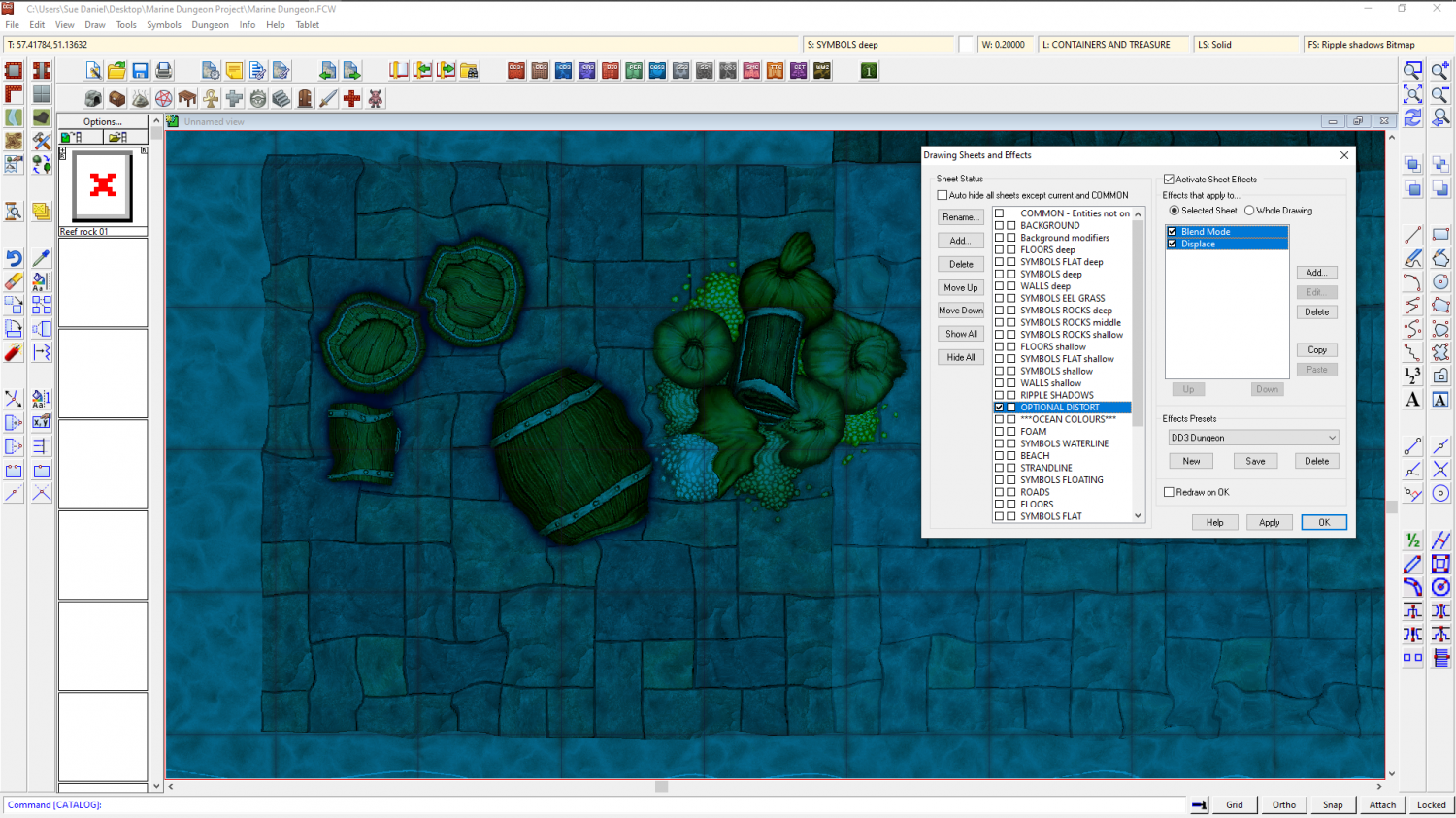
Distort has been possible for at least 5 years. All I did was work out how to affect the whole map by adding the effect to just the one sheet, called OPTIONAL DISTORT. The distort is optional because it doesn't make reading the map all that easy. It's more of an artistic effect.
A rectangle of transparent white that covers the map on the OPTIONAL DISTORT sheet is multiplied (Blend mode sheet effect) to the result of the render so far. The Distort effect is then applied. The white of the rectangle itself is no longer visible thanks to the multiply effect (which removes all the white on it's own sheet) but those other colours it has been blended to are treated as part of the white rectangle and distorted by the following Distort effect.
Blend and Distort. Just two effects in that order.
The only thing you need to be careful about is making sure that all your backgrounds and anything that vanishes off the edge of the map extend as far beyond the edge of the map as the distort is set to act, or you get the edges of things pulled back into the map by the distort.