


Loopysue
Loopysue
About
- Username
- Loopysue
- Joined
- Visits
- 10,414
- Last Active
- Roles
- Member, ProFantasy
- Points
- 10,161
- Birthday
- June 29, 1966
- Location
- Dorset, England, UK
- Real Name
- Sue Daniel (aka 'Mouse')
- Rank
- Cartographer
- Badges
- 27
Latest Images



-
[WIP] Recreating Thedas
Looking good :)
If you are wondering why some of the terrain has sharp edges that's because the Edge Fade Inner sheet effect only acts on the outside edge of the combined polygons on that sheet. To give them all the same faded edge all the way around it may be necessary to create LAND FEATURES 1, LAND FEATURES 2, etc, and copy the EFI effects across to the new sheets, then move some of the land feature polygons to the new sheets. To avoid confusion I sometimes call them TERRAIN DESERT, TERRAIN MARSH, etc, so I know exactly what sheet something should be on when I move it.
Where you do forests you can make them look more natural by dotting a thinning band of single trees around the edge to break up the hard line.


-
Scaling when Import new Bitmap
Hi Brandor :)
Nearly all fills are scaled, so importing them without a scale will cause a lot of hard work because if you don't scale them on import you will end up having to scale them individually by hand using the Fill Style Properties dialog.
This tile (below) is designed to cover 20 square feet, so it has a scale of 20 in this imperial map.
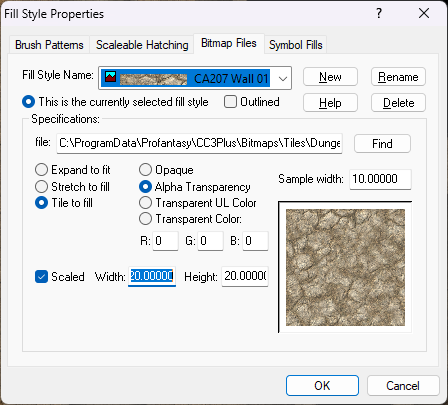
It's probably best to scale them all on import to the scale that most of the tiles will require, and then adjust the scale of any fills that need to be a different scale to the rest.
As I indicated above with my example fill, what scale to give your tiles will depend on how much area you think each tile should cover. For example, if you are importing a tile into a metric map that you know should cover 3 square metres then give it a scale of 3. If you are importing the very same fill into an imperial map give it the equivalent scale in feet.


-
Scaling map for guide
If you reduce the size of the whole city map then it won't be at the correct scale. Keep it at the correct size (1 map unit = 1m), but don't draw individual buildings. Draw whole blocks and leave out the details like back streets and paths.
Once that map is finished, start again with 4 or more districts of the city, mapping each of those smaller areas in greater detail so that these smaller maps cover the whole city in a jigsaw of smaller maps.
-
[WIP] Recreating Thedas
You need to draw the sea first, not the land.
There is a pdf Mapping Guide in the issue's folder here:
C:\ProgramData\Profantasy\CC3Plus\Annual\Issue 173 - Darklands
-
The Cartographer's Vault Humble Bundle
CA132 is the February issue of the 2018 annual, called "Dungeon Walls". Does this look like the style you have things missing in?
EDIT: Oh, sorry! I couldn't see Quenten's answer when I did this one, even though it was hours before.

