


Loopysue
Loopysue
About
- Username
- Loopysue
- Joined
- Visits
- 10,413
- Last Active
- Roles
- Member, ProFantasy
- Points
- 10,161
- Birthday
- June 29, 1966
- Location
- Dorset, England, UK
- Real Name
- Sue Daniel (aka 'Mouse')
- Rank
- Cartographer
- Badges
- 27
Latest Images



-
Cannot delete layer
You could try selecting by layer?
Pick the delete tool and right click in the window, then pick Layer. You will be prompted for the name of the layer in the command line. Once you have entered the layer name on your keyboard you should then see in the command line how many entities are on that layer.
Best to check what they are before you go ahead and delete them, though.



-
Of large and small maps
Remy Monsen wrote a blog explaining the process here:
I'm also quite sure he did a Live Mapping session on the same subject, but I'll have to go find it and come back to add it later.
I found one by Ralf. Maybe it was this one I was thinking of...

-
[WIP] Recreating Thedas
The scaling (or the default symbol size) is something that really should be set at the outset. But you've already done quite a lot of map. When you say it looks too small when you export it, are you exporting it always with this broad white border around it?
What export options are you using? These are controlled by the dialog that opens when you hit the Options button in the Save as... dialog.
Here is an example.
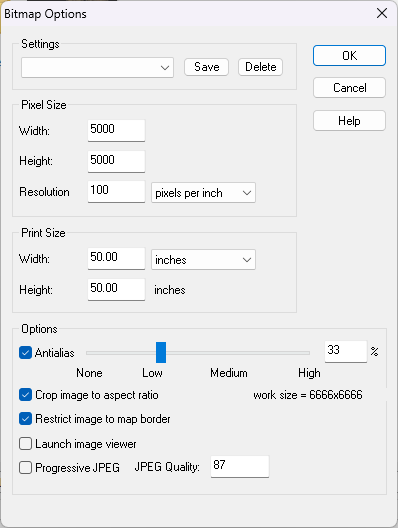
You can export the same map a lot larger by increasing either the Print Size or the Pixel Size. The settings above produce a much larger export than the default settings.
The Restrict image to map border checkbox should also cut out that large white border.

-
[WIP] Recreating Thedas
CC3 draws the BACKGROUND sheet first, and then draws all the others on top of it one after another all the way down the list to the bottom. So if you have something on a sheet near the bottom of the list it's on top of most of the rest of the map in your drawing.
If you want all the entities on a particular sheet to be on top of everything else in the map you would need to move it to the bottom of the list. Take care to leave the border and screen sheets right at the very bottom, though.
The effects on each sheet affect only the entities on that particular sheet.
Usually a sheet with a name that starts with SYMBOLS... has symbols on it, and sheets that don't start that way have lines and polygons on them.

-
[WIP] Recreating Thedas
To create a new sheet just hit the Add... button on the left of the sheet list in the Sheets and Effects dialog. Then move it up or down the list to the best position.
To copy the sheet effects across from the existing LAND FEATURES sheet, pick the existing sheet and select the effects in the right panel, then hit the Copy button to the right of that panel. Select the new sheet and hit the Paste button.
You can move polygons or symbols to other sheets a number of different ways. I use the Change Properties tool as the fastest way, but you can also use Move to Sheet in the right click menu of either the Display Speed Settings button, or the Sheets and Effects button.
