


Loopysue
Loopysue
About
- Username
- Loopysue
- Joined
- Visits
- 10,413
- Last Active
- Roles
- Member, ProFantasy
- Points
- 10,161
- Birthday
- June 29, 1966
- Location
- Dorset, England, UK
- Real Name
- Sue Daniel (aka 'Mouse')
- Rank
- Cartographer
- Badges
- 27
Latest Images



-
Colorize Whole vs Sheet
I don't think symbols that have map files to control the roof shading are redrawn. So they are affected by the sheet effects. You can also use Color Key and other sheet effects on them. Color Key can be quite useful to make ruins by cutting holes in the roofs.

-
Colorize Whole vs Sheet
It's because the symbols on each sheet are redrawn after the sheet effects are applied. However, the whole map effects are applied right at the very end of the rendering process - after all the redrawing has been done.
If you want to cancel that redrawing use the keyboard command DELAYDRAWSYM and enter zero as the value instead of 1. This only lasts for the session and has to be repeated for each session.
While DELAYDRAWSYM = 0 may get you what you want with the symbols, it can cause issues with any semitransparent parts of the symbols. They disappear. So this is not a good thing to do to a style like Marine Dungeon (for example) which has many seaweed symbols that are partly translucent.


-
Accessing the Trace Command
Unfortunately, no.

-
CD3+ Texture issue
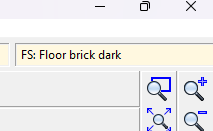
Click the little text box in the bar at the top where it says "FS:...."
A dialog called Fill Style Properties will open. Make sure the Bitmap Files tab is active and pick the fill you want to rescale from the dropdown box called Fill Style Name.
Make sure the Scaled checkbox near the bottom of the dialog is checked and adjust the Width and Height of the fill in map units.
In this screen shot the fill I have picked is scaled to 15 x 15 map units.
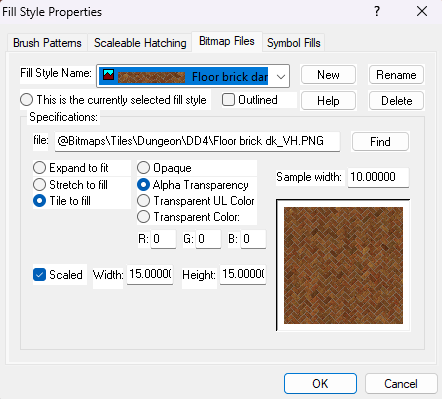
Click OK and the fill should rescale itself in the map.


-
Struggling with "TEXT FORESTS" sheet and outer glow effect oddities
These kinds of label issues tend to happen when the rendering engine gets confused by overlapping black and white extents and fails to see some of the upper sheet - the labels. Please try changing the text colour to the very palest grey in the palette, and edit the glow effect to the very darkest grey.
You may be experiencing the same kind of trouble with your roads. Try changing the road colour to the very palest grey.
It's very unlikely that any of these issues are being caused by your system.
If you are still having problems when you've tried my suggestions, please share your .FCW file here with us so that we can have a more detailed look at what is happening.


