


Loopysue
Loopysue
About
- Username
- Loopysue
- Joined
- Visits
- 10,413
- Last Active
- Roles
- Member, ProFantasy
- Points
- 10,161
- Birthday
- June 29, 1966
- Location
- Dorset, England, UK
- Real Name
- Sue Daniel (aka 'Mouse')
- Rank
- Cartographer
- Badges
- 27
Latest Images



-
WIP: ESTONISCH CONTINENT BIRDSEYE
They are much less convoluted. You could emulate that pattern using the Ripples, rather than the Ridges, or more ripples than ridges.
I don't think your map looks bad at all. Maybe add some ripples in the larger gaps between the ridges?

-
WIP: ESTONISCH CONTINENT BIRDSEYE
Ah yes. That works quite nicely, and you can chose not to add the striping to the rivers and lakes by not copying them across to the new sheet.
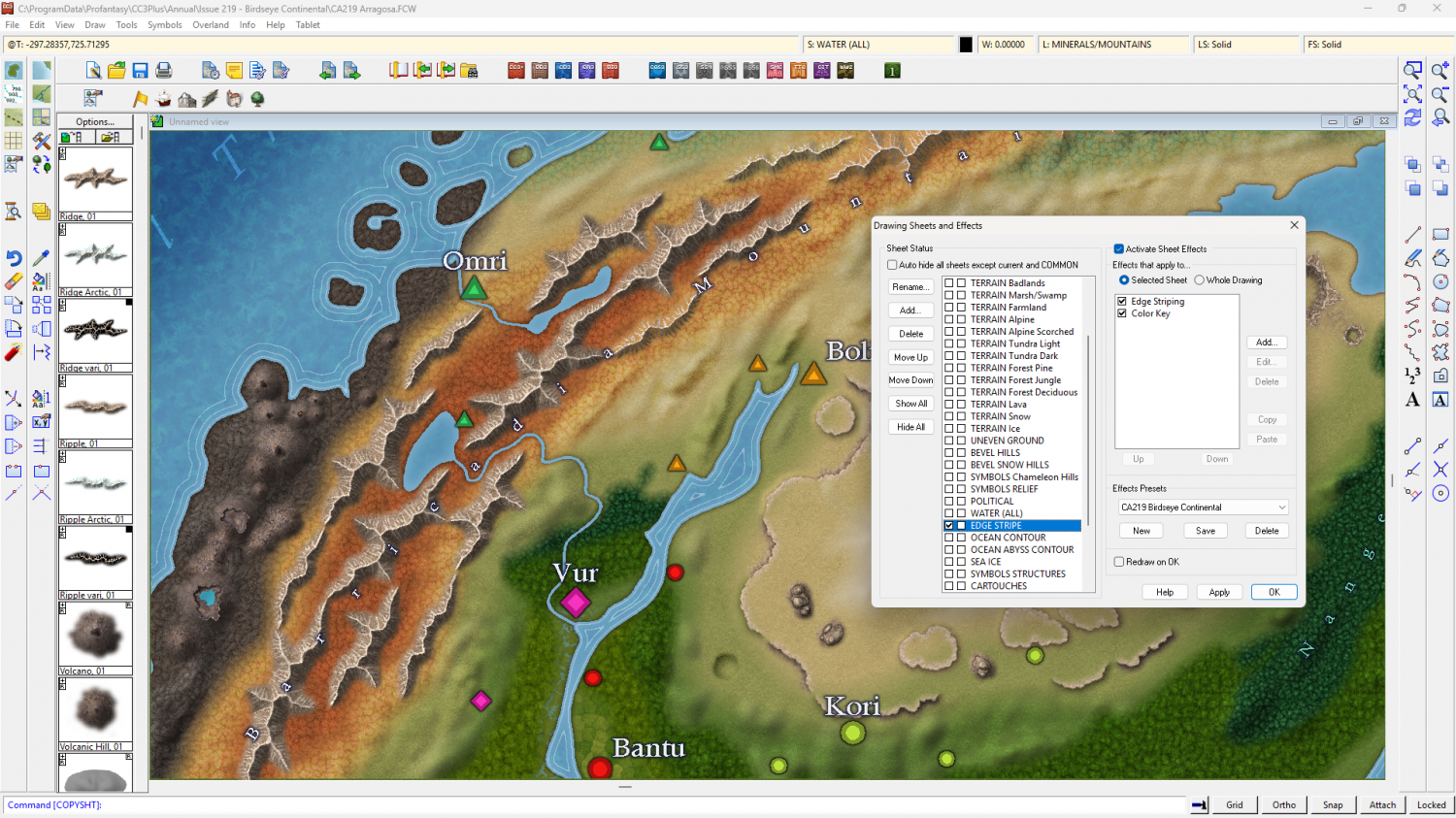
Here is the modified example map so you can see how to do it.
In it I have used the edge striping from Erdan Worlds. Some of you may not have that style, but you can locate an alternative in the C:\ProgramData\Profantasy\CC3Plus\Filters\Images folder.


-
WIP: ESTONISCH CONTINENT BIRDSEYE
There is already a light blue glow set to inside on the WATER(ALL) sheet. You could make that wider? Be careful how wide and how pale, though, since that will be the colour of your rivers and smaller lakes.
I tried an Edge Stripe. It doesn't work as expected. To do what you want you would have to turn the style inside out (ie, Land on Water, rather than Water on Land) - have the land on top of the water and the edge stripe on the LAND sheet (which is currently the BACKGROUND).
However, that would mean you are back to having to trace the coastline with your terrain fills to keep the terrain on the land, and will probably have to greatly reduce the EFI on all the terrain sheets.
This is the one big disadvantage of creating a Water on Land style. Coastal effects are relatively limited.
Alternatively, if you are hell bent on having edge striping, maybe try duplicating all the land polygons from the WATER(All) sheet to a brand new sheet above the WATER(All) sheet, leave them pink and add first an edge stripe, then a colour key. I haven't done it myself yet, so it may not work.

-
Monsen IR command Error Responses?
I mentioned the fact that the chameleon hills don't work well in the arctic regions. The same applies to the uneven ground texture. Maybe that should be noted in the margin somewhere? It's because the arctic fills (snowfield and ice) are too white as a base for the sheet effects. If you really wanted them to work on the ice and snow you could (given some time) add a new uneaven ground terrain sheet and fiddle with the blend modes to get something more noticeable, perhaps. No promises though. I tried it and failed. That's why you have a snow hill drawing tool.
There are no snowy forest fills, but you have made a good solution.
The map size only affects the symbols, not the fills. The fills will be the same scale no matter the map size.
-
CC4 Overland Development Thread
The image for the node setup turned out a bit blurry, so this is it again in a more readable fashion. I continue to work in Blender version 3.6.8 even though there are more up to date versions. They update/upgrade in a fashion that damages version compatibility. Some of these nodes no longer exist in the current version, or exist in such a changed state that they don't work the same way.
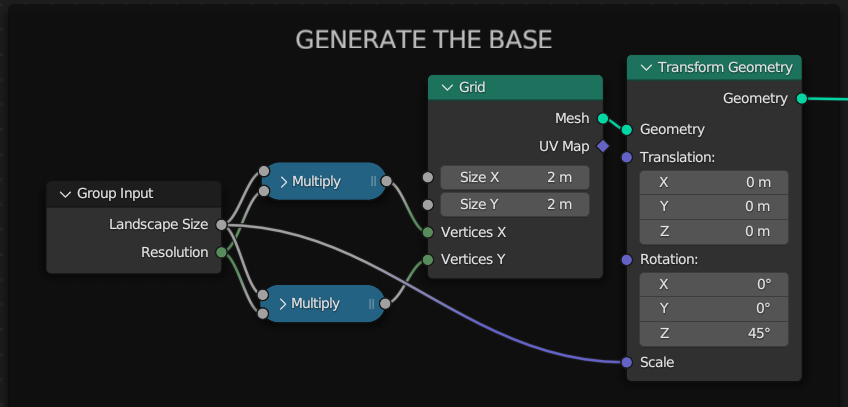
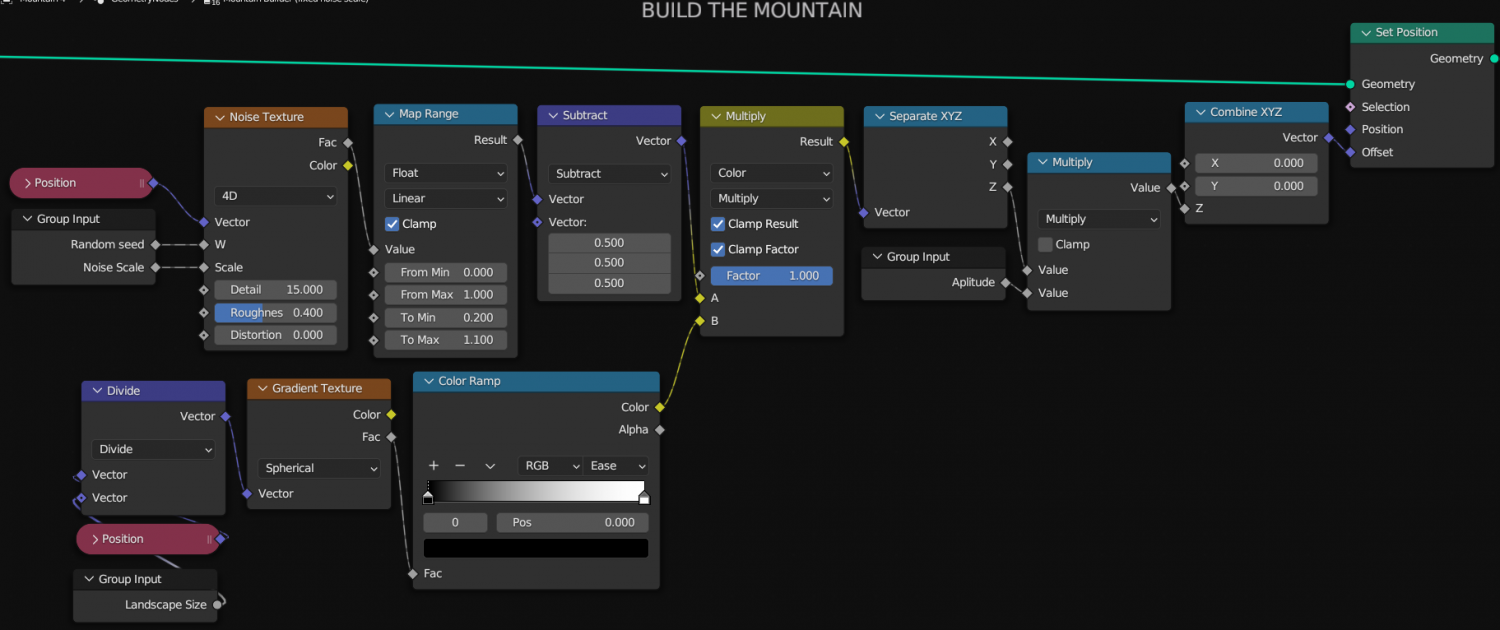
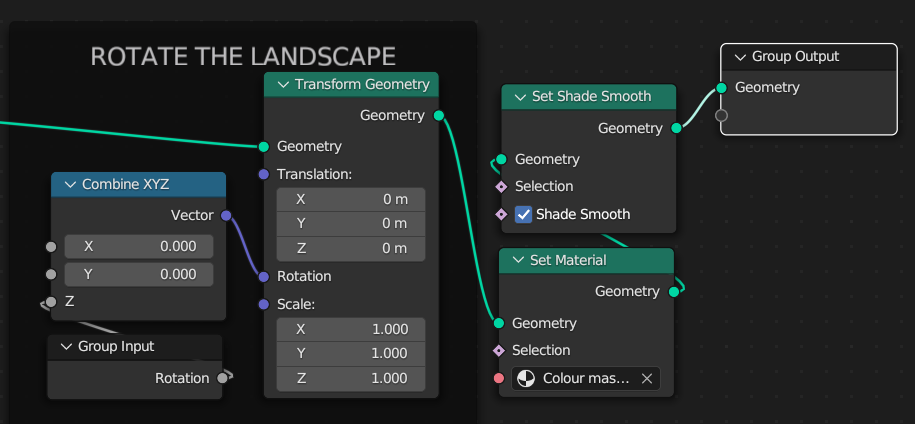
In the first image I use 2 Math nodes to do the same thing. This can be done with just one linked to the same inputs and outputs.
Have fun! :)


