Loopysue
Loopysue
About
- Username
- Loopysue
- Joined
- Visits
- 10,121
- Last Active
- Roles
- Member, ProFantasy
- Points
- 9,981
- Birthday
- June 29, 1966
- Location
- Dorset, England, UK
- Real Name
- Sue Daniel (aka 'Mouse')
- Rank
- Cartographer
- Badges
- 27
-
2 questions: "broken" sheet and effects on load
Hit the hourglass button on the left and check the box that says "Effects are on when loaded", then save the file.
For the dashed grey line issue, first check that they really are on the sheet you think they are on by using List in the Info menu. If you are using a drawing tool to draw those lines the tool will dictate which sheet they end up on regardless of whichever sheet you have active at the time.
-
How do I add variations in textures?
All seamless textures have repeating patterns in them. But there are a couple of ways of disguising this.
The first is to scale the texture so that it is not repeated as many times in the visible area. Be careful that you don't make the scale so large that the textures pixelate in the final output.
The second is to add patches of the partly transparent textures (DD3) on a new sheet above the terrain or ground sheet, with a nice Edge Fade Inner sheet effect on that sheet, or patches of a similar texture that is related to the first on it.
I haven't given you very much detail because there is a chance you won't need to do either of those things. If the map is still in an early stage of development with large blank areas the simple act of adding buildings or details may hide a lot of these things.
-
Banners
I thought of that, and then I thought... That means I would have to do a different banner body for each basic style I created, and then a different banner right end for each basic style I created, and then a different left end, and... by the time I finished this set could be about 500-1000 symbols strong. Then at the receiving end you would get a massive jigsaw puzzle where the pieces that you want might not necessarily be right next to each other in the catalogue due to it's sheer size - meaning that you would have to go hunting for the right ends for the body you have chosen. There is also the shadow problem - where you have to place each piece of your chosen banner exactly right on the spot so there are no horrible overlaps/underlaps of the shadow - which is essential to making them pop. (The shadow being built into the symbol).
Anyone else have any thoughts along these lines?
-
Grimdark Fantasy (renamed "Darklands") - development thread
This is how the sheets lie (please ignore the Effects Presets, which refer to the base template I used to build this on and not the style I'm making):
The WATER sheet lies above the land, not underneath it. The BACKGROUND is a parchment texture, the TERRAIN is a sheet with lots of green and brown patches blurred and blended into the parchment.
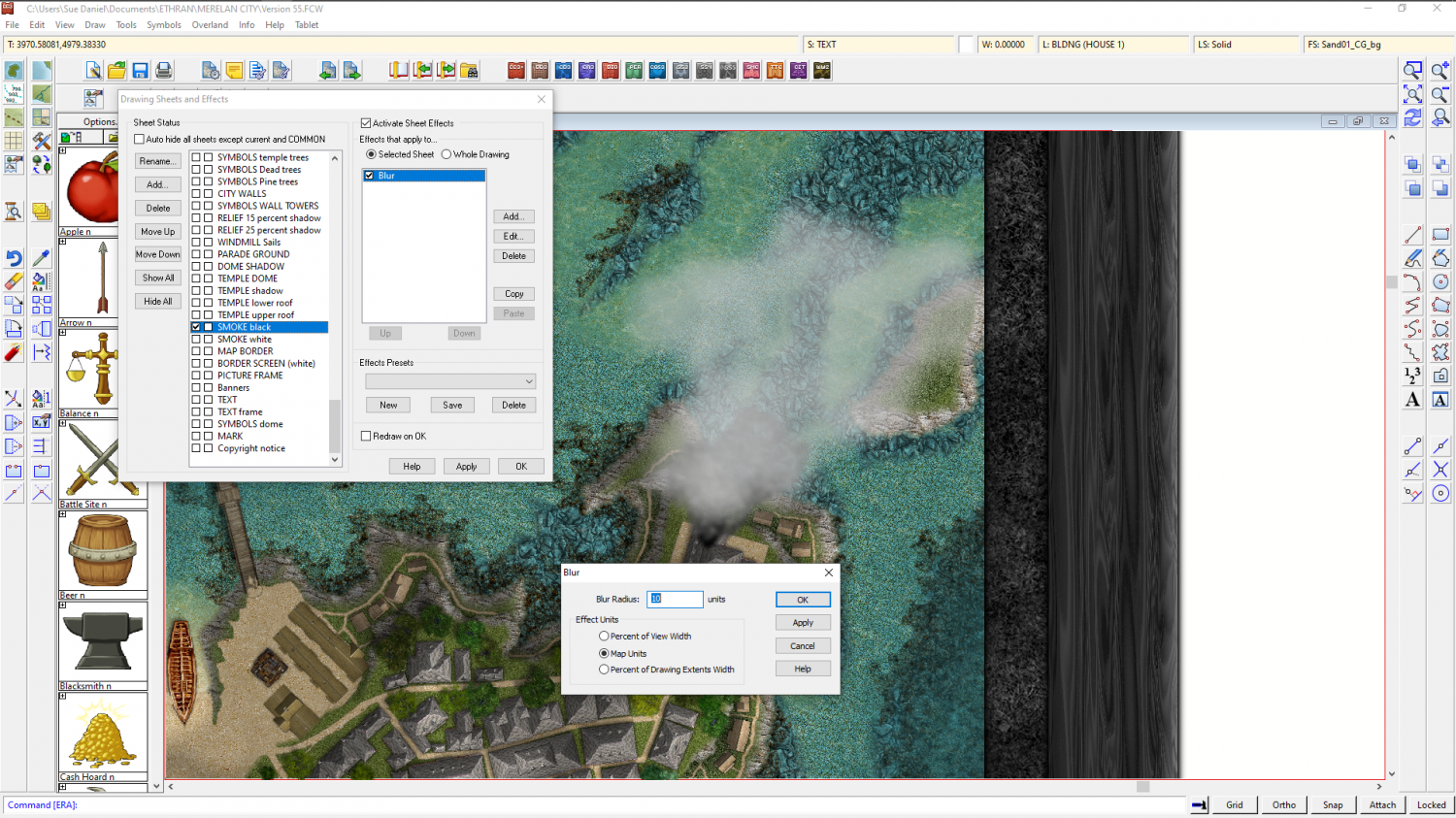
These are the 3 sheet effects on the WATER sheet. Please bear in mind that all these effects are set to map units, and that you might have to adjust them to suit your own map. This is more about the balance between the second glow and the directional shadow - they need to balance for the effect to work.
Also bear in mind that this will only work over relatively narrow bands because it is only an illusion - a fake bevel.
First I have a thin dark line to properly define the coast
Then I have a pale glow set to Outside. I'm using a pale yellow here so that it hopefully matches any of the set terrain colours that might come to the coast.
And finally a dark directional shadow set in opposition to the default sun direction (which is 315 degrees)
If it doesn't work immediately on your map remember that this is not a true bevel. You may have to fiddle around with the numbers quite a bit to get it to look right.
-
No matching draw tool for "Wall*"
Ok. Taking a random example...
If I have created a map in DD3, and I want to use SS4 (Dungeons of Schley) in it, I would get the drawing tools as described above, and then I would open a second instance of CC3 by right clicking the desk icon and picking CC3, or New, or whatever your system provides for a new instance of an app, and then I would use that instance to create a new SS4 map. I would then save that temporary map with nothing drawn in it as "TEMP SS4" and Pick that as the file to Insert into the DD3 file I was actually working on. I would insert it, but then immediately delete or undo the action because I don't want the dummy SS4 map or any part of it. I just want to fool CC3 into importing all the relevant fills for SS4. It doesn't matter that the dummy map is instantly deleted. The fills are imported in that instant and they stay, even though the SS4 map is gone as fast as it arrived.
Once that is done all the SS4 drawing tools will work as if this was an SS4 map.