


Wyvern
Wyvern
About
- Username
- Wyvern
- Joined
- Visits
- 3,266
- Last Active
- Roles
- Member
- Points
- 5,585
- Rank
- Cartographer
- Badges
- 24
Latest Images
-
[WIP] Community Atlas, 1,000 Maps Contest: Villages in The Whispering Wastes of Haddmark, Peredur
The eighth small settlement in this set is from Hex 1604, Brightlawn Hamlet:
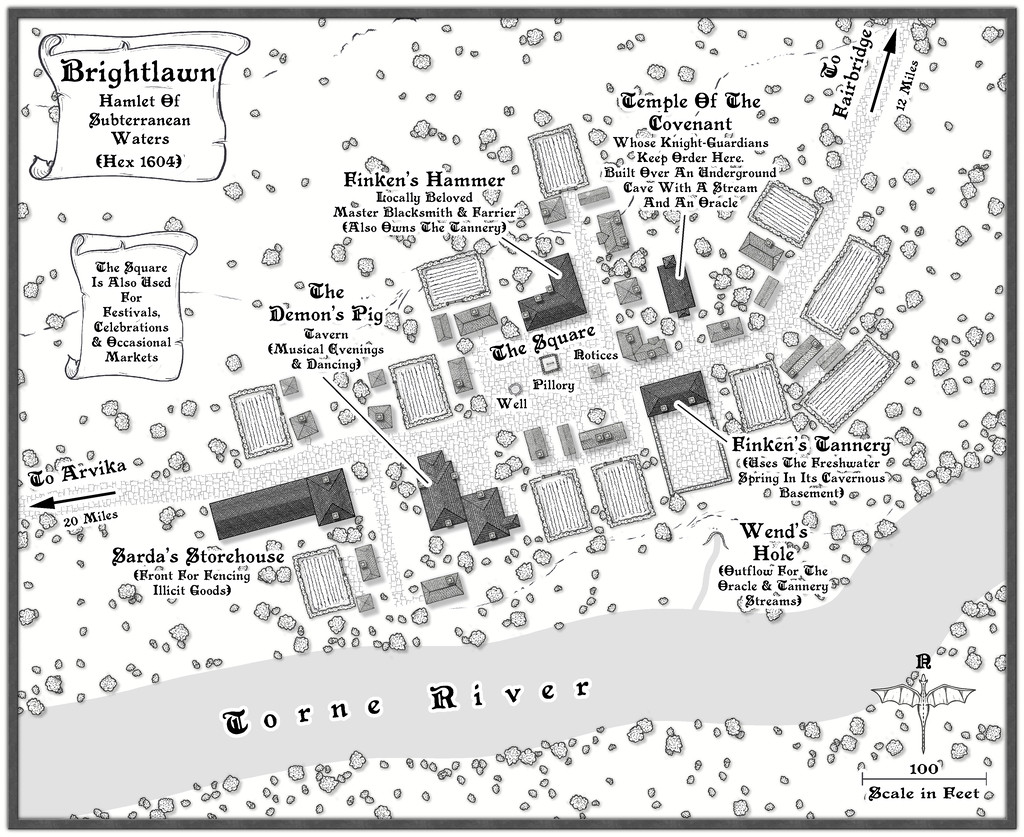
No especially fancy elements were required here, although as a major river shown on the Atlas map for this continent, the Torne needed to look somewhat more imposing than the others to feature so far, and I did feel it would be useful to include an outlet into it from the subterranean streams that had been randomly decided-upon as part of this hamlet's layout. The settlement is also relatively close to the edge of the Siljan Hills, so a few more of the style's contour lines were added than normal. I did trial one of the cliff-line symbols for what became the Wend's Hole stream outlet as well, but that just didn't look right, mostly because the better-shaped of the cliff options is intended as a promontory, with the cliffs on its outer side. Instead I simply hand-traced the line of that cliff piece, and drew the little cliff-line markers to make it look more as if this was a hollow than a clifftop, which in combination with the contours and a mild shadow effect (suitably masked in part) seemed to work well enough.
Everything else was much as has become normal for these village maps, with properties of varying sizes and types, scattered vegetation and a few fields. Interestingly, the random options here from the Shadowdark tables came up with an area with a pillory and a "Wanted" noticeboard that wasn't a market place, although it makes such an obvious feature in the settlement, I decided occasional markets could happen there too. I added a well, and a hut by the noticeboard, since it made sense to develop that other local notices might be pinned-up there, thinking of medieval European settlements and how things such as broadsheets were presented publicly. The oracle in the cave below the small temple here adds a further note of mystery to the place, which hopefully helps make it seem a bit more "real"!




-
Problems with Text
Try copying the text onto a new Sheet with no Effects on it in exactly the same place as it is now (so the two texts overlie one another). It may work better with the new text Sheet below the original (but still above the floor) or above the original text Sheet.
Alternatively, you might try changing all the text's colour to something slightly different to what it is currently (because the "acne" effect seems to happen when there's something of an identical - or nearly identical - colouring on two overlying Sheets which have certain kinds of Effect in operation). In this case, it may be simply the text Sheet's Effect interfering with the specific colour and shape of the floor fill's patterning.

-
Winter Village style development (March 2022 CA issue)
Yeah, I'm with Mike on the anti-snow front! It might look OK from indoors, but when you've had to slog through it, or have spent days clearing it at times, it VERY quickly loses any appeal.
And yes, Joe's right about the concrete look now. It's very tricky. I know even looking at specimens of the mineral galena can be difficult, as it can be both shiny silver-white and black at the same time...



-
Winter Village style development (March 2022 CA issue)
Having lived only in places with tile or slate roofs, I can confirm Shessar's photos are indeed entirely accurate for both those materials. Slide, wind effects and thin ice/snow melt basically works from the top down, and outer roof edges facing more nearly into the current wind, so those will all tend to clear of snow first. This can be enhanced around objects sticking out of the roof like chimneys and stove pipes, especially where those are in use. There may also be some smoke discoloration of the snow near chimneys that are in heavy, regular use as well (albeit that also tends to mean snow there will melt faster as well - introducing foreign particulates to the ice/snow helps it melt faster generally, like applying salt to road and path ice).
Roof patches do tend to be harder edged than you've illustrated so far, and with a tendency to remain in the hollows a little longer than the ridges on shaped tiles, as you've already noted. There are a lot of variables however, and commonly, once the snow's started to melt on such roofs, it will tend to clear fairly quickly thereafter, unless there's fresh snowfall heavy enough to fill-in the cleared gaps.

-
Community Atlas: Embra - Constructed Places
Last of the individual sites is the Twilight Market setting for this group of Places, Candlelight Hall. The Hall has a huge, pale-blue, glass-tiled roof over much of it, and while that was straightforward enough to draw - CD3 tiled roof shaded polygon with added Sheet Transparency Effect - the support structure took rather more thought and effort, albeit "Trim To Entity" does work wonders in cases like this, for all those roof beams. The view complete:
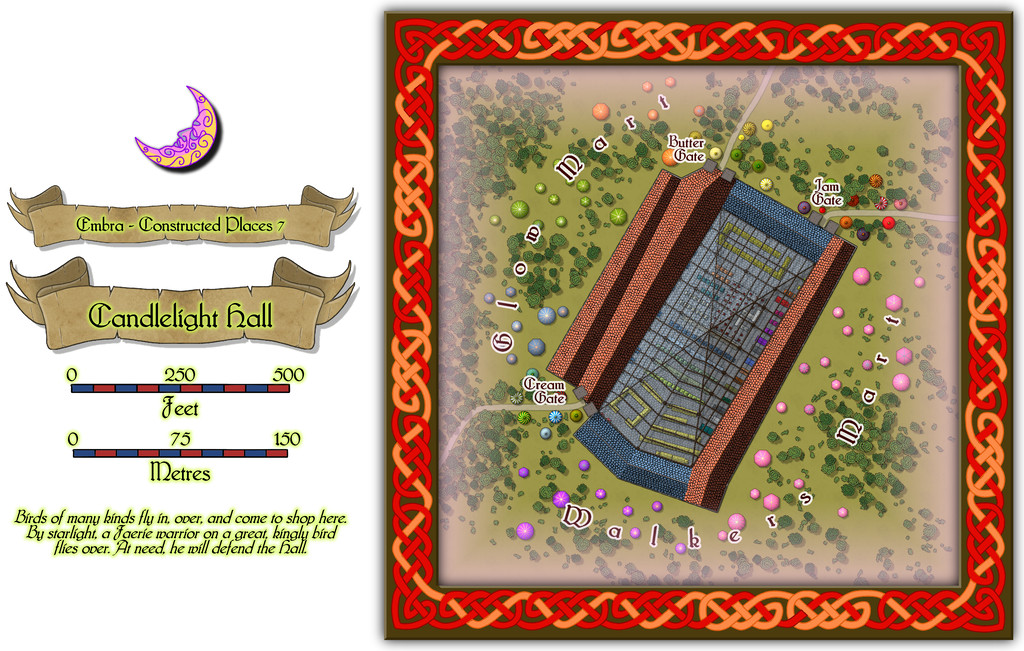
Even this view indicates the interior had to be quite heavily detailed while the roof was left in place, and for once it was prepared normally with fills and symbols, not just the cream-and-green plan sketches all the other Embra interiors have received. The "normal" image above does allow the focus to be a little more on the scatter of other stalls and tents outside the Hall itself, before plunging inside. And so to that interior:
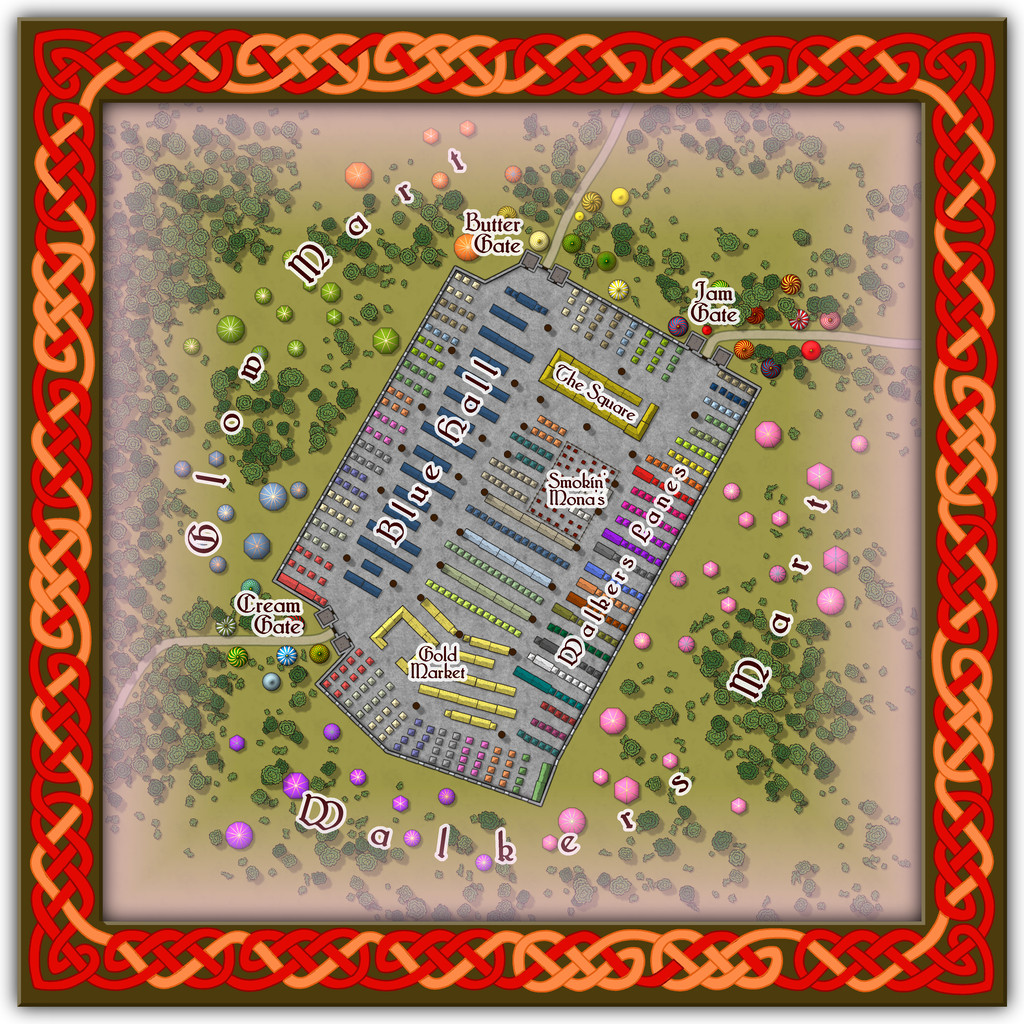
Peering closely suggests there are a lot of windows piercing the walls, all narrow, high, point-topped, and painted with a great assortment of subjects and scenes, which with the huge see-through roof area, means that at twilight or in the dark, the lights from inside shine out like a beacon from here, partly hence the name. And just in case you couldn't guess, Smokin' Mona's is THE restaurant for this part of the Market.
Comparing the two views here, one other element becomes clear. The internal labelling can be turned on or off separately to the other map labels this time. If all goes to plan, that should be via toggles in the Atlas' FCW version.
![[Deleted User]](https://secure.gravatar.com/avatar/c75d9a245b74d9c59be0999ea81ca541/?default=https%3A%2F%2Fvanillicon.com%2F92add7f8c954488718110edc4896ad39_200.png&rating=g&size=200)
-
Community Atlas: Embra - Wooded Places
The third map in the Wooded Places set gave me an opportunity to try something I've wanted to do for a long time, map some spiral patterns in woodland. Those sufficiently familiar with fantasy fiction might guess the idea originated in the "Mythago Wood" tales by Robert Holdstock (the original novel, "Mythago Wood", was published first in 1984), which made a lasting impression on me from when I read them back then. The final map though bore only a mild, passing resemblance to its original base. Thus came to be Spiral Glade Park:
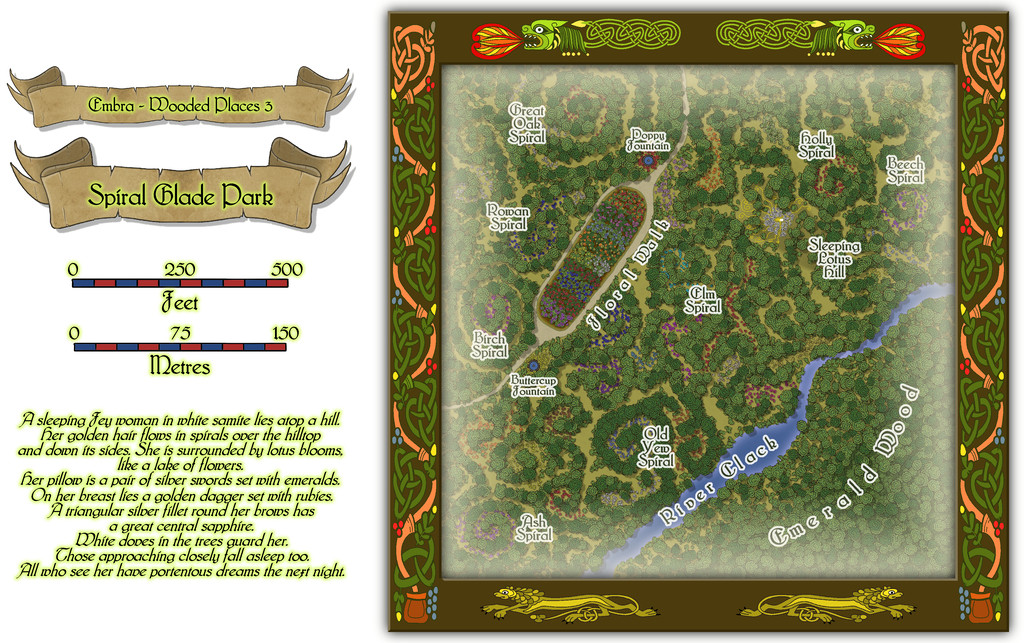
The details are a little tricky to see at this resolution, so again, we can try a somewhat closer view of just the map part:
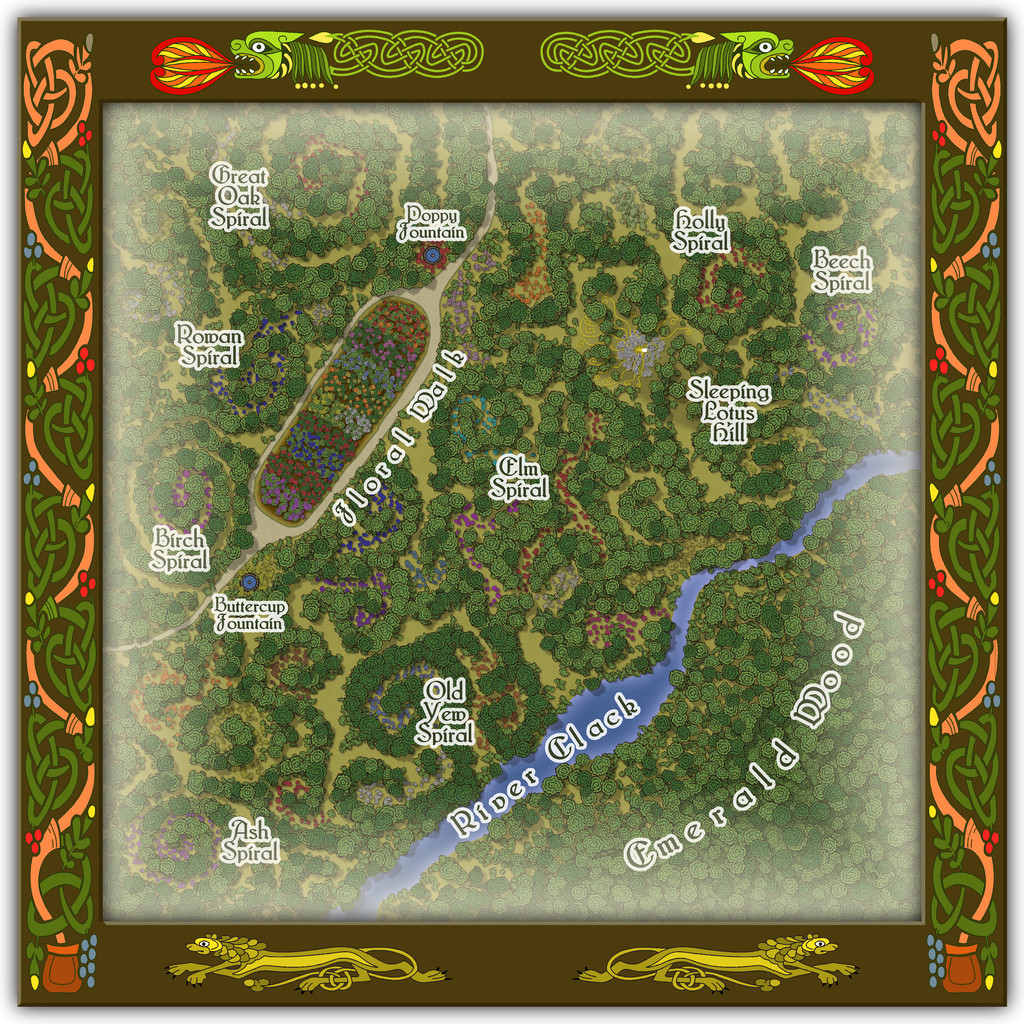
For those wondering, yes, Sleeping Lotus Hill does have a simple sketch of the sleeping Fey woman in white of the map's featured text, and her spiralling golden hair, surrounded by lotus blossoms. There are also a lot more flowers scattered across this map, as with several other of the Embra Places, of course. The PDF and text file notes suggest some possible benefits from traversing the spirals, and a warning regarding the curious grassy hummocks mostly hidden by the lotuses...
-
How Can I Draw Real-World Places in Campaign Cartographer?
It is fairly straightforward to draw hex maps using Campaign Cartographer, providing you have access to one of the hex-map styles. I did a series of small test-maps in such a style back in 2023 here, where you can see both the snap-grid placement of symbols and terrain hexes, coastal shading, and, by scrolling further down the page, some samples where I redrew the coastlines by-hand. Adding roads and river lines would be fairly easy as well, as they're simply coloured lines of whatever style and thickness you prefer, and which can be drawn freehand, or using the hexagonal snap-grid.
@mike robel here has created a number of historical wargame hex-maps. This is his most recent topic on the subject. He can doubtless advise further on the subject, given many of his maps are based on real-world examples.


-
Searching for Farmland
Simplest option would be to use the colour drawing tool, and then add an RGB Matrix Process Effect to the whole map, set to "Gray". This will make everything look B&W - so you could design the entire map using the colour set-up, and have it all appear as greyscale in the finished item.
In case you're unsure about adding the Effect, when you open up the Drawing Sheets and Effects dialogue box (click on the rectangle marked "S:" with the name of the current Sheet in at the top of your CC3+ drawing window), click on any Sheet, then click the "Whole Drawing" radio button above the Sheets list.
Then click "Add", select "RGB Matrix Process" from the list this will call-up, and then click to highlight the RGB Matrix Process Effect that's now been added to the Whole Drawing list.
Then click "Edit". Once you're in the RGB Matrix Process dialogue box, click "Predefined", then "Gray" from that list, and finally "OK", and then (assuming you have something already drawn on your map to check), click "Apply" to see what it does.
Good luck!
-
Community Atlas: Embra - Villages
One thing regarding the Embra Village maps (only) that occurred to me, but time didn't allow discussion of when I posted about these earlier, is that it might be possible to add versions of them elsewhere in the Atlas too.
This is because I left the original "wooden" square frames on them all, but concealed in the current final Atlas versions using their "Embra"-style circular borders. This is the Embra Midnight map without all its Embra labels and trappings:
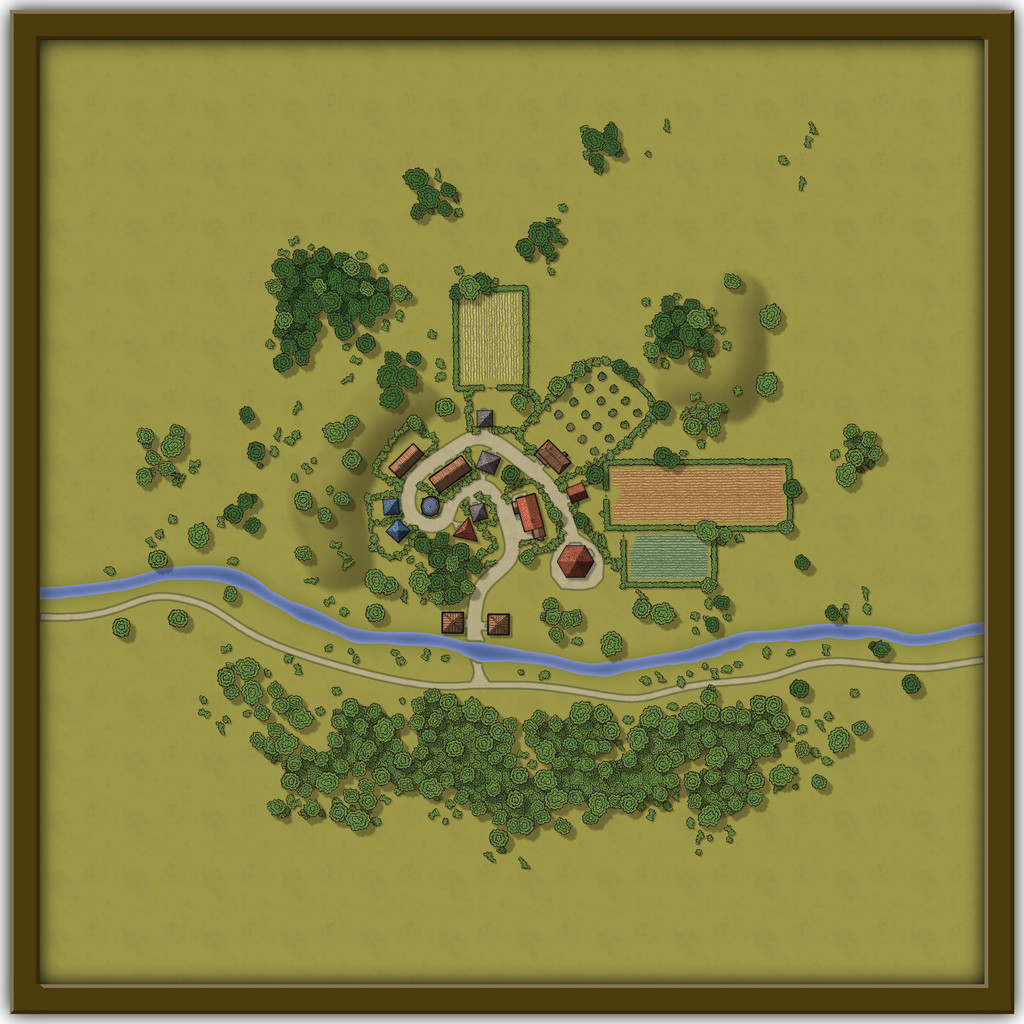
Obviously, it would need further work to fill-in the outer blank areas, as I didn't carry the surroundings much beyond the circular border, but that wouldn't be a huge amount of extra effort.
It seemed to me it might be fun to add them to places on continents other than Alarius (where such loosely European-style, temperate/cool temperate agricultural villages might be appropriate, of course), and perhaps suggest in their accompanying notes that there could be a secret way to pass directly to the "originating" village from the Embra set, if player-characters can but find it. Naturally, there couldn't be a direct link in the Atlas otherwise. Maybe one revised Embra Village per continent, say?
It would be preferable to not have to adjust the established parts of the map, although labels and smaller areas of terrain or vegetation could be changed or added readily enough. Thus the overall layout of each of the eight Villages as shown in the earlier parts of this topic would be retained more or less as-is.
Thoughts? Or ideas for where these might be set-up, if this seems interesting?
-
[WIP] Atlas Contest: Village of Djayet (Gold Coast, west coast of Doriant)
Scalebars are fine in the Atlas.
You can change the font in any symbols like this in your map by making a new symbol with your preferred font in.
Select the symbol in Symbol Manager (in the Symbols drop-down menu), and Clone it, giving it a new name (this is very important, so you don't overwrite the original symbol).
Then, still in Symbol Manager, select your cloned symbol and click to Edit it. Draw your editing pane and then make whatever changes you wish - all the usual CC3+ tools are available to work on the symbol.
Once you're happy with the new version, click the cross box in the top right corner of the editing pane to dismiss it, and you'll get a terrifying message like this:
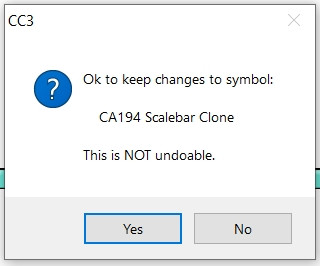
Despite the terror, click "Yes" - it's fine to do so with the cloned image.
Then your revised scalebar will be available to use in that map only.


