Avatar

Wyvern

Wyvern

About

Username
Wyvern
Joined
Visits
3,229
Last Active
Roles
Member
Points
5,502
Rank
Cartographer
Badges
24

Latest Images

  • [WIP] Atlas Competition Entry - Coils of the Cold Coroner

    ...read the novel?

    I picked up the whole Fafhrd & the Mouser series in the Ace editions of 1970 and thereabouts pretty much as soon as I could find a bookshop in the UK that sold them then, as one of the bigger influences on original D&D. Long time since I read them, but I still have the lot! And all the recent talk on the Forum of these stories I read back in this period brings back all the excitement of that first venture into D&D and RPGs more generally (though I didn't know there'd be plurals back in the mid-70s when I started, of course!).

    [Deleted User]Autumn GettyLoopysue
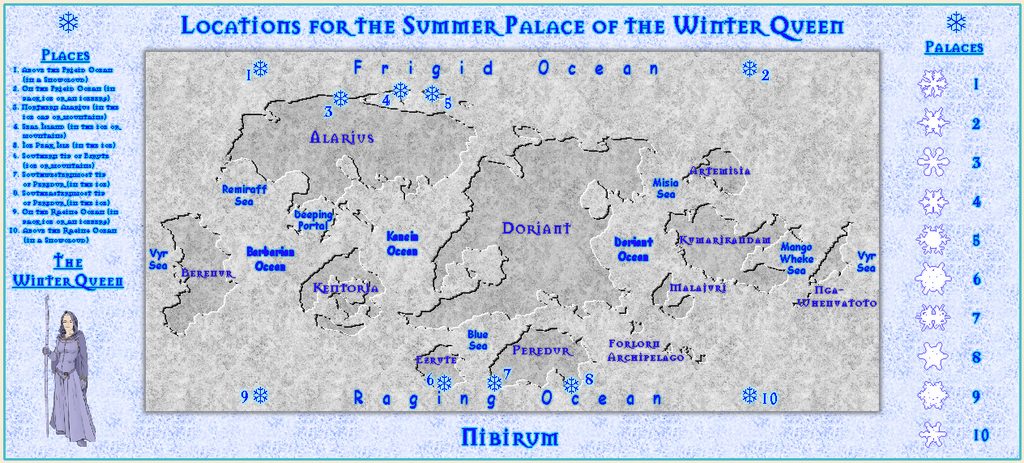
  • Community Atlas competition entry: The Summer Palace of the Winter Queen

    Not sure about that, Autumn. I do seem to have got a little carried away with this one though!

    Autumn GettyJimP
  • Community Atlas competition entry: The Summer Palace of the Winter Queen

    Next, concluding the Palace area notes from the forthcoming PDF description, begun a few days ago.

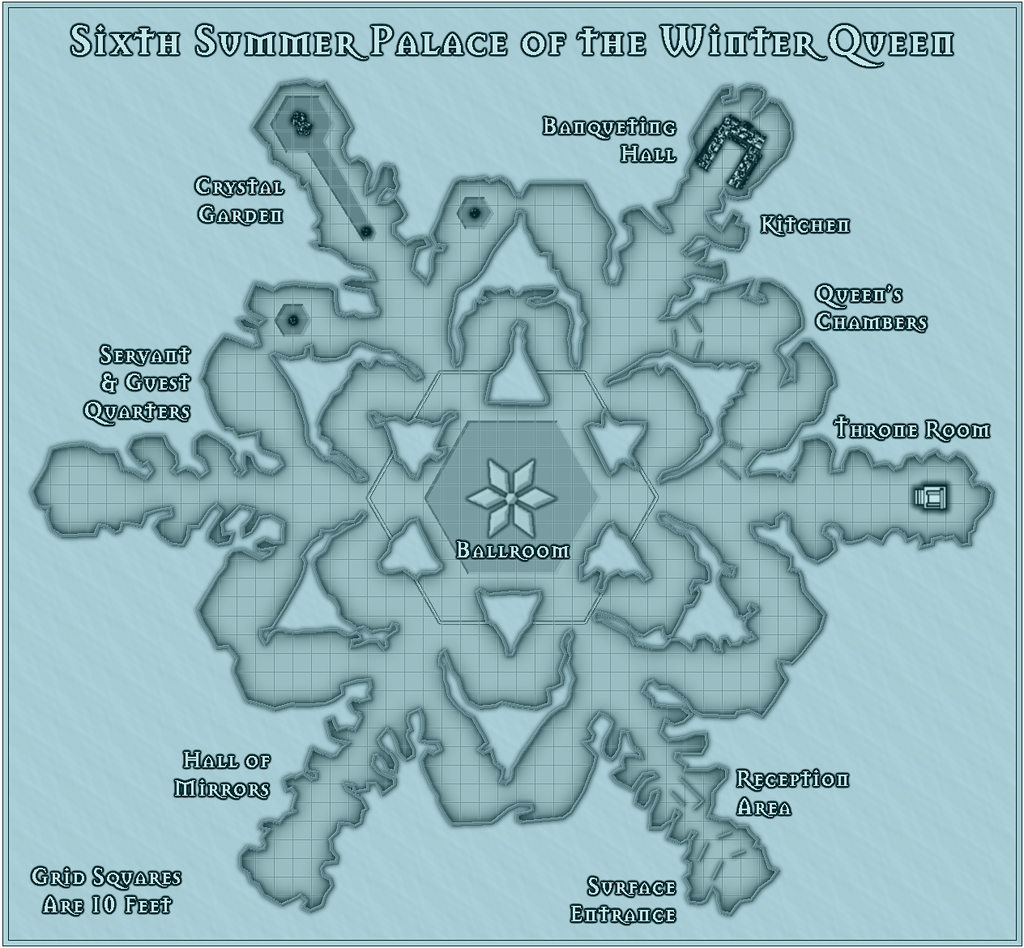
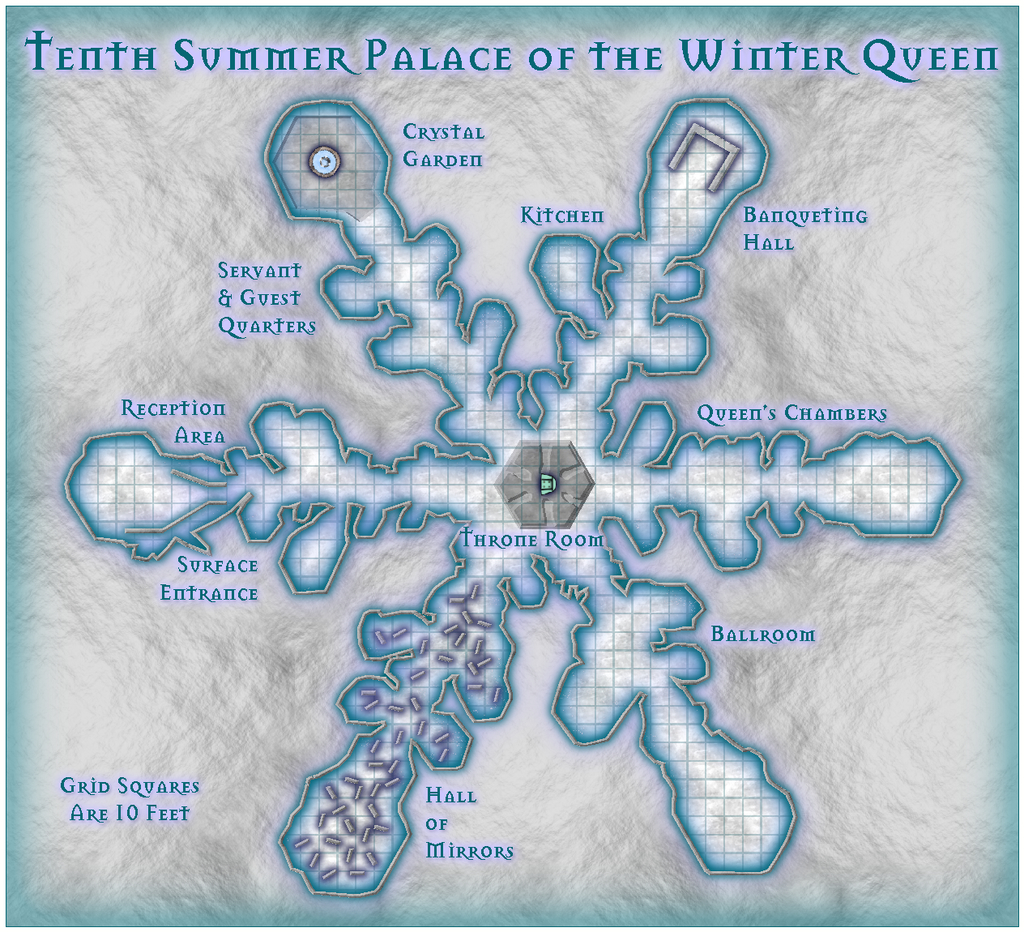
    Crystal Garden: A sunken area, a fountain and pool of running fresh water form the primary physical features in this part of the Palace, all sculpted from ice, with lighting that varies from a sparkling summer daylight quality, as if through moving leaves, to a glowing summer twilight. Places to sit and rest will grow up from the ice for any physical people coming through the Garden. The whole area is particularly peaceful and pleasant, if rather in the fashion of a summer graveyard, complete with passing souls wandering through from time to time. The Garden is filled with an astonishing variety and profusion of delicately-tinted summer ice plants, often with a light hint of summer fragrances on the air. The plants may have herbal properties as reputed to them in lore, or additional, sometimes unexpected, magical ones. Such properties can be used only if gifted freely to someone by the Winter Queen. Taking any without permission renders them instantly ineffective. Such ice plants are also fragile and quite easily damaged; doing so purposefully makes the Queen extremely angry. While she can restore the damage fairly easily in most cases, the offender is liable to be expelled from the Palace instantly, deposited on the surface some considerable distance away, yet still within the Palace's fifty-mile region of influence, so the person can enjoy the worst winter weather the Palace's proximity generates.

    Hall of Mirrors: A confusing area set with numerous tall (often ceiling-high) plates of mirror like ice, along with similarly mirrored surfaces on parts of the nearby floor, walls and ceiling. Multiple reflections abound, and it would be very easy to become lost, frightened, or both here, especially as viewing one's own reflection forces the person to revisit their own fears, failings or perceived physical-feature flaws. The longer this goes on, the worse such feelings become. Souls passing through here may be reflected as well, sometimes undergoing a similar process. A few may become trapped within the maze of mirrored reflections and be unable to pass beyond the Palace. Most spirits simply drift through here without problems, however.

    Servant & Guest Quarters: Physical creatures requiring regular rest who serve the Queen, and those who become her guests, will be allocated personal spaces in this area, each - should it be necessary - separated from others by freshly-grown, temporary (or occasionally more permanent), ice walls. Even souls that request a secluded spot may be provided with space here. All such can be accommodated comfortably. The area would simply expand outwards should more space be required.

    Throne Room: A raised area of variable size with the Queen's throne, often with one or more free-standing walls, dominates this part of the Palace. This is where visitors, whether souls or those physically present, are first brought, if they come to the Palace with a specific need or request for the Winter Queen. Here, she will listen and decide what is to be done. The Queen's Chambers, a private apartment suite where few are ever permitted, either adjoin the Throne Room, or are situated nearby, often with concealed accessways when adjacent to the Throne Room itself.

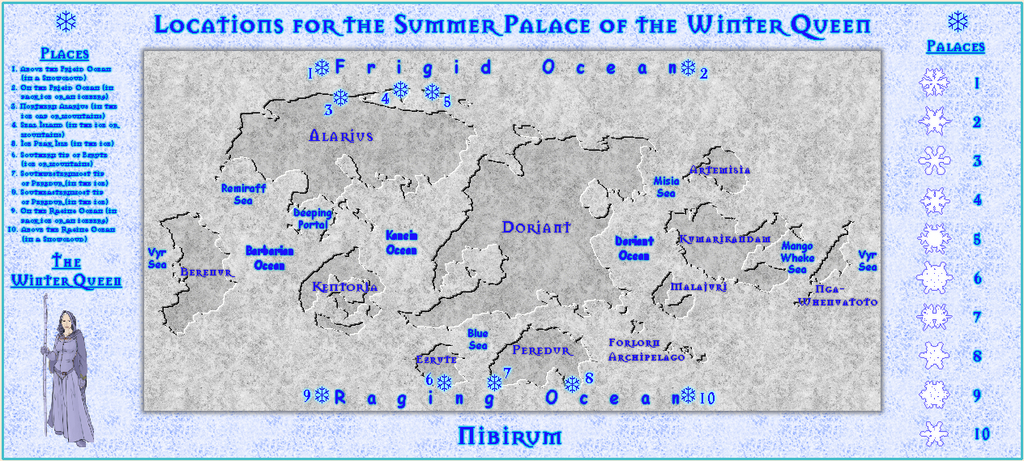
    I decided this wasn't quite enough, because although the ten snowflake Palaces are intended only as examples, each has a character of its own, as well as its variant layout, so I've been adding to a new section for the PDF and text notes as time's allowed, under the heading "Quirks of the Palaces". This adds a few more specific comments for every Palace. As I haven't finished the maps yet, let alone got all these notes typed-up so far, just the quirks for the first five Palaces today.

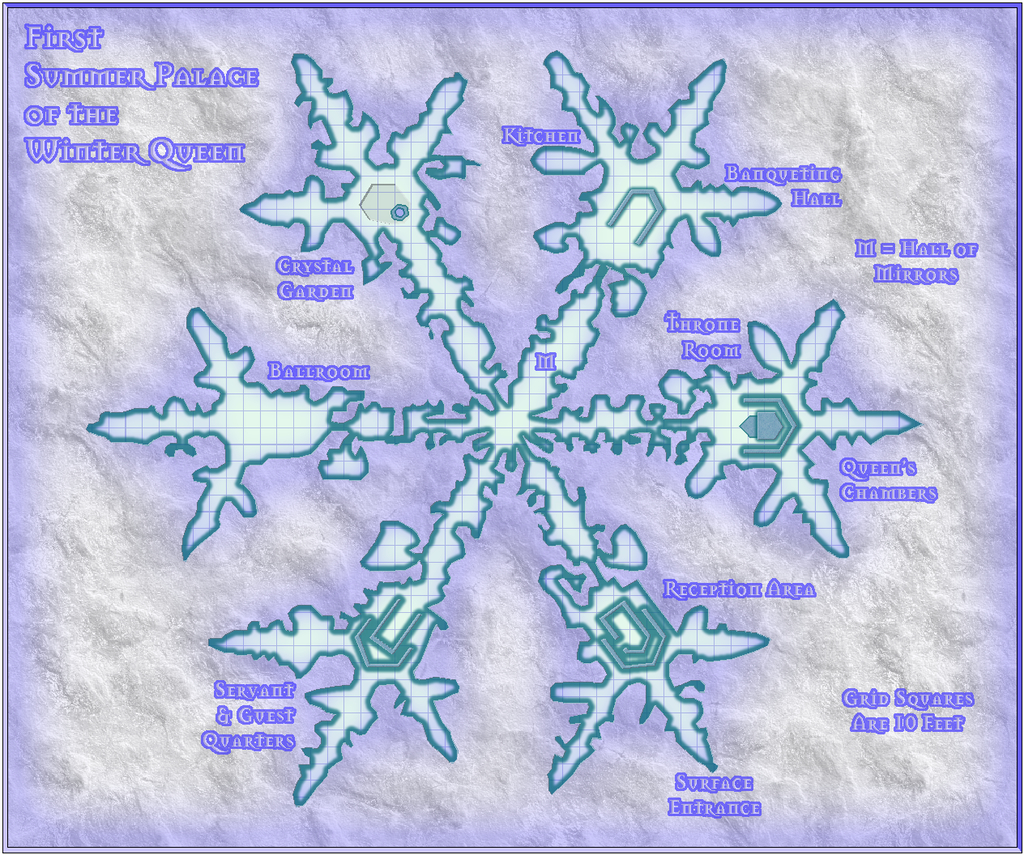
    The First Palace: Probably the most difficult of the ten Palaces to negotiate, with several very narrow passageways, and a number of other places where the walls are rich with sharp, protruding ice crystals liable to snag loose clothing. The floor-to-ceiling freestanding walls in the Reception Area and Servant & Guest Quarters also continue this "narrow way" theme, if in a smoother-surfaced form, with the Reception Area even having its own enclosed chamber in the centre, including a single access point (no doors, of course). The Hall of Mirrors runs between the central nexus and the Banqueting Hall, in the broadest of the six radially-projecting wings of the Palace, liable to be problematic for those other than the Winter Queen going to and from a feast there.

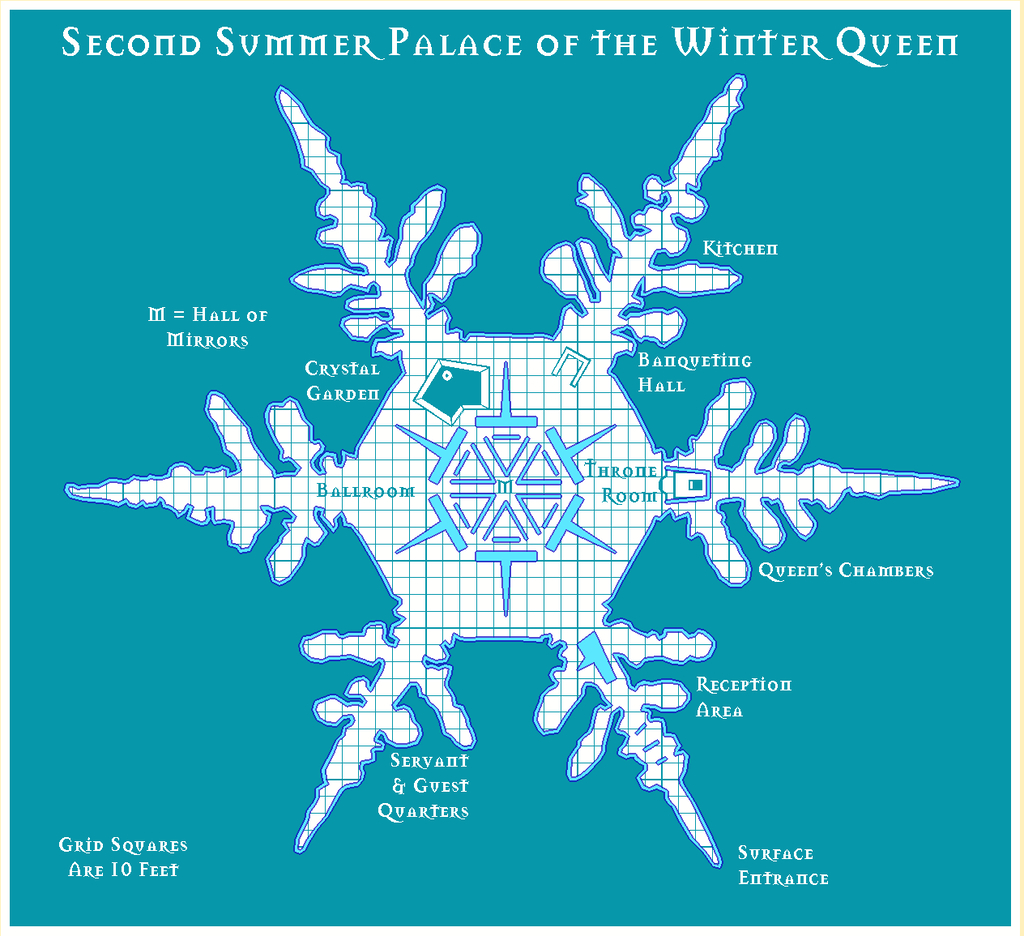
    The Second Palace: This has a very large, open, central nexus, in the midst of which is the Hall of Mirrors, surrounded by six broad, floor-to-ceiling freestanding walls that each have a "T"-form in plan, which also serve to divide up the outer part of the nexus into the Palace's six other main areas. Only the Reception Area and Throne Room have freestanding walls beyond this. The substantial one in the Reception Area almost blocks the exit into the Palace proper. The Hall of Mirrors is unusually well-ordered, if as problematic to traverse as normal.

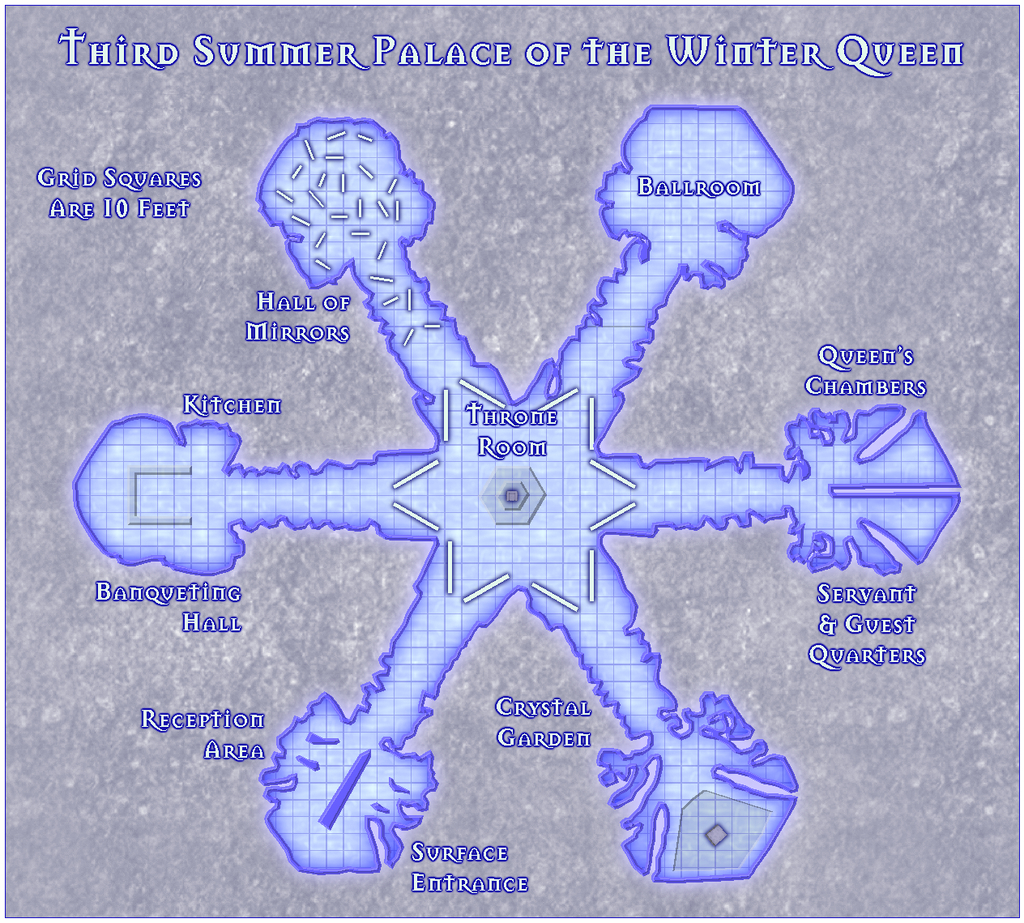
    The Third Palace: All parts of this Palace are broad and open, with only the Reception Area having a few freestanding floor-to-ceiling walls to restrict access in a limited way. The large ice-panels separating the central Throne Room from the rest of the complex have mirrored inner surfaces, though they reach only about halfway between floor and ceiling. The central throne on its hexagonal dais can freely rotate to face in any direction. Passage through the Hall of Mirrors is restricted by the numerous, roughly 10 ft tall (3 m) mirror-plates there. Unusually, the Queen's Chambers and Servant & Guest Quarters share the same wing of the Palace.

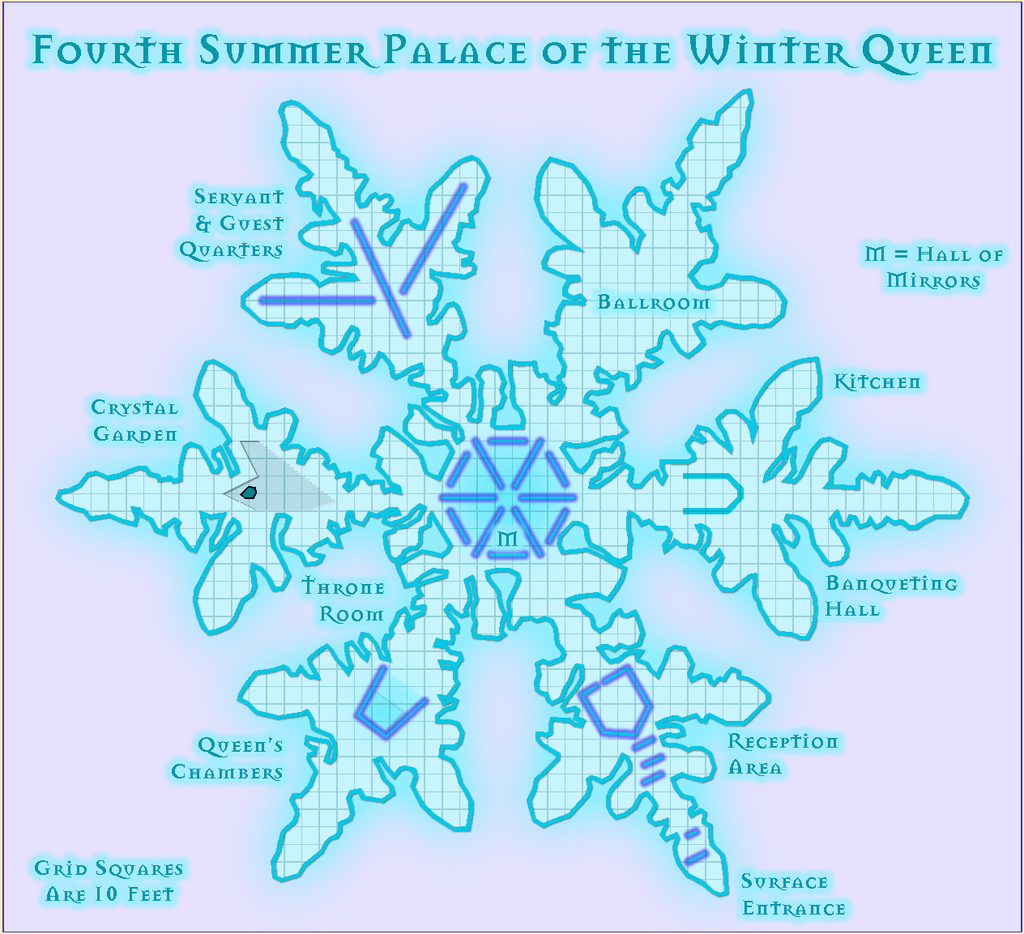
    The Fourth Palace: Freestanding floor-to-ceiling ice walls create narrow ways in various places, including in the Reception Area, Throne Room, central Hall of Mirrors and the Servant & Guest Quarters. The Reception Area has a large, enclosed chamber at its inner end, constructed from some of its extra walls. The Hall of Mirrors, segregated from the rest of the Palace by mirrored walls (the outer ones mirrored only on their inner sides), has smaller ice-mirrors scattered at different angles within it too. None of these latter rise above 10 ft (3 m) tall, however.

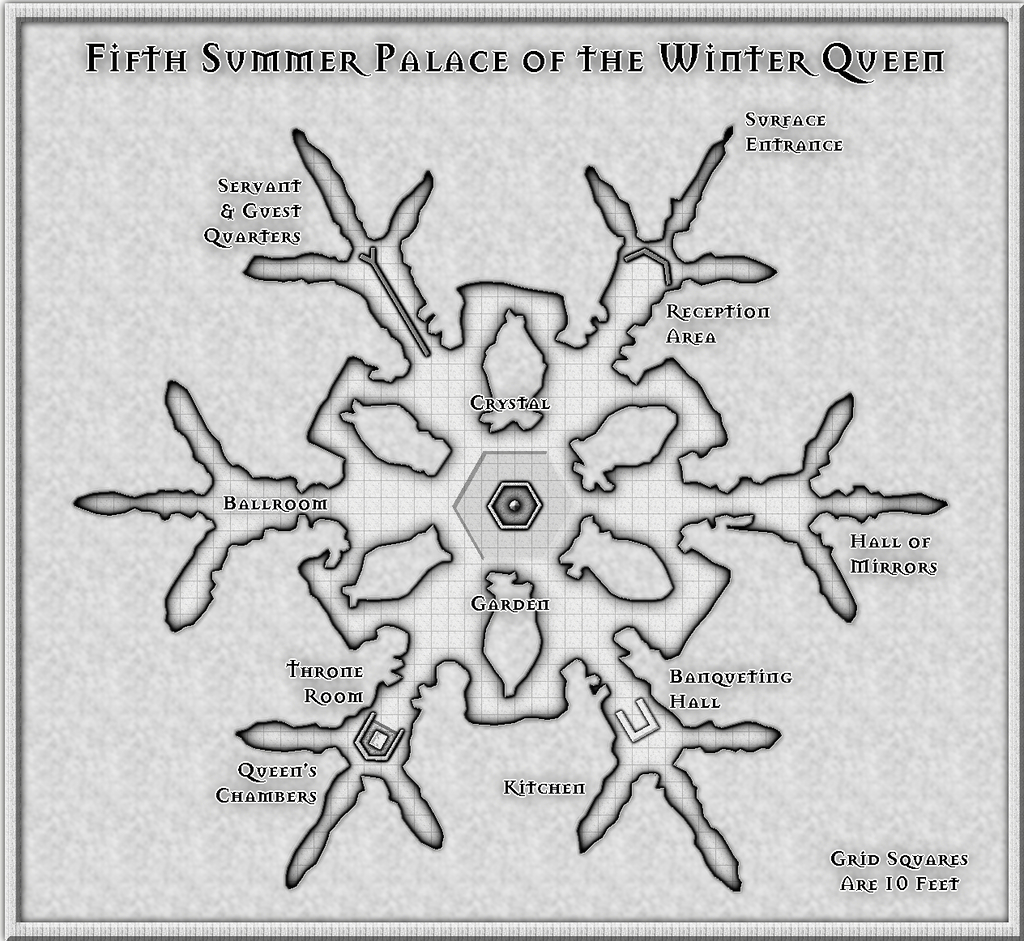
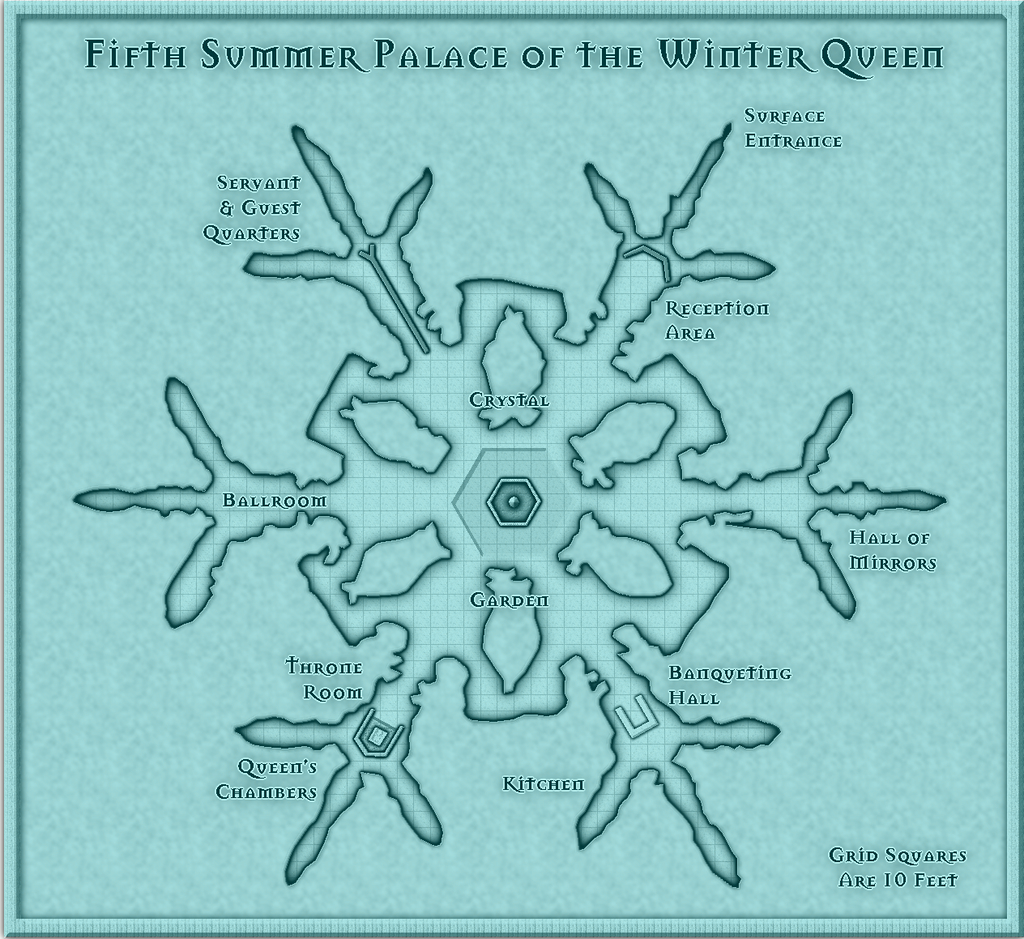
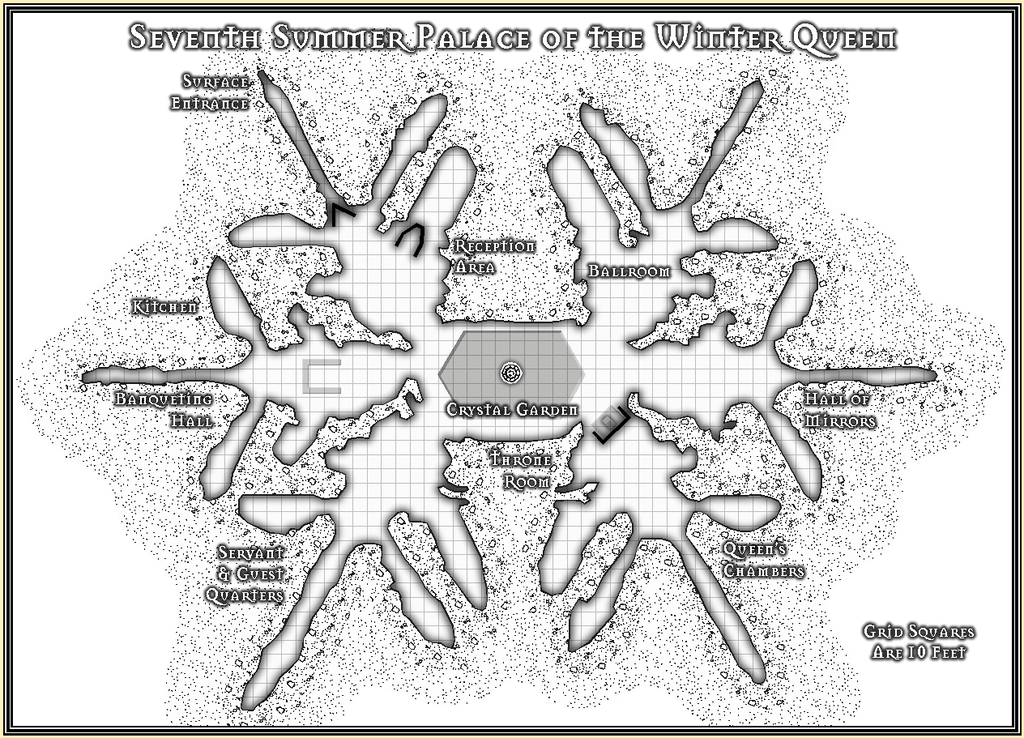
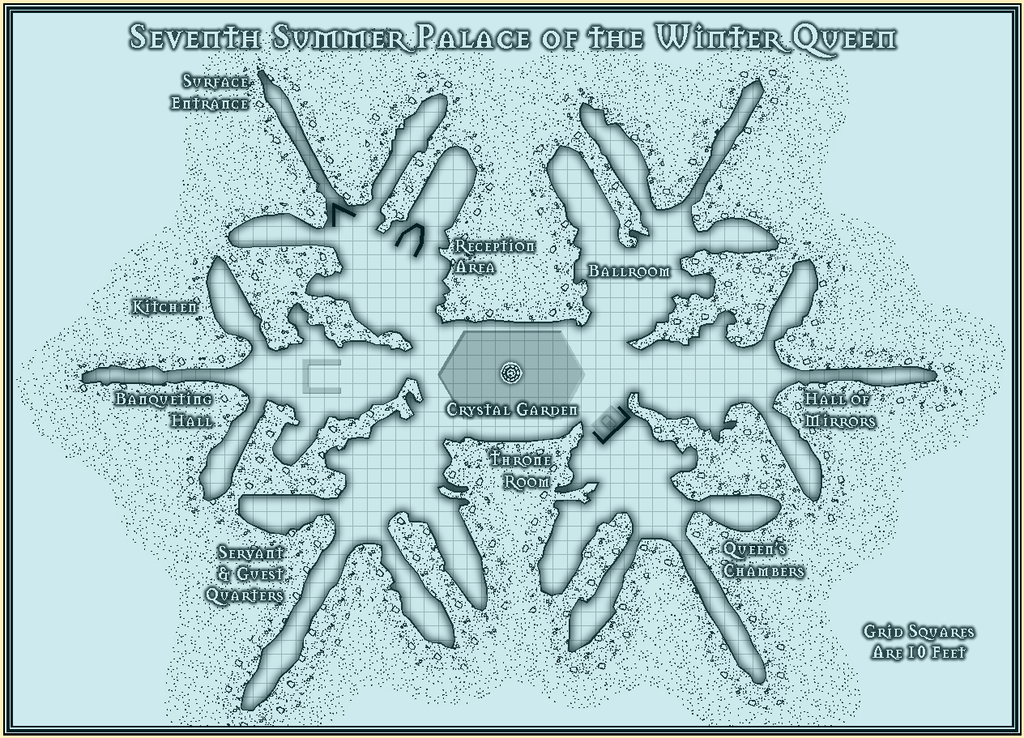
    The Fifth Palace: Dominated by a large Crystal Garden that occupies the entire central nexus, the ice flowers and foliage here coat the six irregular interior wall-blocks and the surrounding outer walls as well, spilling out, increasingly only as lightly scribed forms further from the Garden, into all the radiating six wings. Freestanding floor-to-ceiling walls are few; one each in the Reception Area, Throne Room and Servant & Guest Quarters only. By contrast to the huge Garden, the Hall of Mirrors here seems rather a shrunken afterthought, tucked away in a wing that scarcely need exploring, it might seem. Finally, not a quirk of the Palace as such, rather of the map, as it was drawn using a black-and-white mapping style. By toggling the "Colour Cover" option, the map can be viewed either in its greyscale format, or with an icy-blue filter superimposed on it.

    More to follow, once complete!

    LoopysueJimP
  • Community Atlas competition entry: The Summer Palace of the Winter Queen

    Thanks Quenten! I started trying to analyse what the influences had been on this set, and while some were obvious enough, the more I thought it over, the more came to mind, mostly from folklore, mythology and fantasy fiction (which latter tends to rely heavily on both the former, of course). Plus as I said back when I started mapping "my" bit of Alarius a couple of years back, I've been working on parts of what was to go into that for decades, and the same is true here too, as essentially another part of the same thing.

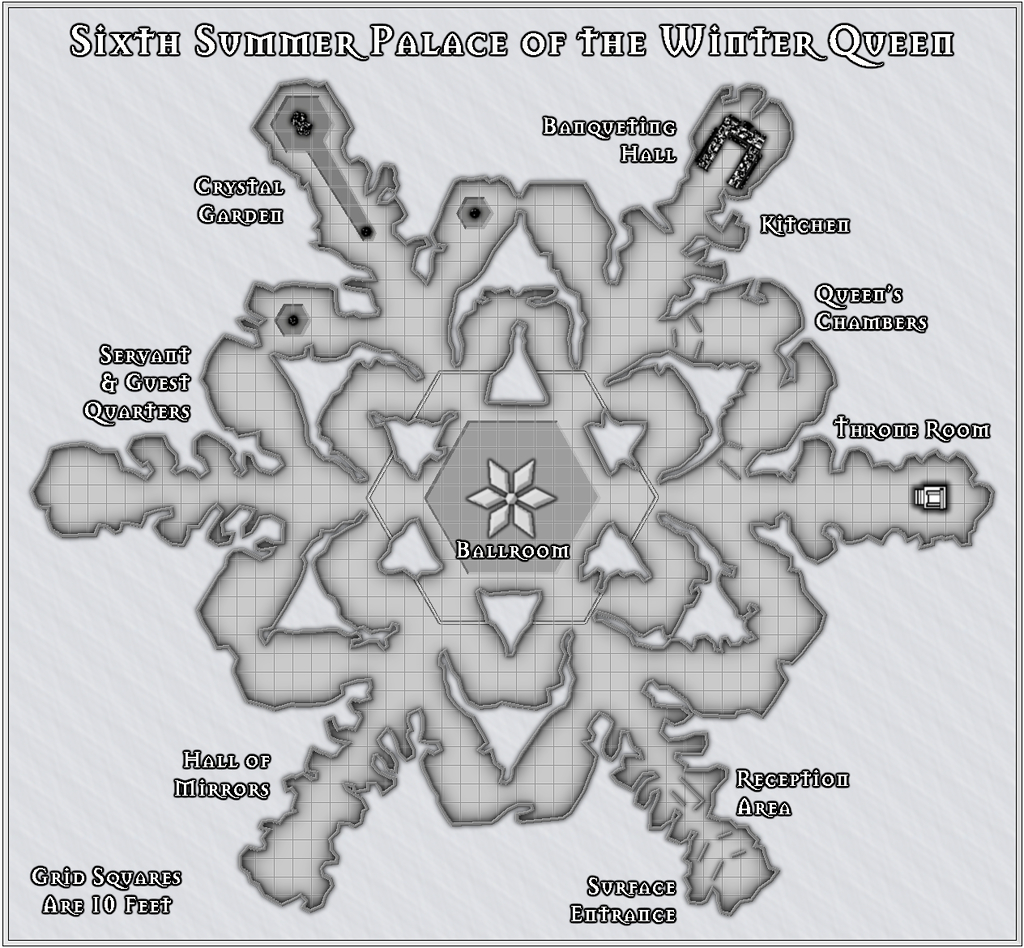
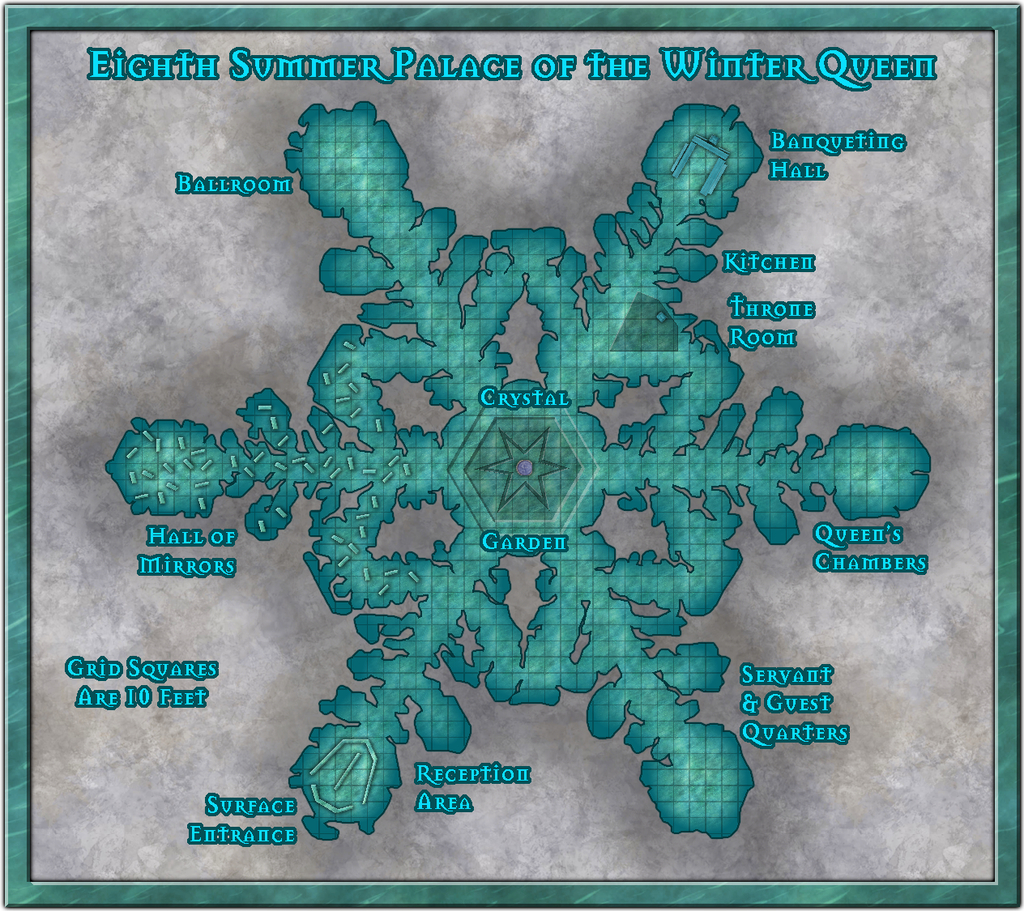
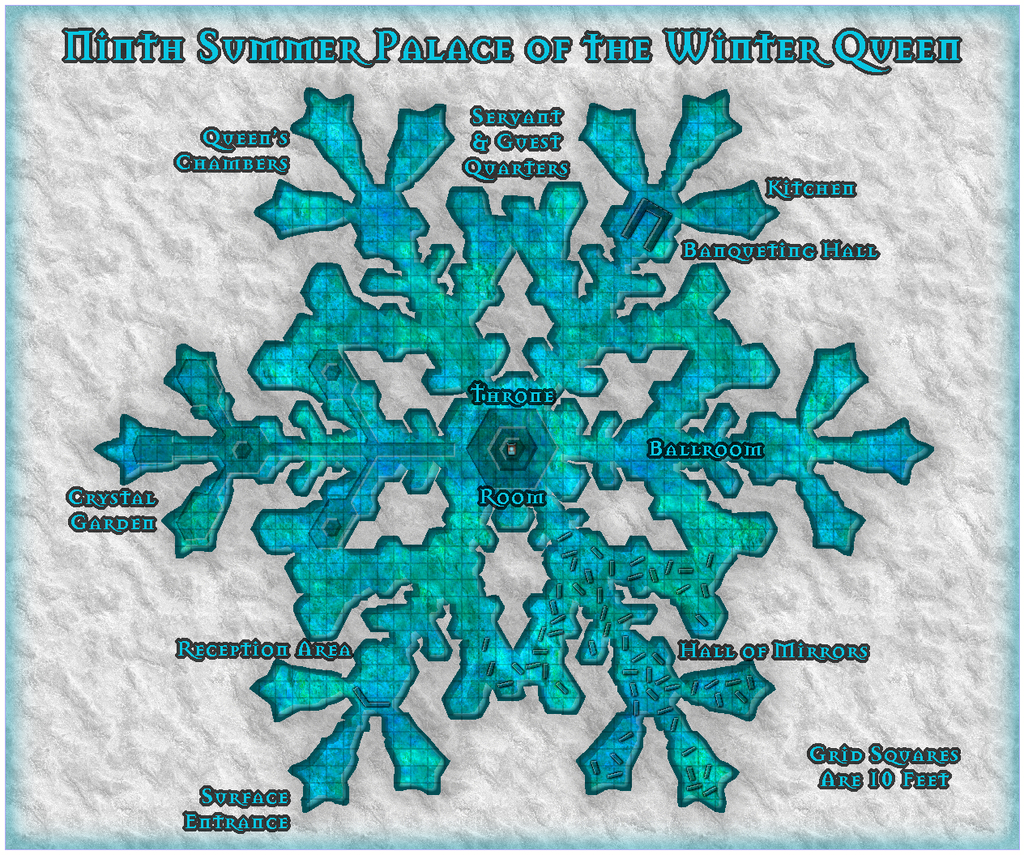
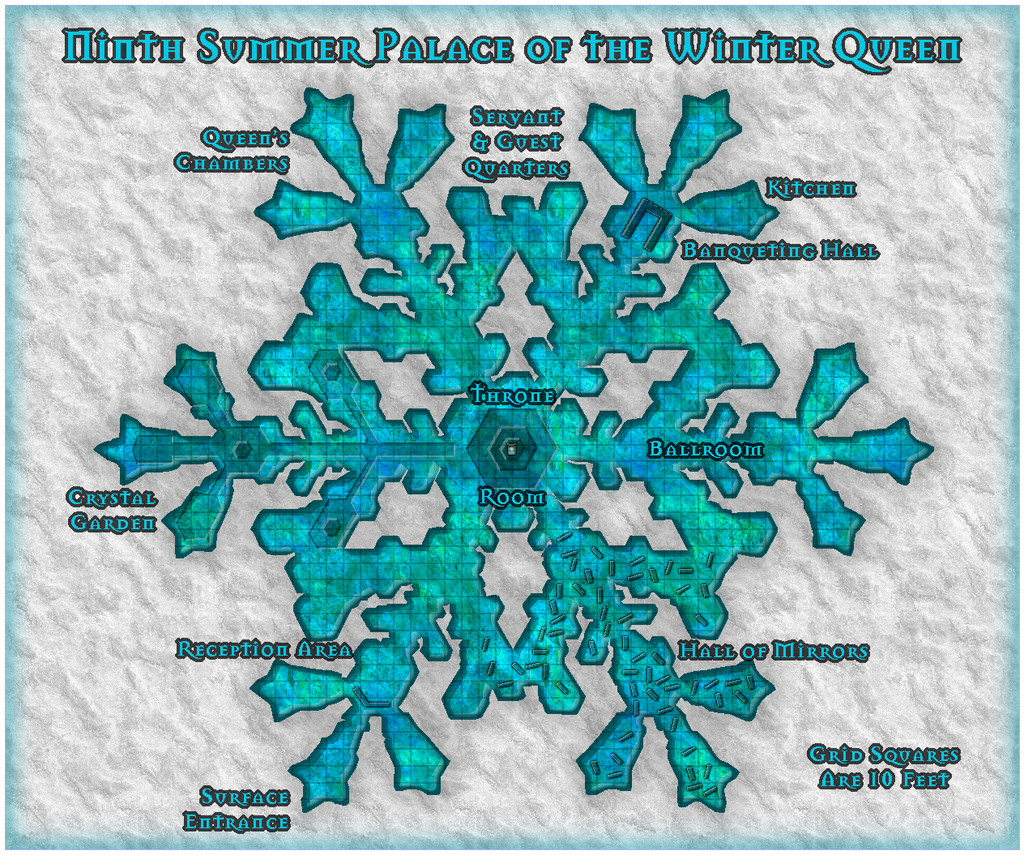
    Meanwhile, back to Palace 8, which is finally completed. This is it:

    There have been a number of additions and amendments, mostly of a cosmetic nature, beyond the anticipated scattering of symbols and other internal additions, and the labelling, of course. The most substantial change was probably to reduce the overall size of the map somewhat, as the whole felt a little unbalanced at the top and base of the drawing once everything had been added. That was a bit fiddly, because there are always quite a number of entities to amend on the Map Border and Screen Sheets, as well as things like the Background Sheet, whose rectangle was also then too large.

    I then had to change the fill for the frame. For all it might be thought a little incongruous as not having a very icy/snowy look, I rather liked the default wood-block pattern on the earlier version, and it looked a serious contender to remain, right up until the point where I adjusted the size of said frame. At which point, the lower border (only) suddenly had a dark horizontal line running right through it, because of the way the fill fits itself into drawings at the scale it had. And that quickly became A Distraction, so sadly it had to go.

    The new fill for the frame is Water Green from this CA54 style, scaled-up to prevent it tiling, and holding up remarkably well in doing so, I thought. I was really just experimenting with it, but as soon as it dropped in with the light Bevel Effect, I knew it had to be The One!

    LoopysueMonsenJimPLillhansCalibre
  • Community Atlas competition entry: The Summer Palace of the Winter Queen

    Bit of an excursus today. I've never really done full "works-in-progress" reports on the Forum here, chiefly because when I'm working on a map, I'm not thinking about anything else - such as how I've got to the point I have - which means taking screenshots or jotting down notes along the way so others might be able to follow the process is quite alien to me. However, a contest is nothing if not a chance to stretch beyond the expected bounds, so here are some thoughts on how I constructed the basis of Palace 8 in this series.

    Partly, this came about because with working on such a series of similar yet different maps, each using an imported bitmap image as the template, I've established a pattern for doing so, drawing on previous experience, as a lot of my earlier mapping has involved copying layouts from images into CC3+.

    Before even starting any of the maps, I'd picked the ten photo-micrographs of snowflakes I intended to use as the individual Palace shapes, and given them a number each, so I knew what order I'd be working on them. Then I printed-off copies of the ten. I like hard copies of such things to-hand, as it means I can jot notes on them in between mapping sessions, and can think more on the map design without having to be sitting at the computer. Additionally, they can be very handy while I'm tracing the image in CC3+, and find I've suddenly hidden some key item with a polygon that I now need to see!

    These maps were always going to be a bit unusual, because what I'm doing is taking tiny, microscopically-imaged objects and expanding them to Palaces which are several hundred feet across. So there was a scaling issue from the start in that. However, looking over the images and deciding how the final Palaces were to be drawn, it was clear the key trait was going to be the minimum passage width, to allow access to all parts of the final structure. I fixed upon a general minimum width of 10 feet, from which I could then physically measure features on the hard-copy images, that in turn gave me the approximate maximum dimensions for the area each Palace would need to fit within, and hence roughly what the size of each map would need to be to allow for titling, labels and overall layout.

    Palace 8's measured image meant the Palace itself was going to be around 515 feet by 460 feet, so I guessed that a map around 600 feet square might be OK. Firing-up CC3+, and having recently worked on three black-and-white style maps in succession, I opted for the Jon Roberts Dungeon style for Palace 8, from CA54, as a complete change. Aside from setting the size in the New Drawing Wizard, I wanted a paler background than the default to represent snow or grey-white ice, and went with the Stone Light Grey option from what the style offered.

    Once the new map had opened, it was clear the fills for the map's frame and background needed adjusting to avoid the dreaded tiling effect, so I greatly increased both fill sizes using Tools - Set Properties - Fill Styles from the drop-down menus, after a bit of experimentation (and locating the correct fill style after picking the wrong one for the background first of all, and wondering why nothing happened when I adjusted it...).

    After that, I created a new Sheet, BITMAP, and Layer, also imaginatively called BITMAP, into which I could import the map image. Now, placing and correctly rescaling such imported images is something I've long struggled with in CC3+, because of its restricted redraw standards, where most of the time, you can't see what it is you're trying to resize, or where its edges (which almost never coincide with the image edges) are going to land. So my trick now is to create a rectangular polygon with only a thin outer line in a bright colour, place that in the right spot on the map, and only then bring in the bitmap image. It isn't a perfect solution, but it's the one I've grown used to.

    Of course, actually drawing the linear "box" is a bit of a nightmare in itself, because you can't just draw an open rectangle like this and tell CC3+ what size you want it to be as you might in a graphics program, or something even more basic, like Word. Instead it means counting dots on an appropriate-sized grid. For large areas like the Palaces, it's appallingly easy to lose track, so what I do is draw a single line with a kink in it, using the Line tool (not the Path one). For anyone unfamiliar it's:

    That actually creates three separate lines, not just one. On the next image, the grid dots shown are those for the 10' Grid, 2 Snap (so the snap runs at five-feet intervals, with the dots every ten feet), and the lines are in orange:

    Then I rotate the longer line (that at the left side here) through -90° from its left-most point. (This is because CC3+ insists on doing angles backwards, not logically clockwise! We've discussed this on the Forum before. There are good mathematical-programming reasons for CC3+ doing so, which if nothing else will convince you that mathematics has very little to do with reality after all ?). And then draw a new linear box of the right size, using that left-most point as its top left corner, and the construction lines as templates to give the right size overall:

    Then the construction lines can be deleted, and the new box moved to a more central position, again using the snap grid dots as a guide (not shown here, as the image size meant you could scarcely see where the box was any more with the grid left on):

    After which, using the Draw - Insert File command from the drop-down menus, the correct snowflake bitmap image can be brought in, resized and correctly positioned, using the construction line box (and a fair amount of adjusting and tweaking):

    The box can also then be deleted. Sometimes, I draw in one or two crossed centre-lines like this as well, as they're useful for adding items such as the title, if it's meant to be centred somewhere near the map's periphery. Which means at this point I also often add the map's title, so I can remove all the construction lines together. (If they might be needed again later, I usually set them up on their own Sheet in the first place, so they can be hidden or called back at any stage.) In this case though, the title is long enough it's not hard to centre it without needing that:

    Next up is to start the mapping proper, by drawing the floor. Looking at the image, it's clear there are several areas where the floor should be missing in the final version, within the outermost line of the flake, so I'd already decided with this mapping style, that would be best accomplished using a Multipoly command on the completed outer floor. This is easier by drawing the areas of floor that will eventually be omitted first, and although it's not so useful for seeing all the pieces you've drawn just before going to the Multipoly action, I like to use the same fill style as the final floor will be, mainly so I don't forget later... Thus:

    I really liked that Water Green Light fill in the Jon Roberts style, as representing here ice instead. Just has the right colouring and texture to me to give a magical "zing" to the whole. It is a magical ice Palace, after all. You get a better impression of it once the whole outer floor's drawn:

    And yes, the tiling's very obvious here. While that could be changed, it'll be much less obvious on the finished drawing, so I left it alone, and just carried out the Multipoly command at this stage:

    After which it was time to consider adjusting the Effects on the Floors Sheet:

    and adding the central floor design based on what the imported image showed, using the Solid 10 to 30 fills, which have the perfect level of transparency to still let the underlying "ice" floor show through, even after adding a suitable Bevel Effect to make them look sunken into said floor, after one of Remy Monsen's recent blog posts about using such Effects:

    Beyond which, it should be just a matter of adding other smaller details, labels and a grid. While I'd love to show you what the final map looks like, that will have to wait for another time, as the amount of time and effort involved in putting these notes together meant I didn't manage to get the map itself finished in time to post it today as well!

    Starting to remember why I don't do "proper" WIP threads here now... ?

    MonsenJimPLoopysueTheschabiDaltonSpenceAleD