Royal Scribe
Royal Scribe
About
- Username
- Royal Scribe
- Joined
- Visits
- 9,939
- Last Active
- Roles
- Member
- Points
- 3,476
- Birthday
- February 5, 1968
- Location
- San Francisco, California
- Website
- https://legacy.drivethrurpg.com/browse/pub/31814/Royal-Scribe-Imaginarium
- Real Name
- Kevin
- Rank
- Mapmaker
- Badges
- 16
Latest Images
Reactions
-
Selling maps?
This question if very timely for me because I have just started to dip my toe into trying to sell maps…so I, too, have more questions than answers.
I am trying to sell mine on DriveThruRPG. My storefront is called Royal Scribe Imagiinarium. I have five maps up right now and two more pending review. Your first month or so selling on DTRPG, you’re considered “unverified.” During that period, everything you submit for sale has to be reviewed by staff before it goes live, and some of the other tools are limited (including not being able to put up a logo, etc, yet). Once I’m verified, I will have more tools to work with to promote my stuff.
I can’t tell yet whether it’s a waste of time. I have had about 101 map downloads. Some are priced and a few, for promo purposes, are set at “Pay What You Will.” But of these:
1 paid full price - but I know from the positive review they left that it was a friend of mine
1 paid $5 for a pay what you will map - same friend
3 were free downloads from a comp link I sent to my rpg group
And 95 were the pay what you will maps where they chose to pay $0. Hopefully they will someday convert to being paid customers.
Maybe once I’m verified I will be able to promote it better
Happy to chat more here or in DMs.
-
Volcanoes
The first time I posted a map, I was soooo intimidated...and everyone was super friendly and helpful. I've learned so much from folks in the forums here, both with aesthetics and software mechanics. I promise we'll be kind.

-
Printing maps from PDF?
I think I found a good approach.
- Save a high resolution PNG file following the VTT specs Remy laid out in this blog post from 2020.
- Upload the image to an image splicer app that can automate splicing in a grid that you specify with customizable horizontal and vertical dimensions. I used Imagy.app.
- Take the spliced images and drop them in a desktop publishing or word processing program. I tried it in MS Word with margins set at 0.25", but with the images centered. Printed perfectly (nothing cut off and every square is 1 inch by 1 inch.)
So helpful with larger maps, like a town where you never know where the battle may go.


-
Wish List: City/Dungeon Top-Down Mountain Peaks, Ridges & Crags
So when Sue asked if I had tried stacking cliff symbols, I had...but always in the same direction, which gave me elevation but didn't give me ridges. I just tried flipping the Forest Trail cliff symbols so they're back-t0-back -- and these are exactly the sort of ridge lines I was imagining.
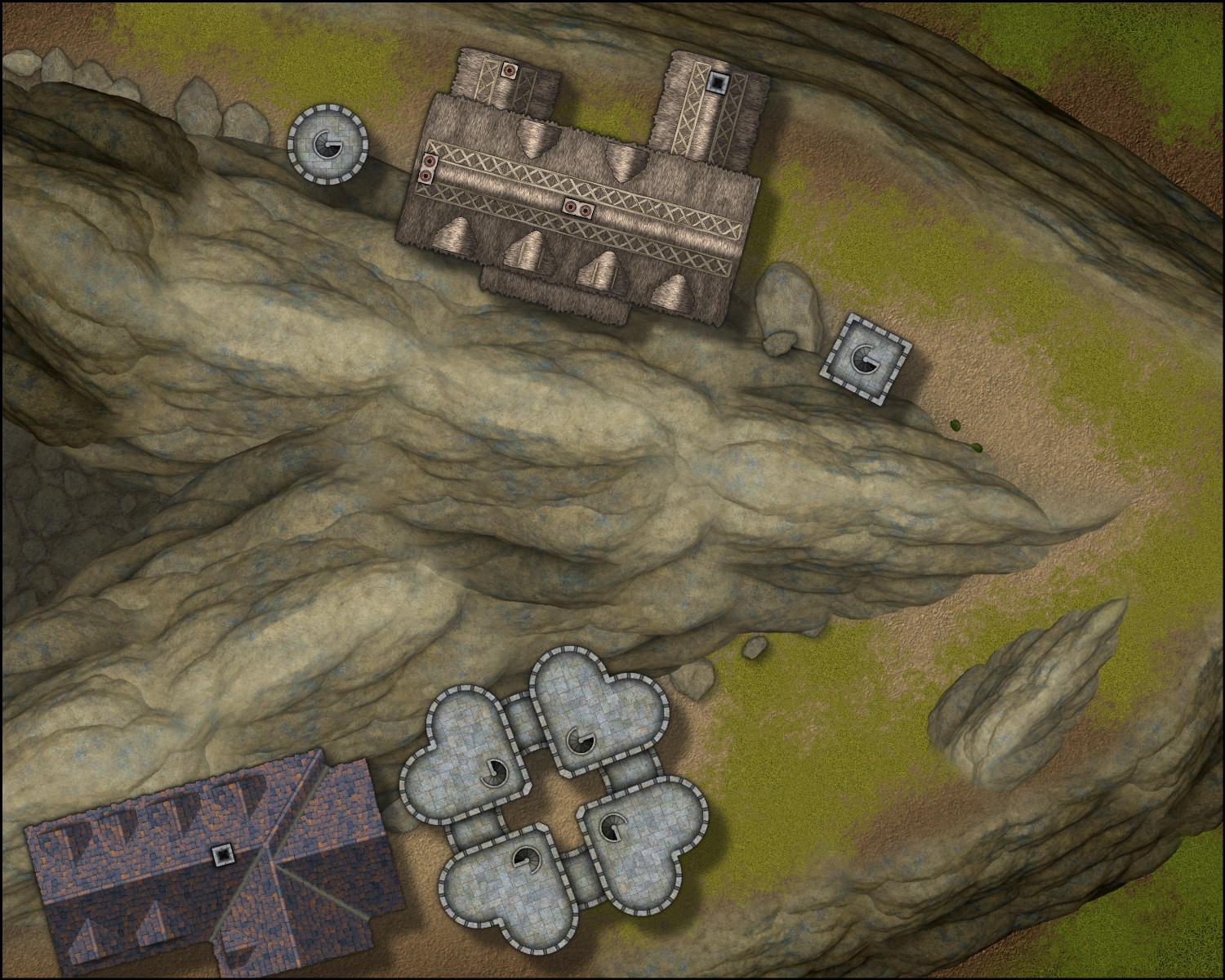
These symbols blend together so beautifully. Truly amazing, Sue! Very excited to start planning a mountain village.



-
Trouble with Layers, priority, etc.--help?
In fairness, it's an awfully long manual. It's great for reference, but I struggled when I tried to learn the software with just the manual. For me, the video tutorials were very helpful.
One of the things I struggled with, and this may be the same for you, was understanding how layers and sheets differ, and how layers differ from the other art design and desktop publishing software I was more experienced with.
In CC3, layers help with organizing similar things so that you can hide, reveal, or freeze them, but they have no impact on the order in which things are shown. You'll notice that the layers are all listed alphabetically because the order they appear in the list doesn't affect anything.
Sheets have the big impact here. The software renders things in order they appear on the list. In this screenshot, the BACKGROUND would render, then BACKGROUND HILL, then OUTSIDE SHADOW, etc.
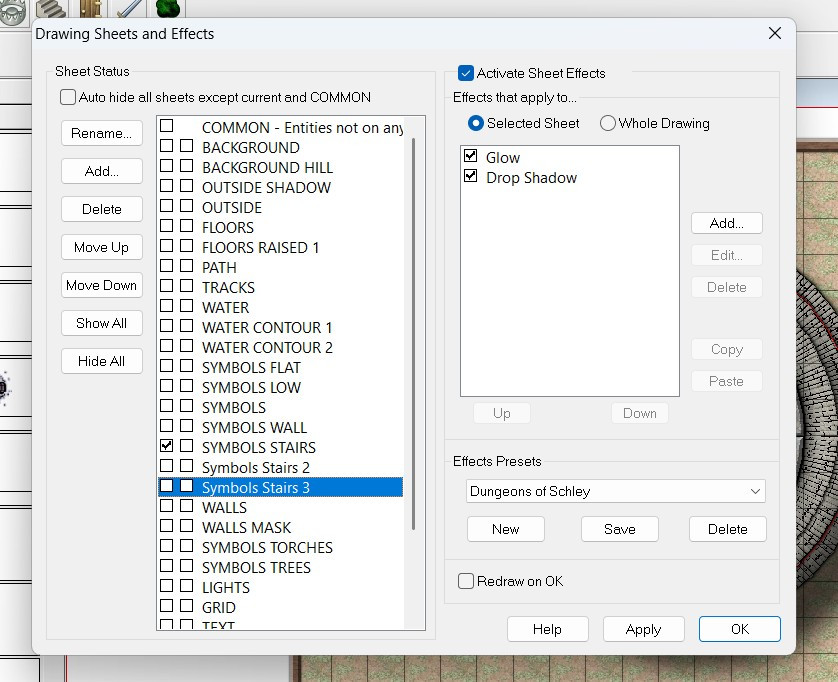
This allows you to control in how your symbols and drawn polygons sort, so that your floor will always be below your furniture, for example.
The Move to Front command only affects things on the same sheet (regardless of layer). If you have two symbols on the SYMBOLS LOW sheet, then the Move to Front command could force that symbol to be on top of the other one. Both symbols, however, will be above any other symbols on the SYMBOLS FLAT sheet (because the SYMBOLS FLAT sheet would render first, and then the SYMBOLS LOW). And both symbols would be below the regular SYMBOLS sheet, because it will render after the SYMBOLS LOW sheet.
Screen captures are always helpful, but I hope this gets you on the right track.