

KertDawg
KertDawg
About
- Username
- KertDawg
- Joined
- Visits
- 4,668
- Last Active
- Roles
- Member, Administrator, ProFantasy
- Points
- 375
- Birthday
- February 16, 1978
- Location
- NC, USA
- Website
- https://playbyweb.com
- Real Name
- Kertis Henderson
- Rank
- Surveyor
- Badges
- 6
Latest Images
Reactions
-
XP - Solar Legends Map Generator
I copied orbit radius and period from a NASA page, so yes. The symbol scales are not to scale, because you wouldn't be able to see them if they were realistic!

-
XP - Solar Legends Map Generator
I present a map generator for my own RPG: Solar Legends
The game uses a solar system map that is updated as the campaign goes on. On one day, the distance between Earth and Mars might be a quick trip, but the next month it could be a long journey. This XP add-on calculates the orbits and draws them out. You can zoom in/out, pick specific planets, and scale everything.
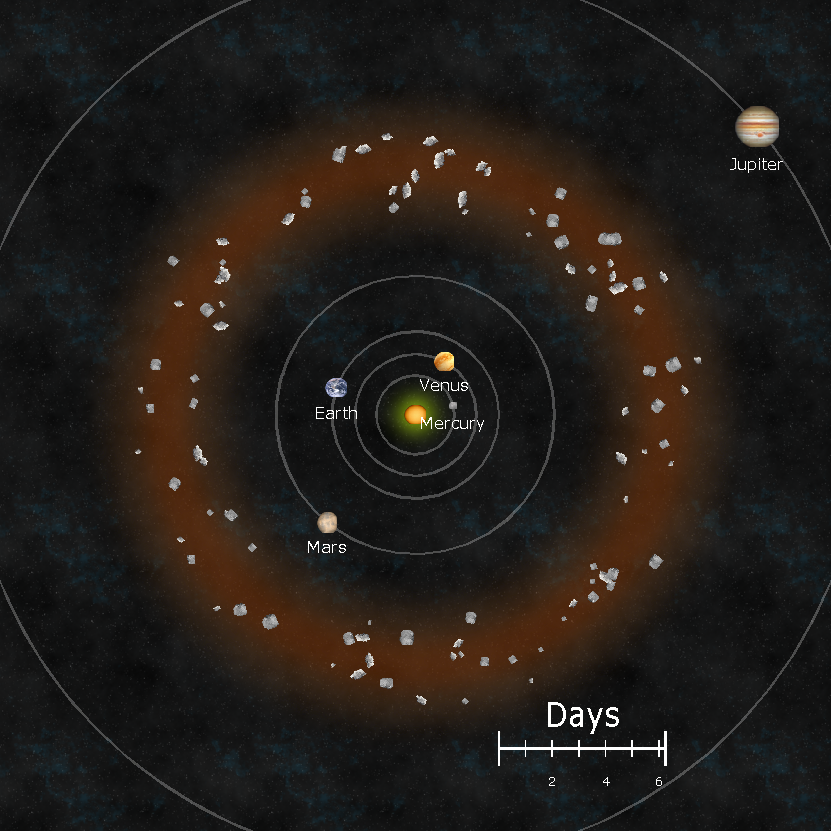
I have the code at:
My next effort will be to package it so that you don't need Visual Studio to run it. I'll probably ask for advice soon. Thanks everybody!






-
Symbol Scaling & Position
This explains it. It's not a scaling factor alone. It's also that the origin is offset from the graphic. I'm so glad that I'm not crazy, just underinformed.
Thank you!
-
How long have you been using Campaign Cartographer?
I first used CC2 when it was a big deal in the late D&D 2e age, maybe very early 3e. Around 2000, I guess. It wasn't my copy, though. It was on a friend's PC. I expected to open a window and drop a beautiful map onto the screen with a few clicks. Boy was I wrong. It was my fault, of course, but you couldn't convince me of that. I think that friend hated it for a similar reason.
Then at Gen Con 2022, I saw the ProFantasy booth. I was again lured in by the fancy maps. I talked to somebody, but I forget who it was! We talked for a while, and he kept pointing at somebody sitting down, saying, "He knows this or that technical situation," etc. They convinced me to buy a package. This person said again and again, "Watch the YouTube videos! That's the key to beginning to learn." Again and again in this 5 minute conversation. That was my first real purchase.
I got home and installed it. I was overwhelmed again. Then, that voice boomed in my head: "Watch YouTube..." I did, and everything clicked. Then, I discovered the forums, and it set me on the right path. I do think these forums are an under-advertised part of CC3, and one of the best parts.
So, whoever that was at the booth: Thank you for convincing me!




-
Transparency Acne - Lesson Learned
Hello. Let me share a lesson that I just learned. I had a problem with transparency acne, and it took me a while to solve. I had an inner fade effect on a sheet, above a bitmap background. The background was green grass, and the poly above it was black so as to suggest a dome-like shape. Of course, the top poly had acne. Nothing new here. So, I made a liner sheet in between that was a copy of the top sheet with the acne. I used an RGB Matrix effect to make the line sheet bright red. I thought this should have solved the problem, as I've *done this before.* At least I thought so...
Here is a shot of the liner and background sheets with no sheet effects:
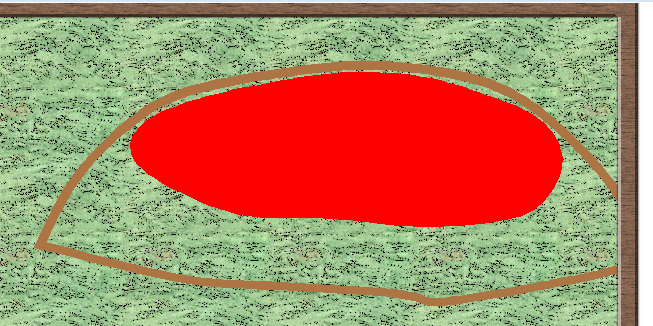
There's a black poly with red RGB Matrix on top of a greed bitmap background. I have the actual top layer hidden for this discussion. When I turned on the inner fade, I got this:
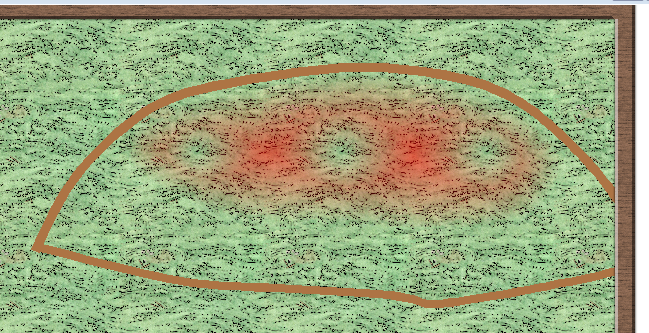
Yikes! Why would a *red* layer cause acne on top of a *green* background? Any guesses?
Solution: The RGB Matrix effect did *not* help the acne. The acne was caused by the intrinsic color of the poly, not the computed color after the RGB Matrix effect. In other words, even though the poly looked red to me, the edge fade still took it to be black when it came to acne.
I changed the poly to be explicitly red, and I removed the RGB Matrix effect. Drumroll....
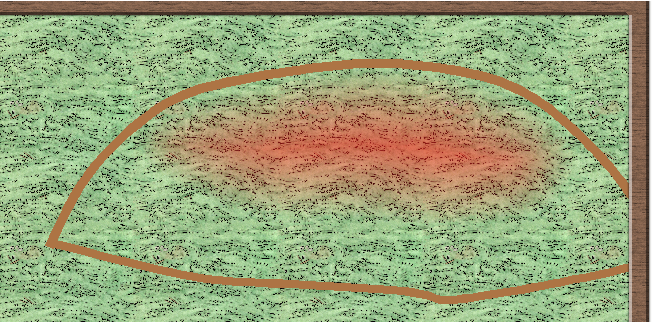
The lesson that I learned: Transparency Acne relates to the color of the top layer without any effects applied to it. Don't use an RGB Matrix effect to shortcut a change to the poly color.
I learned a lesson here. Maybe it was just "Dumb Cartographer Day," and I needed to drink more coffee. Either way, I hope this helps somebody someday!


