Wyvern
Wyvern
About
- Username
- Wyvern
- Joined
- Visits
- 3,266
- Last Active
- Roles
- Member
- Points
- 5,585
- Rank
- Cartographer
- Badges
- 24
Latest Images
-
Community Atlas: Queen Mica's Scintillant Palace
Thanks very much Remy!
Slightly shocked on doing a quick tally-up today, while downloading the latest Atlas version, to discover this makes 140 maps of mine now in the Atlas! I'd forgotten quite a chunk of the earlier materials I'd done, looking at the list.
Still some way behind the great leaders of Quenten and JimP of course, but not doing too badly by comparison 😊
Plus, I think once the contributions from the recent mapping contest are added, this could take us over 850 maps in all!



-
Is there a reference that gives the latitude and longitude for locations on Toril?
Monsen's right in that virtually everything that tries to equate the Forgotten Realms setting to anything genuinely geographic has been done by the fans only. Part of the problem is that the size of some of the continents were changed at different times, and as the setting developed through various novels written by different people at different times, there was never a single basis on which any of this was hung. It's extremely irritating!
Even the official TSR 1990 "Forgotten Realms Atlas" by the great Karen Wynn Fonstad shows nothing of any latitude and longitude lines, though she does demonstrate very clearly in that just how little of the planet had been even approximately mapped by that time.
The only thing I have come across is a mention on the Candlekeep.com site in their FAQs regarding a map in "Faiths & Avatars" (TSR, 1996) regarding where the equator is. I found that via this discussion post on the Forgotten Realms Wiki site, which mentions the same map shows the canonical lines of lat and long, though so far as I can tell, while there are some lines shown, none have labels attached.

-
Community Atlas 500th map and 4 year anniversary competition with prizes.
@Monsen commented:
Map notes... I think Wyvern has the record with a 20-part map note.
I just don't know when to stop sometimes ?. Lifetime of designing RPG scenarios, I suspect, coupled with a desire to explore many avenues. All the time...

-
[WIP] August Competition - The Southern Gatehouse
Didn't like any of the border attempts I made.. Guess I'll leave it without a border.
So, stand-by to repel borders, then? 😉
As for alignment issues and other minor mistakes, this is all very familiar territory! The worst ones are those you find only after you've submitted something, of course, usually after the map's been published somewhere...
![[Deleted User]](https://secure.gravatar.com/avatar/c75d9a245b74d9c59be0999ea81ca541/?default=https%3A%2F%2Fvanillicon.com%2F92add7f8c954488718110edc4896ad39_200.png&rating=g&size=200)
-
Seven Pines Lodge (keep it simple stupid)
Nothing to do with this topic, but I did just want to say very well done to C.C. Charron for creating the new Ancient Cities mapping style that's just been released by ProFantasy as June's Annual issue! Based on the "Sumerian Kinda" Forum posting here, of course!

-
[WIP] Community Atlas, 1,000 Maps Contest: Villages in The Whispering Wastes of Haddmark, Peredur
Map six - Hex 1304, Arvika:
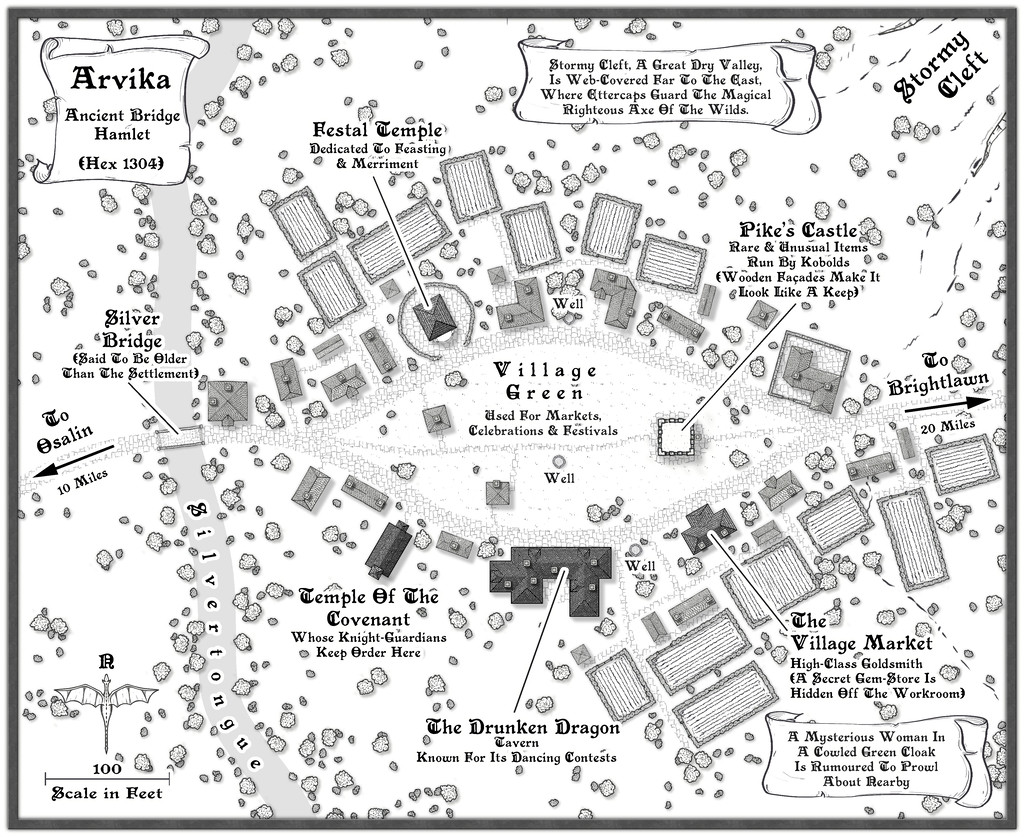
Arvika was one of the three settlements in this area that were originally shown on the existing Atlas map. In the absence of any text notes for it there, I simply looked at what the symbol was - a hamlet. As luck had it, no random feature was selected during the creation of my Whispering Wastes regional map for the hex it was in, but there was something in an immediately adjoining one, a mysterious ravine partly filled with webs, where a legendary artifact was guarded by a nest of Ettercaps. So I simply moved the ravine into the hamlet's hex, combining both elements. The hexes are six miles across, north-south, after all, so there's room for a lot more than just a single feature in each one.
The setting for the place was to be in a river valley, the Silvertongue, and I randomly discovered instead of the fords, so popular elsewhere so far, the proximity to the uplands had clearly provided stone enough for a bridge here for once, and it also turned out to be notably ancient, something that, like the Stormy Cleft ravine, simply helped reinforce why this hamlet had ended up being shown on the Atlas's area map, while other, seemingly larger or similarly-sized, settlements in the Whispering Wastes had not appeared there. Mapping it was straightforward enough, with the contour symbols fitted-in to act as the entrance to the ravine, although I did add a few more fields than I'd initially thought to provide some further interest around the settlement itself, which also lessened the impact of the ravine on the whole drawing.

-
WIP: Fane of the Swamp People...
Looking a lot better now!
Yes, I think the walls would work very nicely for ruins too.
If the stepped outer surface was full regulated, it would also work for buildings such as ancient Mesopotamian temples, which had deliberately constructed outside walls that had this kind of "vertical recesses" patterning all round them. I've had to draw these before, both by hand and on computer, and it can be pretty tedious for a larger building plan!

-
Where can I find great resources for the creation of a subterranean world?
For the crystal city concept, it may depend exactly how you envisage it. For a large-area map such as the Dungeon Worlds Annual will let you create, you could perhaps repurpose some of the standard CC3+ overland map symbols, like glaciers or icebergs (though you may have to get creative about hiding what are intended as water lines for the latter!), and making use of the varicolor options to recolour other features - and also with CD3 house symbols, for instance, if you wanted to map the city itself, or parts of it, in more detail.
It's definitely worthwhile to take some time to look through all the symbol catalogues you have available, and make a note of any symbols that might work in such map creation, even if that's a long way from what the symbol was originally meant to be! As you can resize any symbol in CC3+, imagine too how it might look if a given symbol were larger or smaller, or a different colour (which you can set and see while you're browsing through each symbol catalogue that includes varicolor symbols).


-
CA style development - "Darklands City" (issues for September and December 2021)
Looks like Wyvern dropped off the end of the page.
Just as well Wyverns can fly 😎🐲
-
WIP: Mega-dungeon, Dorag Skel Level 1A
As you might tell from my frequent use of random options in my Community Atlas maps, I've been a long-time fan of such random design systems, for all they can need a bit of nudging sometimes to get things to work out OK. I've not used the 5E system as yet, though almost exactly 20 years ago (July-August 2001), I created a classic 12-level dungeon using the random system in the original (1979) AD&D DMs Guide, each level filling an A4 page of graph paper. All done by-hand then, however. I did make a start converting it to CC3 not long after I got the program, around 2014 or 2015, I think, but that was very slow going, as I hadn't the option then to scan the hand-drawn maps to trace in CC3.
Have to say that your map looks a lot more elegant and less cluttered than any of my old ones from that dungeon set, so the 5E system may be something I should experiment with in future, perhaps...