


Wyvern
Wyvern
About
- Username
- Wyvern
- Joined
- Visits
- 3,303
- Last Active
- Roles
- Member
- Points
- 5,647
- Rank
- Cartographer
- Badges
- 24
Latest Images
-
WIP - Wayward Village and Inn
Glitch asked: Question - is it possible to create a similar simple style for Dungeons ? The idea would be to keep it simple, with just a few symbols to help scale rooms and identify their uses.
There are already hand-drawn options for dungeons, including the Handdrawn symbols from SS2, for example, albeit not in an identical handdrawn style to Ralf's overland style.
For the kind of basic layout you drew, there's also the Create Your Own Style pack from the first Annual, which comes with the basic OSR-style "blue" dungeon style, which is very straightforward to use, and very forgiving. You can maybe get a better idea of what's possible with it from this Atlas map I drew in this style back in 2023. That's extremely easy to recolour to not be blue, if you prefer!


-
Hex Crawl Test
As a long-standing fan of hex maps, it's great to see what's being done here.
Hex maps are quite tricky creatures overall, because most of the time you need the features to fit within a single hex - it is the point of setting up hexes with a specific single terrain type in each, after all. And then you want to add specific smaller features, like settlements, interesting sites, etc., so they have to work with the terrain features as well. And sometimes you want the terrain to bleed over hex edges, and even beyond the outer hex boundaries, because that looks better and more realistic.
So yes, multiple sheet options is probably the only way to go in CC3+ - and then remember what needs to go where to look good!
The existing CC3+ hex mapping options do tend to aim for the one terrain and one feature per hex at most, so having something more artistic like this would be excellent.
-
Symbols Missing, Floorplans>Wall Features>Modern Fill Wall Feature Cutting
After a bit of digging around (it's actually SS3, not SS2, which confused at first!), the SS3 Bitmap A and B styles both have wall features like doors, so will cut the walls. SS3 Blueprint Floorplans has no door symbol options, so won't have any wall-cutting tools (so that symbol catalogue comes up as blank).
It looks, though, as if you're actually using the Vector style, as in the Symbols > Modern > Floorplans Catalogue are two vector wall features catalogues Wall Features 31 and Wall Features, both of which have wall-cutting features.
For unknown reasons, using the symbol catalogue icon doesn't call-up either of the Vector Wall Features catalogues in a new Modern Vector Floorplan map I did as a test, so at least I can say it's not just your system!
You can navigate to the symbols manually, or you can add either of those files to your map using the drop down Symbols - Symbol Settings... option, which calls up this panel:
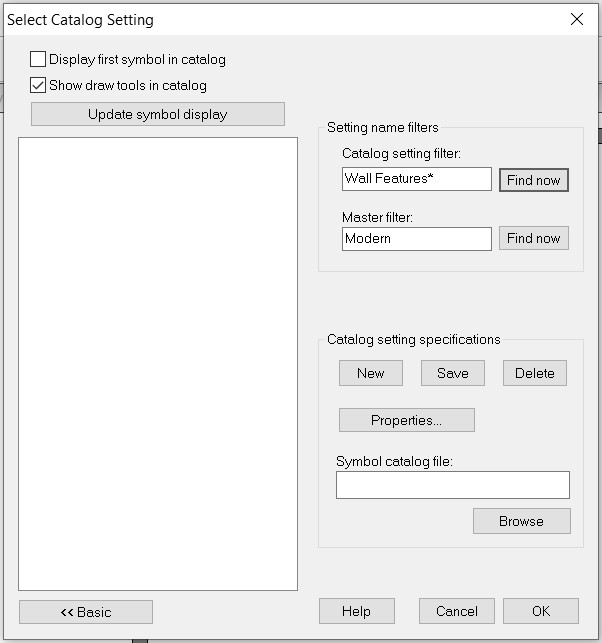
In which I simply added the word "Floorplans" after "Modern" in the "Master filter" box and browsed to the correct FSC file under "Catalog setting specifications", saved that, and the catalogue now shows up when I click the :CC2SYMPATH: icon.
Hopefully, this will help with your mapping.
@Don Anderson Jr. - The line with the horse icon will only show up if you have the various non-ProFantasy symbols from the CSUAC, Dundjinni, Bogies, etc., items installed.

-
Live Mapping: Character Artist 3
Just finished catching-up with today's video, as I wasn't able to be there for it live.
I've used Character Artist quite a bit over the years, and it was a shame to discover there are no plans to update or expand it, if perhaps understandably so, given it is something of a "luxury" add-on, compared with the primary mapping purpose of CC3+ in general.
Reviewing the video so soon after it was posted means the chat wasn't available to view (it sometimes is lost anyway, if the video is later edited before its final YouTube posting), but I don't think it was mentioned there that there is also the original Character Artist Pro, which has many more drawn-symbol options than CA3, and is much easier to draw your own additions onto, because it uses the far simpler vector drawing style. I suspect many now wouldn't feel it to be "pretty" enough, compared to the more modern hand-drawn version, unfortunately, but it is a versatile tool that shouldn't be ignored - to me, at least!
-
I Can't Buy Campaign Cartographer And Other Such Products
You should though check your card provider's terms and conditions before carrying out the transaction, as you may find there's a small extra fee to convert the currency (about 3% of the transaction value is common, though not universal). Like Loopysue, I'm in the UK, but have carried out transactions this way for some years for US, Canadian and New Zealand Dollars and Euros, for instance, and the transactions have always been pretty straightforward.
Also, if you're concerned, you can pay through PayPal (even if you don't have a PayPal account), and that shows you exactly how much you'll be paying in your own currency, including the conversion fee (and your card provider shouldn't charge you any extra).



