Ralf
Ralf
About
- Username
- Ralf
- Joined
- Visits
- 3,668
- Last Active
- Roles
- Administrator, ProFantasy
- Points
- 2,517
- Rank
- Cartographer
- Badges
- 17
Latest Images
Reactions
-
Strange Artifacts
That's because the text is the same color as the outlines of the buildings below. Try changing the text to a very dark grey instead of black.



-
disappearing symbols
Yes, there was a problem in that template. Here are fixed versions, which you can copy into the foolde /Templates/Cosmographer/Wizard/ (overwrite the existing versions).

-
Q: Import real star data into Cosmographer?
It places a height symbol as the Stars in the Cosmo 3 style are. It expects the symbol catalog and the symbol name as input next, and then the location and height of the symbol.
You can always try out such a command by typing it at the command line in CC3+.

-
Q: Import real star data into Cosmographer?
That map was created via an excel sheet with the data, and a script file created from that data.
Take a look in your CC3+ programdata folder in the "Scripts" subfolder. You should see a "stardata.xls" file and various script files. If you look at the spreadsheet that it contains all the commands and data which appear in the script files - the scr files where generated from that spreadsheet.
In CC3+ you can create a new map, and then run the script via Tools > Macros > Script File to insert all the stars as symbols into the map. You will have to replace all # with @ in the script file first though, as that has changed in CC3+.


-
Is there a better way to make font names visible on the Text Properties\More Fonts screen?
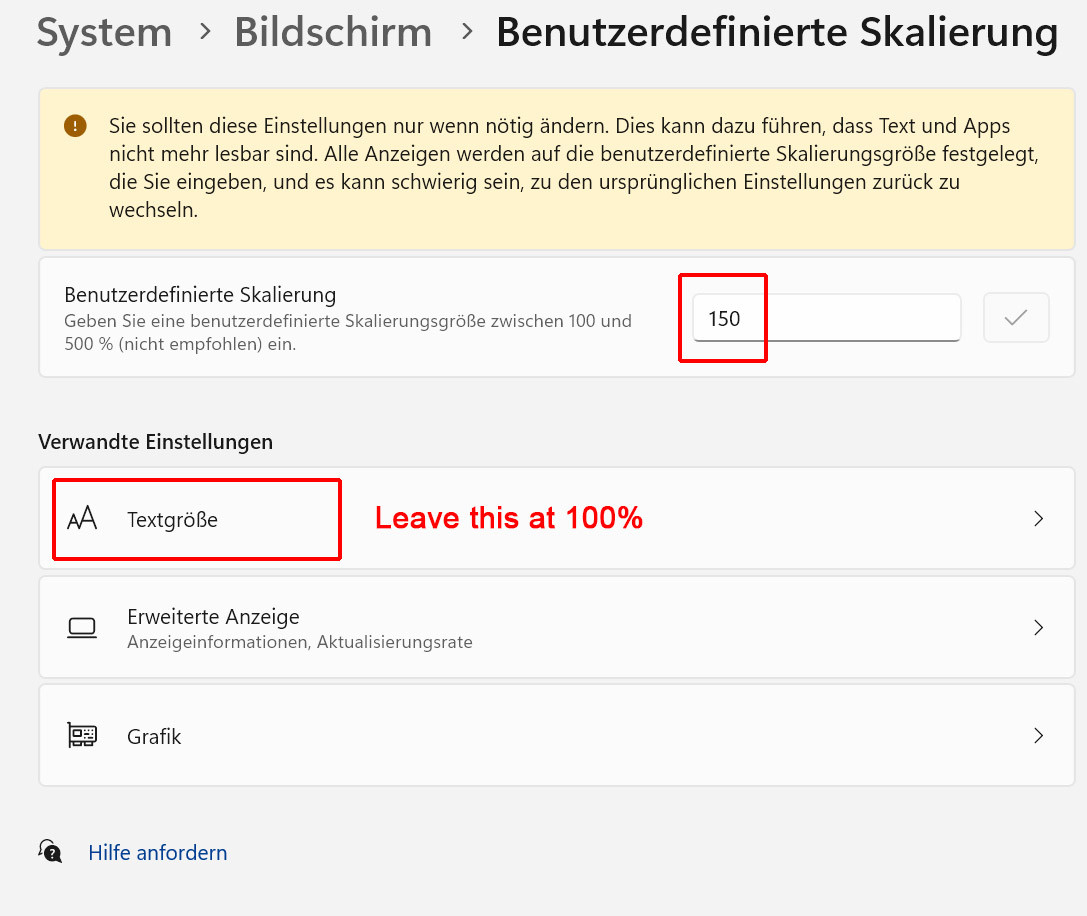
What you're seeing is the Windows Text Scaling interacting with the dialog text. Unfortunately that's not something that can be fixed in CC3+ at the moment. I recommend setting your Text Size to 100% in Windows, and instead increase User-defined scaling if otherwise everything is too small.
See my attached screenshot, though it is in German, sorry.