


roflo1
roflo1
About
- Username
- roflo1
- Joined
- Visits
- 2,878
- Last Active
- Roles
- Member
- Points
- 576
- Rank
- Surveyor
- Badges
- 8
Latest Images
Reactions
-
Forgotten Realms Interactive Atlas repairs.
What what and what. I installed off of CD, Cherry picked all the correct maps, updated each in order 1 - 2 - 3. I don't understand why the early one works and the older one doesn't, ARG so frustrating.
Sorry to hear that. At least you're no longer derailed?
Making an XP is sounding more and more interesting.
On a positive note, at least I correctly worked out were those links were supposed to be!!!!
Yes you did!

-
Forgotten Realms Interactive Atlas repairs.
Yes, they do open correctly, but the "parent" links to B1cNWlc instead of High Moor.
I.e.: they link to the parent of the parent map.
-
Forgotten Realms Interactive Atlas repairs.
I am lost by this. I have everything working fine everything points to moonshae island.fcw I always show hyperlinks and zoom in on them.
... like thehawk said,
Moonshae Island.fcwandViledel's Isle.fcware essentially the same. Just be sure not to confuseMoonshae Island.fcwwithMoonshaeslc.FCW, which is the parent map: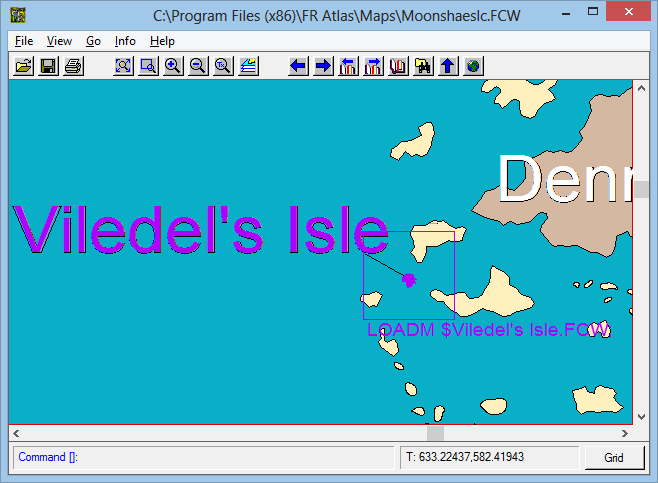
As you can see, the parent map points to
Viledel's Isle.fcw(so does0030 Temple of Selune.FCW); which is why I'm suggesting avoiding links toMoonshae Island.fcwIt shouldn't be hard to write an XP module that lists all the links in a map either, and combined with the MULTIFILESCRIPT command should allow all links in all maps to be listed.
...
I think I see why you say that though, there's no way to script the LIST command? Is there a way to script the output to automagically go to a file or the clipboard?
I haven't delved into XPs yet. But this would also be useful. I too have thought it might be useful to create an XP/script that saves all Info->List information to text files (in batch; one txt file per map) so that we can compare changes between different versions of the same file across updates.
-
Forgotten Realms Interactive Atlas repairs.
Since we can't legally share the maps among us... My guess is, you'd still have to install each update, one at a time. On each stage, you'd have to create a copy of the cherry-picked maps (except now you'd have a list of which to keep on each update), and then copy them back when you're done.
For future installs, if you keep a copy of your cherry-picked folder, you could just jump to update3 and overwrite them.
Best I can come up with so far.
-
Forgotten Realms Interactive Atlas repairs.
I opened the spreadsheet and it had no colours. I'll try on my other laptop.
That's strange. Perhaps you saw the first sheet/tab instead of the one named "roflo1"?
No matter, I have a minor update:
Also...
However, turns out The Board does not allow ODS attachments. So trying XLSX and see?
OpenOffice should allow exporting to XLSX. Google sheets also allows exporting to XLSX.
Speaking of which, I'm now working on Google Sheets so I can edit online from different places. If any of you want live access, please send me a DM.
Anyway, on to the "what's new" section... I wasn't happy about having to inspect visually the differences between 2 maps, but I figured out a way to do it. Basically: a) open in CC3+, b) Info->List->All, c) copy all to clipboard, and d) compare with WinMerge.
It's cumbersome, but precise. I decided to start at the top: with
0030 Temple of Selune.FCW. I discovered update1 is not ok (points to wrong/outdated parent map) so we should use the one from update2 or onwards (I added a "cherry-pick" column to the sheet, where I'll write down which map is the best one to keep when there are multiple versions). While at it, I also discovered thatMoonshae Island.fcwhas the same entities asViledel's Isle.fcw(from upadate2 onward); so links toMoonshae Island.fcwshould be avoided. Finally,Viledel's Isle.fcwfrom update2 has the same entities as the one in update3.

