Monsen
Monsen
About
- Username
- Monsen
- Joined
- Visits
- 723
- Last Active
- Roles
- Administrator
- Points
- 9,029
- Birthday
- May 14, 1976
- Location
- Bergen, Norway
- Website
- https://atlas.monsen.cc
- Real Name
- Remy Monsen
- Rank
- Cartographer
- Badges
- 27
Latest Images



-
Store not forum related
You'll need to contact support by email, and they'll help you out.


-
[WIP] Community Atlas - Ezrute - Dunor Valley - Strip map of Journey from Rocky Valley to Isendathin
Map now in the atlas. Thanks for the contribution Quenten.

-
SciFi Outpost - the Files
These are seriously cool. Not using physical miniatures myself, but I still love these models.

-
Live Mapping: Cubing the Dungeon
This thursday I will be doing a new livestream, this time I will look into cubing a dungeon for some more spatial awareness.
Stream will be 1800 hours CET on Thursday, find your local time and notification option by accessing the video below.


![[Deleted User]](https://secure.gravatar.com/avatar/c75d9a245b74d9c59be0999ea81ca541/?default=https%3A%2F%2Fvanillicon.com%2F92add7f8c954488718110edc4896ad39_200.png&rating=g&size=200)


-
NAN,NAN Problem
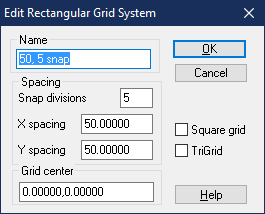
Here is a fixed version of the file. I've set it up with a 50' grid with 5 snaps.
Here's the exact steps to set up a reasonable grid:
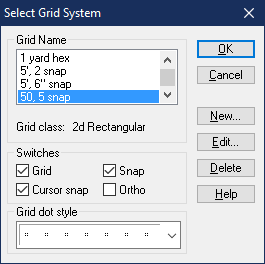
- Right click the Snap button in the lower left.
- Hit the New button in the dialog to define a new grid
- Select 2d Rectangular as the grid type and hit continue
- You can name the new setting whatever you want, but it is best that it follows the actual settings, so I named mine "50, 5 snap". I then set the snap divisions to 5, and the X and Y spacing both to 50. What this ends up doing is making a snap grid that has a visible dot every 50 map units (feet), but it snaps every 10 feet. If you feel the the snaps are too fine grained, try setting the snap divisions to 2 instead, and if you have too few snap points, try with 10 for snap divisions.
- Click ok, and then back in the select grid system dialog, scroll down and click on your newly created grid to select it, and then hit ok. This will make your new grid the active one. Save the map.