


Monsen
Monsen
About
- Username
- Monsen
- Joined
- Visits
- 723
- Last Active
- Roles
- Administrator
- Points
- 9,029
- Birthday
- May 14, 1976
- Location
- Bergen, Norway
- Website
- https://atlas.monsen.cc
- Real Name
- Remy Monsen
- Rank
- Cartographer
- Badges
- 27
Latest Images



-
Welcome to the Updated Forum
The only way to look at a gallery is to go into the user's profile and select it (or follow a link they posted one). There are no ways to see multiple at once.
The 5MB limit for the gallery should be working now, I believe.
![[Deleted User]](https://secure.gravatar.com/avatar/c75d9a245b74d9c59be0999ea81ca541/?default=https%3A%2F%2Fvanillicon.com%2F92add7f8c954488718110edc4896ad39_200.png&rating=g&size=200)

-
Forum Guidelines & Help - Please Read
Welcome to the ProFantasy community forum! The purpose of this community is to ask questions, share tricks, and generally learn how to use ProFantasy products. Current patches and tech support are available from the ProFantasy website.
Guidelines
Because our users make up a very active community, some guidelines have been put forth to keep the forum running smoothly and on topic.
- Please be civil and polite in your postings. We are a friendly bunch of people here, and we'd like to keep it that way. Disagreeing with someone is fine, but please do it in a calm and civil manner.
- We try to make this a place where everyone can feel welcome, so please avoid sensitive topics like religion, politics or the latest news. What you consider harmless fun may be an infuriating provocation to someone else.
- Try to stay on topic. A little conversation mixed in with software related messages is acceptable, but please don't stray too far off-topic. Respect moderators closing a topic, if they decide it to be irrelevant.
- Please try to avoid "Me too" postings. If you agree with someone, that's great; but put some other information in the message as well. You can also use the reactions (like, awesome, insightful, lol) if you just want to show your support without writing anything.
- In many cases, the answer to your question is already available. The forum is fully searchable, so before you post a question, please click on the "Search" tab above and try whether a few keywords relating to your question bring up an answer.
- No "Virus Warning," "Help A Sick Child," or any of their ilk. Please keep this spam to yourself.
- No advertising for sites or products that do not directly relate to ProFantasy.
- Images in posts are automatically resized to a maximum of 1000 by 1000 pixels. If you want to post higher resolution images, you have your own personal image gallery in your user profile. Images in posts are limited to 2MB, while the gallery accepts up to 5MB. Please consider using .jpg images whenever possible, as there is very little visual difference between jpg and png, and jpg images are about 6 times smaller, which means they load much faster and is much friendlier for people with slow or metered connections.
- Please DON'T send Private Messages to admins/mods/knowledgeable people to ask for help unless you need to convey sensitive information. These people are not your personal support staff. Post in the open, that benefits everyone else who might have the same problem, and it helps you get an answer quicker, because there are more than one person who can reply.
- Don't post copyrighted material or anything else you don't have explicit permission to post. Provide a link to the source instead. If you post images that are not your own, make sure to properly credit the artist.
- If you see any objectionable content, please hit the Flag link in the post to report it. If you are harassed via private messages, please notify a mod or administrator.
- Please do start your own discussion when asking for help. Asking a question in another thread just because the topic there is somewhat similar to your issue just muddles up the discussion as people try to help you both. Of course, you are allowed to ask follow up questions in direct response to what is being posted, but if you ever feel the need to start your post with "I have a similar issue..." or similar, it is better to start your own discussion. If it is relevant, just post a link in your discussion back to the other one.
- Posts consisting mainly of AI-generated text are not accepted in this forum, and will immediately be deleted. While AI's like Large Language Models (LLM) can often be helpful to find answers, they often also contain misleading or wrong information. This is especially true for a niche program like CC3+ where suggestions tends to included reference to non-existing features.
We're trying not to bog anyone down with rules, but some order must be maintained. If you have any questions, please don't hesitate to e-mail us.
Help
If you have any issues using the forum, for example trouble registering or logging in, please get in touch with support via e-mail and we will get you sorted.
More information and helpful guides related to the use of this forum can be found here.
You can also found a curated section of helpful resources that may aid your mapping here.
Data Deletion
If you wish to have your personal data deleted from the forum, please send a request via support e-mail.
Thanks!







 and 24 others.
 -
New Blog and Video: Symbol Groups
Just posted a new blog article over at the ProFantasy blog talking about creating custom symbol groups with random selections. The article is also available as a video. Enjoy.



-
Welcome to the Updated Forum
Welcome to the new and updated forums.
As you can see, the new version do look a bit different than before. The new version doesn't support the same template as the old, and have different elements, so the look has been recreated for the new templates.
Mostly, you'll find things in much the same place as earlier, but here is a short list of changes and new features to get you all started.
I'll write more detailed writeups of some of the features later.
New Editor
The post editor is now a new fancy rich text editor. It allows you to easily use different styles like headings and lists by using the tools in the editor itself, no more writing html codes. It also allows for easy uploads of images, in addition to clicking on the image icon to be presented with a file picker dialog, you can also drag and drop images, and paste them with Ctrl + C.
The new editor should automatically turn any pasted URL's into hyperlinks, and turn links to some special media like youtube into embedded videos.
Profile Data
Your username and password and email is exactly as before, but some of the user data, like real name and custom profile fields did not transfer over because the new forum versions handles things a bit differently. So if you want your real name showing on your profile, please edit it and add it. You'll also want to check your avatar. To edit your profile, click the avatar icon in the top right
Whispers
The new version no longer supports whispers in conversations. Instead, it uses a more traditional Private Messaging system. All old whispers have been converted to PM's. Click the envelope in the top right followed by the All Messages link in the popup to see these.
Notifications
Next to the envelope icon is the notification bell. By default, the forum notifies you of all manner of things. Click the bell and then the settings icon right below it to customize your notifications, and which will be shown just on the bell (popup) and which will be sent as email.
Image Uploads
The forum still has an attachment limit at 2MB for images and other attachments in posts, but now you also have a personal image gallery on your profile. Uploads in the gallery is limited to 5MB per file, which should give you a nice hi-resolution image if you stick to .jpg.
Reactions & Badges & Points & Ranks
You can now react to posts by clicking the like, awesome, insightful and lol reaction buttons. Please don't let these be a replacement for a friendly comment though, it is much nicer to have someone say something, but a like still shows you appreciate something even if you don't find anything to say. Getting reactions to your posts grants you points, which when enough have been accumulated will give badges and ranks, which showcase your community involvement.
Post Editing
A common way of spamming is to post a seemingly helpful post, and later go back and edit it. To prevent this behavior, there is now a time limit for editing your posts. If you really need to edit an old post rather than just post a new comment with an update, contact a moderator. Members with higher ranks have a longer period, since trusted members probably aren't spammers.
Old Links
Not all old links to various spots in the forums will work anymore. I'll update the various stickies and such in the coming days, but if you encounter a link that doesn't work properly, such as in the Interesting Resources sticky, this is why.
Have fun, and go on mapping :)




-
Command Spotlight - Line Styles and Properties
The Command Spotlight series will highlight several commands and features of CC3+. It is a successor to the Command of the Week series and will be similar in approach and style, but won't appear on a regular schedule. As with the earlier series, this is more about showing the existing of the command or feature, and showing what it can do, rather than a detailed tutorial.Index
Line Styles and Properties
One of the issues many people are having when they use the various line styles in CC3+ is that things doesn't always look the same when they export the map as it did on their screen. Let us start by looking at an example.
Below, you can see a screenshot of a demo map I made. Notice that the left and right sides are nearly identical. Note that this is an actual screenshot, and not an export.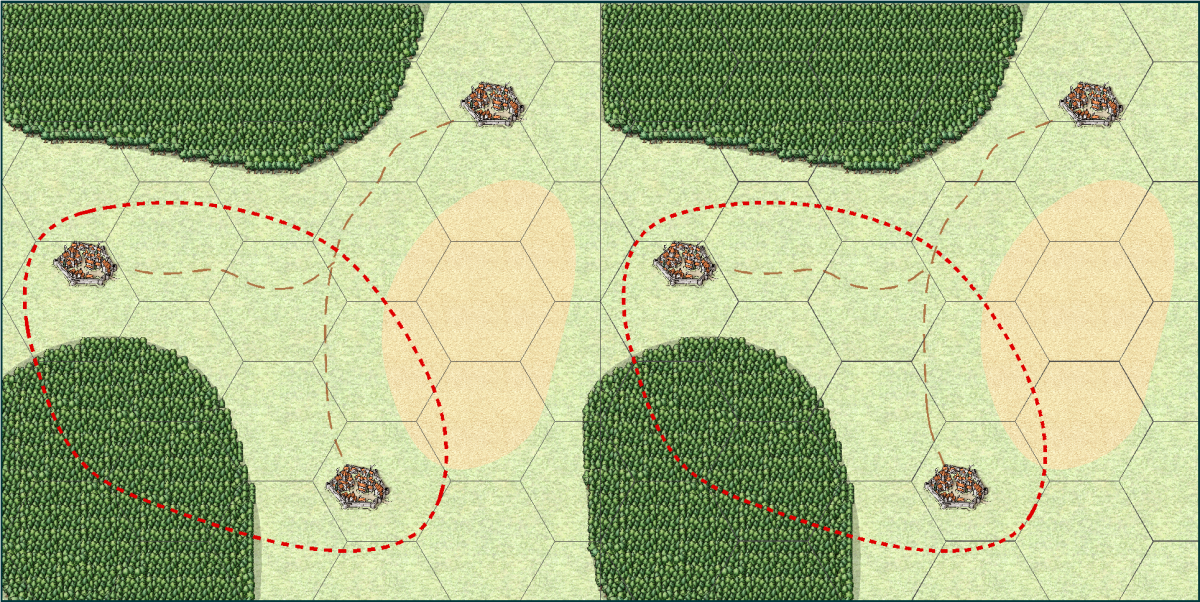
Now, this is the result of a high resolution export of this map. Notice how the various lines on the left side look quite different now.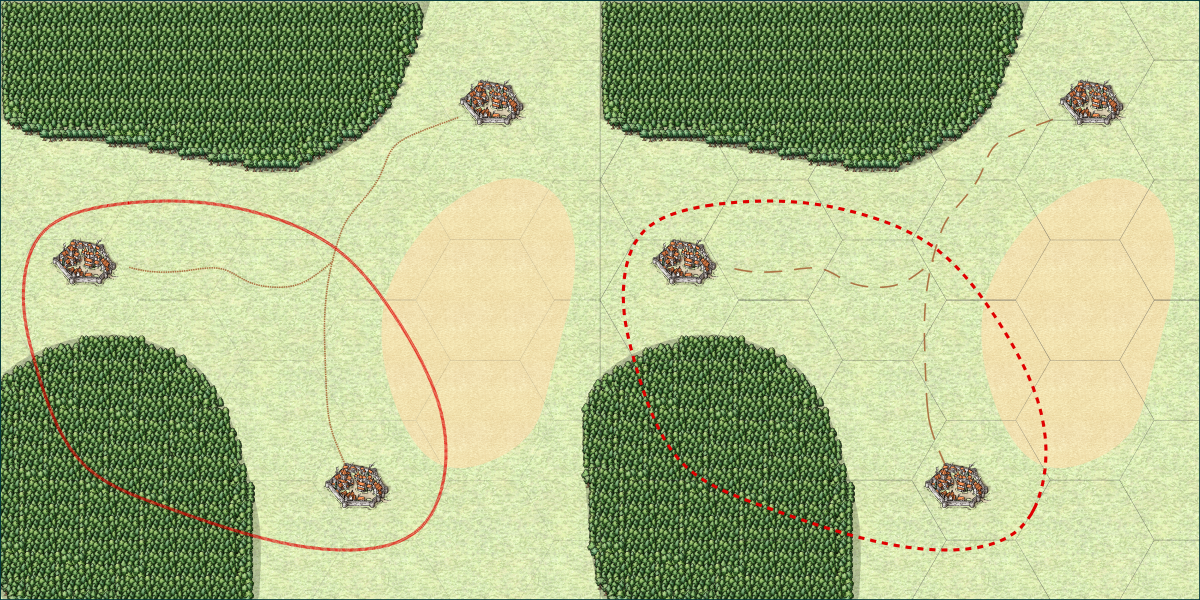
And here is a closeup, to better see exactly how the lines look in this export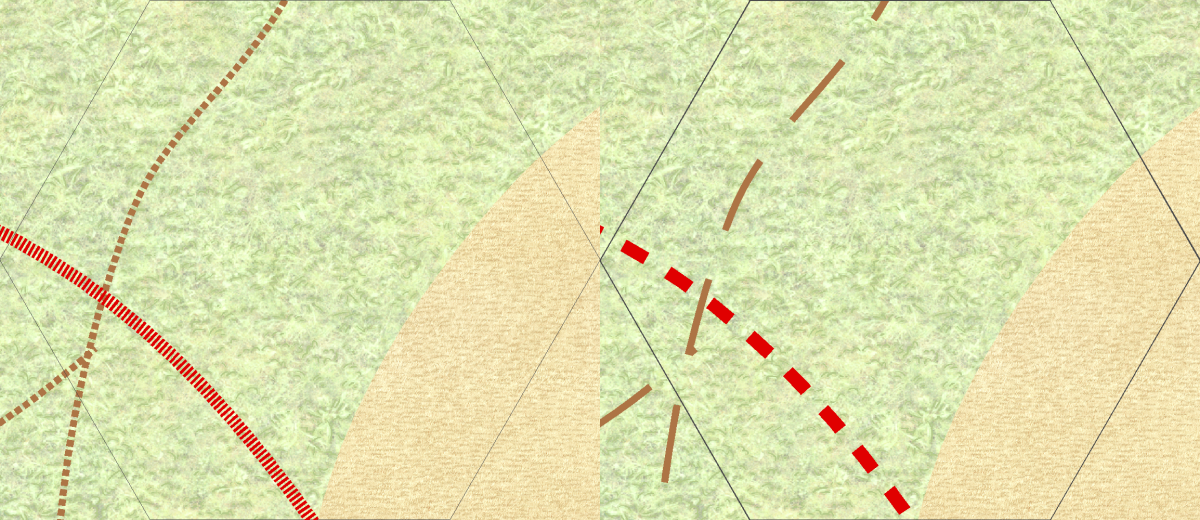
What happened?
Now, as you can see from the images above, in the right-hand version, the images looks the same both on screen and in the export, but in the left-hand version the lines look radically different. The grid is almost invisible, and the road and border seem to use very small and wide "dots" instead of the longer segments seen in the screenshot at the top. Let us have a closer look at what is causing this, and how you can make this work properly yourself.The Grid
Looking at the images, the grid looks very similar in the screenshot, but in the export, the left version almost disappears. The reason this happens is due to line with. The secret here is the difference between lines with a width of 0 (called 0-width lines), and lines with a width of greater than zero. CC3+ treats a zero-width line as a line that should be drawn just wide enough to be visible at any zoom level. That means that on the screen, it will always be 1 pixel wide, no matter how far you zoom in or out. But, that also means that it will be 1 pixel wide on exports and printouts too. And for a high-resolution export, 1 pixel is extremely tiny, usually so tiny that you can't even see it if the map is zoomed to fill the screen. This is just one of the ways a static image is very different from a CC3+ map.
Just to throw some maths in there. My map was exported at 10000 pixels wide. That means that on a normal computer screen (1920 pixels wide), the line will be just 0.192 pixels wide. Now, a monitor cannot display partial pixels, so the computer needs to determine if it should show it or not. And remember, if the monitor shows the pixel, it means that there is one pixel of something else that isn't going to be shown. So, what does it do with a 0.192 of a pixel? In most cases, it won't be displayed at all. Fortunately, a computer can interpolate, so that tiny fraction of black will actually cause the nearby pixel (that is being shown) to darken a little, thus giving a faint hint of the grid that is supposed to be there. Resizing an image has the exact same issue, and also with printing. A printer actually have a very high resolution (600dpi is most common, but 1200 and higher dpi are also frequently used). So a typical sheet of paper is 210 by 297 mm in size. Converting that to inches , that is 8.27 by 11.69 inches, and multiplying that by 600 dpi means the sheet is 4960 by 7015 dots. So a 1-dot wide line will only be about one fivethousands of the width of the paper. That is a thin line indeed.
On the right, the grid is instead set up with a width of 0.03 map units. This means that the line will be scaled in relation to everything else on the map. 0.03 map units is pretty thin, but in contrast to the 0-width line, it will keep its width in relation to other map entities. This means that it will get wider (relative to the view window, not the map) as you zoom in and thinner as you zoom out, but it will always be the same size relative to the map. So if the line is the size of a tree at one zoom level, it will still be the size of a tree when you zoom in, and it will still be the size of a tree when you export or print. The 0-width line may look better at certain zooms when you work on your map in CC3+, especially as you zoom out, because it will always be visible, while the 0.03 wide line may actually disappear when you zoom out in CC3+, but the 0.03 one is the one that will look visually the same no matter if you do a high resolution export, low resolution export, or printout.
There is also a setting in CC3+ called pen tickness. Just forget about this immediately. It is a setting intended for printing on plotters, something that is still used for large-format technical printouts, but unless you are actually using one, you won't need this setting (and if you are unsure, then no, you are not using one. Just leave the pen thickness at 0, and always rely on the line width setting. In older versions of CC, this was one of the values visible on the status bar, but for CC3+, it has been removed since it isn't normally used, although it is still available behind the scenes.Road and Border
The situation with the road and border have similar causes to the grid above, but for these lines, it is actually the length of the pattern that is the problem, not the width of the lines. These lines are already using a width larger than zero, and if you look at them and ignore the tighter pattern you'll see that the width is actually correct in both the left and right side of the export.
To understand what is going on, let us see how the line styles are defined. you can edit line style definition by clicking on the LS: indicator in the status bar. For the screenshot below, _BORDER1 is the style used by the border in the left image, and _BORDER2 is the one used by the right.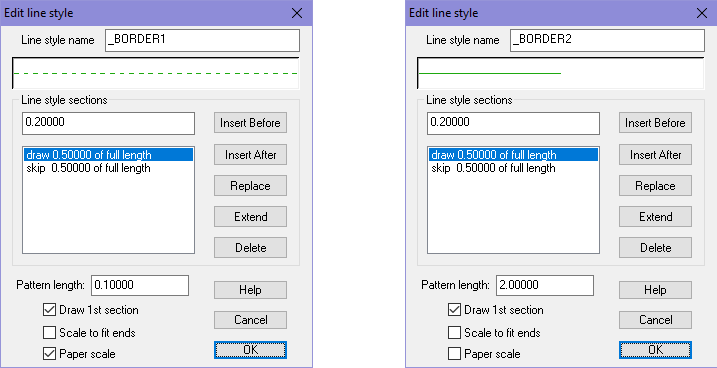
The most important here is that the left line style has Paper Scale enabled, while the right one don't. Basically, paper scale makes the line change based on the resolution of the output (screen, print, export), while having it off makes it follow the map. Otherwise, the pattern is being defined the same, except for the pattern length which is different. The great advantage to using paper scale is that it will fit our current view, which means it will work on both a small sized local map as well as a world map and still look reasonably the same on screen, but the downside is that it won't look the same on exports and prints as it did on screen. When using a line style with this setting disabled, you are going to need to adjust the pattern length manually for every map, what works in one map size won't work in another. But the advantage of this approach is obviously that it will look the same both on screen and when exporting.
In closing, I would like to point out that the observed differences differ between printing and exporting. Printing have some issues, exporting others, but if you make sure to don't use 0-width lines and don't use paper-scale lines, you should end up with a map that will work great for both cases.
I have attached my sample map, but note that I tweaked the values to make everything look the same for my screen resolution. If you view it on a screen with a different resolution, or just change the window size or zoom, you'll find that the left and right side may not look as alike as they did in my screenshot, but you can still experience the same issues when exporting/printing as I have shown here. Tweaking them to make the left and right side identical wasn't strictly necessary, since the point wasn't comparing the left and right side, but comparing them to their respective export results. Having them identical made it easier to compare though.
