


Monsen
Monsen
About
- Username
- Monsen
- Joined
- Visits
- 723
- Last Active
- Roles
- Administrator
- Points
- 9,029
- Birthday
- May 14, 1976
- Location
- Bergen, Norway
- Website
- https://atlas.monsen.cc
- Real Name
- Remy Monsen
- Rank
- Cartographer
- Badges
- 27
Latest Images



-
Floor Tiles
@Wyvern stated:
Dread's the one that uses a Jenga tower to resolve actions instead of dice, so it isn't for everyone (if you have real-life dexterity issues, say)
I have a real-life cat. Those are also not 100% compatible with jenga towers.





-
Delete hyperlinks between maps
While the tome doesn't address deleting them directly, it tells you how to show/hide and edit them on page 136.
I try to cover as much as I can for the documentation, but CC3+ is pretty complex so it is difficult covering all the different ways people may be looking for information without making the documentation unwieldy.
But I am always taking suggestions for what to improve.
-
Community Atlas - Irisian City States - Dimitrios island
Yea, you can put a lot of things on small islands. I've been to a couple of the Caribbean ones. Barbados for example is 169 square miles, which looks about similar to yours in size, and has a population of 300 000 and lots of interesting locations.

-
Community Atlas - Irisian City States - Dimitrios island
@Ricko Hasche wrote:
how i can do this master @Monsen ?
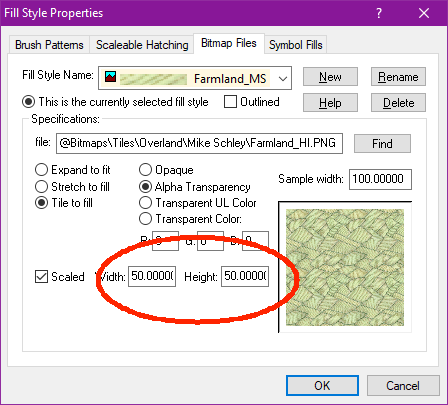
Reducing the scale of a single fill is just a matter of opening up the fill style dialog, selecting the appropriate fill, and reduce the width/height values.

-
Symbol Scaling & Position
This is due to the setup in that traveller catalog you are using. For the standard traveller map, a gas giant is treated as a modifier to an existing symbol, to be displayed in the corner of a hex, not in the center where a regular planet goes.
This means that the symbol is quite offset from it's origin, which should be noticeable already at 1x scale, but as you scale up, distances are also scaled obviously, meaning that distance is now 16x larger. (This special placement for traveler is also why it is so small)
The gas giant in the regular planets catalog is more normal, but that is a height symbol, which isn't what you want here.
My recommendation is to create your own symbol catalog. Just make a copy of the traveller one, and then go in and scale all the symbols so they are properly scaled related to each other, and not for the abstract traveller use, and change the origin of the gas giants to be in the middle of the planet.



