


Monsen
Monsen
About
- Username
- Monsen
- Joined
- Visits
- 723
- Last Active
- Roles
- Administrator
- Points
- 9,029
- Birthday
- May 14, 1976
- Location
- Bergen, Norway
- Website
- https://atlas.monsen.cc
- Real Name
- Remy Monsen
- Rank
- Cartographer
- Badges
- 27
Latest Images



-
Mirabar Region Of The Forgotten Realms
You might also simply not be increasing it enough. Keep in mind that when exporting to an image, you take a very high-detailed setup in CC3+ and tell it to squeeze it in to a limited number of pixels. This means something sometimes have to give and give up some of their pixels to other elements in the map. An line can feel plenty thick in CC3+ itself, but when competing with the rest of the map for those precious pixels, it may still be too thin for export.

-
Cleaning Up CC3 Asset Location?
Moving them is pretty easy:
For the stuff under 'Documents' ==> move it as you please. CC3+ doesn't reference this stuff (unless you yourself have told it to do so by manually putting images in here, and then putting these in your maps, if you have done that, you also need to update any maps referencing stuff here)
c:\ProgramData\ProFantasy\CC3Plus ==> This is the main CC3+ data directory. You can move this as you please, but you need to update the file c:\Program Files\ProFantasy\CC3Plus\@.ini with the new location. [This is a normal text file, can be edited with notepad, but you need administrator permissions to do so since it is inside the program files hierarchy.].
The only things that can go wrong here is that if you have manually added content to this folder [This IS where all map resources should go, so adding things is fine] and used it in your maps without using the @-identifier in the path. This should not be an issue with standard content, only custom content that was improperly used. If this is the case, maps using fixed paths needs to be updated, and the easiest is to open them in CC3+, and then type FFIX on the command line as this changes full paths to relative paths. But this has to be done BEFORE the move. You can read more about relative paths here.
Lastly, the {1CE7E770-44A2-4D72-991C-3E7870515B1C} folders you identified in ProgramData ==> These are not used by CC3+ itself, but by the windows installer when installing/updating/repairing/uninstalling CC3+. For normal operation, it is generally safe to remove these if you need the space, but keep them somewhere you can copy them back when windows complains about missing installers if you try any of the above operations.
Note that putting things on an external hard drive will probably slow down CC3+ a bit. It can't keep everything in memory, so it need to access those image files regularly whenever you scroll/change zoom/issue a redraw. External drives are usually significantly slower than the internal one. Personally, I recommend keeping the data directory on the internal drive for the added performance, but feel free to experiment, after all, it can easily be moved back.


-
Minor Roads issue
Not sure why it turned out differently, but both are minor scale issues that are easy to change.
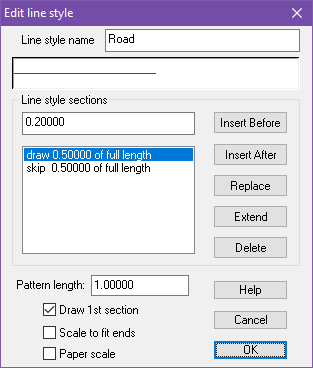
For the roads, click the Line style (LS) indicator in the top statusbar, pick the Roads entry and hit edit, then set the pattern length lower, for example to 1.
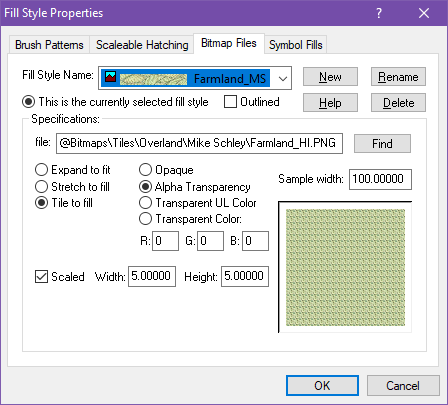
For the fill, click the Fill Style (FS) indicator in the status bar, go to the bitmap files tab, select Farmland_MS from the dropdown, and increase the width and height values for scaled. Try doubling them from whatever you currently have as a first step:

-
November 2023 Humble Bundle collection
No. That is only required when adding additional resources to the program. But this is a map bundle, and you can keep your map files wherever you want.
Note that the bundle do contain maps in many different styles, not all of which you will have access to with just the basic program, so you will see red X's when opening these .fcw files in CC3+, but that isn't an installation issue, just that it was made with resources you don't have. For these maps, the bundle still contains the pre-rendered export as high resolution image files so that you will be able to use them all.
-
Exporting Climate View
Note that you can always export the climate view from FT3+ to CC3+ just by going to File -> Save Campaign Cartographer file. There is an export setting there, Legacy Climate Only that will export the climate view, or you can make your own.
But it won't look identical to what you see in FT3+. FT3+ and CC3+ are two different programs that have different ways of doing things, the idea with the export functions is to get the actual data across so you can customize it in CC3+, not the exact visual look.


