


Monsen
Monsen
About
- Username
- Monsen
- Joined
- Visits
- 723
- Last Active
- Roles
- Administrator
- Points
- 9,029
- Birthday
- May 14, 1976
- Location
- Bergen, Norway
- Website
- https://atlas.monsen.cc
- Real Name
- Remy Monsen
- Rank
- Cartographer
- Badges
- 27
Latest Images



-
Problem making a symbol fill
The issue here is with the wide lines. Unfortunately, symbol fills cannot have lines with a width other than 0, nor can they have solid filled polygons.
If you change the line width to 0, it should work, but that probably won't be the look you are after then.
You're probably better off making that as a png image instead and using it as a regular bitmap fill instead.


-
Export Azgaar's Fantasy Map Generator files to FT3+ or CC3+
I am not familiar with that tool, but looking at it, it doesn't seem to be able to export maps in a format CC3+ can use. Which gives you two options:
- Use their svg export, find an online svg to dwg/dxf converter online, and then import the result from that into CC3+. That preserves the vector maps, but you're probably going to end up with a pretty bare version that needs lots of work before it is back in a state similar to what you have online.
- Use their image export, import the image into CC3+ and trace it. This has two downsides. First of all, tracing is quite a bit of work for a large map like the one created there, and secondly, their image export is a bit limited. If you export it as a single image you're not really get much detail, while the highest scale export is a nice high quality, it still isn't close to getting all the detail you can get by zooming in, and while their tiling function can be used to get a much higher detailed result, dealing with a huge number of tiles that needs to be assembled has it's own challenges.
-
Problem making a symbol fill
It works fine for me, so it doesn't seem to be a general problem. But of course, that doesn't help you.
Let's start with the blank preview. Make sure the sample width is set to something sensible. Often it defaults to something so small that it only shows a tiny section of your pattern, which may be a blank area. Since your pattern is 20x20, try something like 100. Not that this is really important, it is just a preview after all, what matters is if it works when you try to use it in the map, which you didn't mention at all if that was a problem or not.
Now, as for the crashing. That dialog can sometimes be a bit fickle when you add/remove styles. My general recommendation is always make everything ready, which in your case includes defining the symbol, then save the map. This gives you a read to use starting point in case of a crash. It is also possible to do the fill definition in steps, i.e. go in first, create a new symbol fill, then immediately close the dialog and save. Then go back in, and change the symbol for your new style to the one you made. This makes it easier to track down exactly what causes the crash if it is repeatable.
If you attach your map here with the symbol to use for the fill already defined I can also try to define it, see if everything works fine for me with your map and symbol, or if there is an issue with either.
-
Remapping the Forgotten Realms
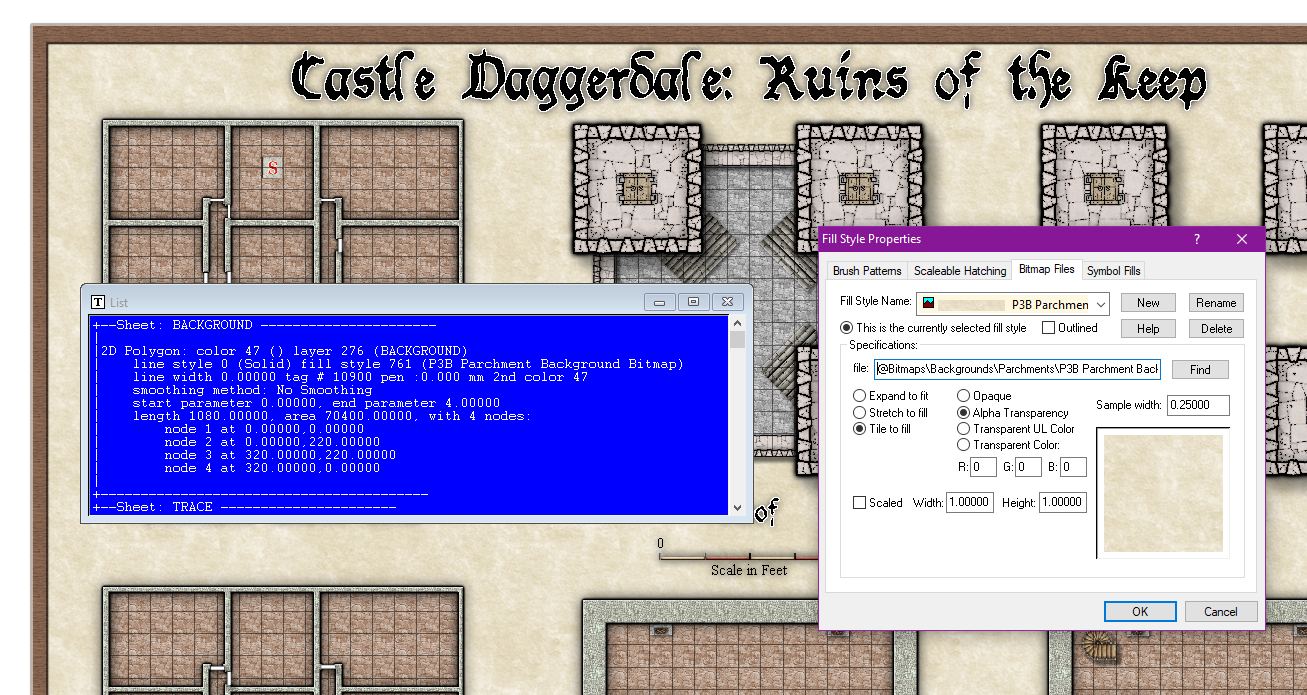
Keep in mind that the names of the fills doesn't mean anything, it is just a name. Just because that particular fill happens to be named "background" doesn't mean it is the fill that is used for the map background.
If you look at my screenshot below, I have used the List command on the background polygon. In the list output, you can see the fill is "P3B Parchment Background Bitmap", which you can then look up in the fill style dialog as I did in my screenshot.
As Steven chimed in above, this comes from Perspectives 3. (It can be a bit difficult to read from the fill style file name since it doesn't mention Perspectives int he path, but P3B means Perspectives 3, bitmap style B.)

-
Remapping the Forgotten Realms
Those "C:\CC2\" missing files are unlikely to be an issue, they're probably just some remnant definitions from old times that still is defined, but not used. I doubt Steven would have those either. Same with those "E:\FCW32" references. Sometimes some of those old references decides to hide out in the list of fill style, but it doesn't matter if nothing in the map actually references them.
If you see a red X in the map, use List on it. If it is a symbol reference, it doesn't matter what fill style it has, as you are dealing with missing art for the symbol itself, which should then be checked by opening up the symbol manager, finding the missing symbol in the list there, and hit the list button to get info on the paths of the symbol artwork files, while on the other hand if it is some kind of filled polygon, then the fill style matters, and you can look up the name in the fill style dialog and check the path.
