


Monsen
Monsen
About
- Username
- Monsen
- Joined
- Visits
- 723
- Last Active
- Roles
- Administrator
- Points
- 9,029
- Birthday
- May 14, 1976
- Location
- Bergen, Norway
- Website
- https://atlas.monsen.cc
- Real Name
- Remy Monsen
- Rank
- Cartographer
- Badges
- 27
Latest Images



-
Community Atlas - Irisian City States - Xenothon and Demydice Isles
You're probably planning to fix it already, but that farmland cutoff at the top looks a bit artificial being so straight and all. A few trees covering up parts of the edge helps a lot here.

-
Community Atlas - Irisian City States - Dimitrios island
@Ricko Hasche wrote:
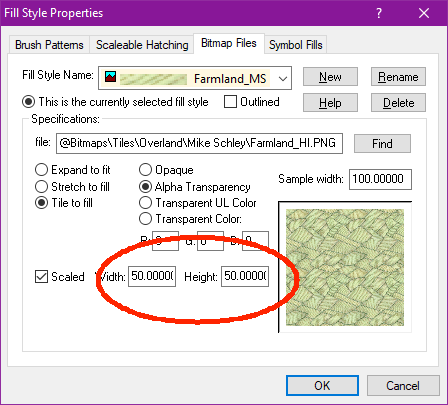
how i can do this master @Monsen ?
Reducing the scale of a single fill is just a matter of opening up the fill style dialog, selecting the appropriate fill, and reduce the width/height values.



-
Community Atlas - Irisian City States - Dimitrios island
Farmland fill looks a bit too large scaled IMHO for that small island. Have you tried reducing the fill scale a bit?
-
XP - Solar Legends Map Generator
My next effort will be to package it so that you don't need Visual Studio to run it.
That's easy enough. When you build it, it creates a .dll file. Just give people a copy of this file and tell them to put it in the CC3+ installation directory (Just make sure you build it in Visual Studio using the Release profile and not the Debug one). I am pretty sure people won't need to install any C++ runtimes.
-
Printing huge Map
It depends a bit on the exact quality you feel you need. Generally, I try to see if I can get at least 300 dpi. Even though printers today typically can go higher than that, 300 usually guarantees a good image.
However, 4x4 feet is 48x48 inches, resulting in 14400x14400 resolution, which is more that you can export in a single operation from CC3+, which gives you two options:
1) Go for 200 dpi resolution. It should still give you a resolution I would consider good enough. This means you need to export an image of 9600x9600 from CC3+ which is doable as long as you leave anti-aliasing off
2) Export the image in multiple parts, and stitch it together. When exporting from CC3+, if you use the rectangular section option when you pick export file types, you can export one and one section. And as long as you use snaps or other options for precision, you can easily make 4 precise equal-sized quadrants and stitch them together. There's also an annual issue that deals with this.


