


Monsen
Monsen
About
- Username
- Monsen
- Joined
- Visits
- 723
- Last Active
- Roles
- Administrator
- Points
- 9,029
- Birthday
- May 14, 1976
- Location
- Bergen, Norway
- Website
- https://atlas.monsen.cc
- Real Name
- Remy Monsen
- Rank
- Cartographer
- Badges
- 27
Latest Images



-
Can't see objects when moving, scaling, etc.
Which kind of object is it? Symbol, polygon? Does it happen in all map styles, or just in your current map? (Try starting a new map in a completely different style and test)
There is one specific quirk in CC3+ that makes this happen. The outline when moving is drawn using an XOR against the background. This basically means that the outline color always will be the exact opposite of the background behind it. But, if there are two entities stacked exactly on top of each other, then you get the reverse of the revers, which means it gets drawn the same as the background.


-
Ricko's Questions
To add on to Sue's answer, If you need several versions at different scales, you can clone a fill style definition by first picking the desired one to clone, then hitting the New button in the dialog, and give the clone a name. Now you have two versions of the same fill, which can be scaled independently. You can then make another drawing tool that uses the new version of the fill to have two drawing tools with the same fill at different scales.





-
recover old autosaves?
Autosave deliberately save to a separate file to make sure to not accidentally overwrite your actual map file with what is perhaps unwanted changes, for example when testing things.. This is how autosave works in most software. I guess a more correct name would be "recovery save" or something like that, but autosave has just stuck in most software as the common term. It is not a replacement for manual saves, just an extra layer of security, so yes, you should always manually save before exiting. (Personally, I have autosave on, but the dialog off, so it autosaves silently in the background, which is what most other software does by default)
-
Help! Nothing in my FCW will display
Something has happened that corrupted the current coordinates, so when zooming, it causes CC3+ to multiply numbers with illegal values, which won't work very well unfortunately.
The easy way to fix it is to just do a View -> Zooms -> To all Text, then pick any text entry in your map. That puts you back into proper coordinates, and zooms should now work fine.


-
"Run as Administrator" - still necessary?
The right click -> Run as Admin is old legacy advice which doesn't make a difference at all with modern installers. All modern program installers automatically make themselves admin if needed, this is why you see that UAC prompt that asks you if this installer should be allowed to make changes to your computer, what that really means is that the installer have just requested admin permissions.
You can see it on the program icon for the installer if it will run automatically as admin or not. Look for the blue/yellow admin shield on the icon:
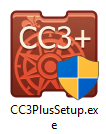
As for running CC3+ itself as an admin, that should be completely unnecessary. The old CC3 needed it because it kept all it's data files in the installation folder where normal users can't write, but CC3+ changed that by introducing the data folder and sets it up with write access for all users.




