Monsen
Monsen
About
- Username
- Monsen
- Joined
- Visits
- 723
- Last Active
- Roles
- Administrator
- Points
- 9,029
- Birthday
- May 14, 1976
- Location
- Bergen, Norway
- Website
- https://atlas.monsen.cc
- Real Name
- Remy Monsen
- Rank
- Cartographer
- Badges
- 27
Latest Images



-
the dreaded red x symbol
It is certainly not normal behavior for CC3+ to intermittently show red X'es for images that worked earlier, but there are a few external factors I can think of:
- If you have the CC3+ data directory on an external drive like Thescabi mentions, it may be an issue with the drive or connection to the drive. Could also happen with an internal drive if the drive itself was bad.
- Your antivirus is a bit too greedy. Antivirus software often scan files that are opened, and while it does that, it denies other software access. If it keeps the file locked for too long, CC3+'s request may time out, which means it fails to load the file. If this is the case, just hitting :CC2RESMODE: and clear the bitmap cache, check "redraw on ok" and then hit OK should force CC3+ to reload all bitmaps.
- Either the actual bitmap on disk the drawing refers to have been moved, OR if the image is set up with a map-relative path, and you moved the map file but not the corresponding files (The latter is really only a possibility witch custom artwork though, not with the standard symbols and fills from CC3+ and add-ons). You already mentioned you didn't move things, just kept this point here to have a complete list.





-
WIP: Now, for something completely different...
Trace have an unfortunate aversion to smooth polys. You can usually get it to work as desired by turning them straight temporarily, trace, and then turn them smooth again.
As for going the wrong way around, it will do that until you have moved your mouse far enough from the starting point that you pass the selection point. Trace always go through the selection point, so if you haven't moved your mouse far enough yet to pass the selection point, it is forced to go the other way around to be able to go through it. I usually always make my selection point quite close to the starting point (but far enough away that I am 100% sure it is on the right side of it) to minimize this behavior.
-
WIP - Quay thing
It is a bit difficult to see the end result. Could you make it a bit more visible to be closer to the visibility of the paving on the pier?

-
clicking brings a pop-up dialog that I don't know what it Is
This happens if in Tools -> Options, you deselect the "Select with right button context menu" option.
The reason it pops up when you click in your map is that clicking in your map without a command active will automatically repeat the last command, and if the option mentioned above is unset, this will pop up if the command require a selection.
-
Community Atlas-Elen Daelarion-The Mithlas Holes, 8
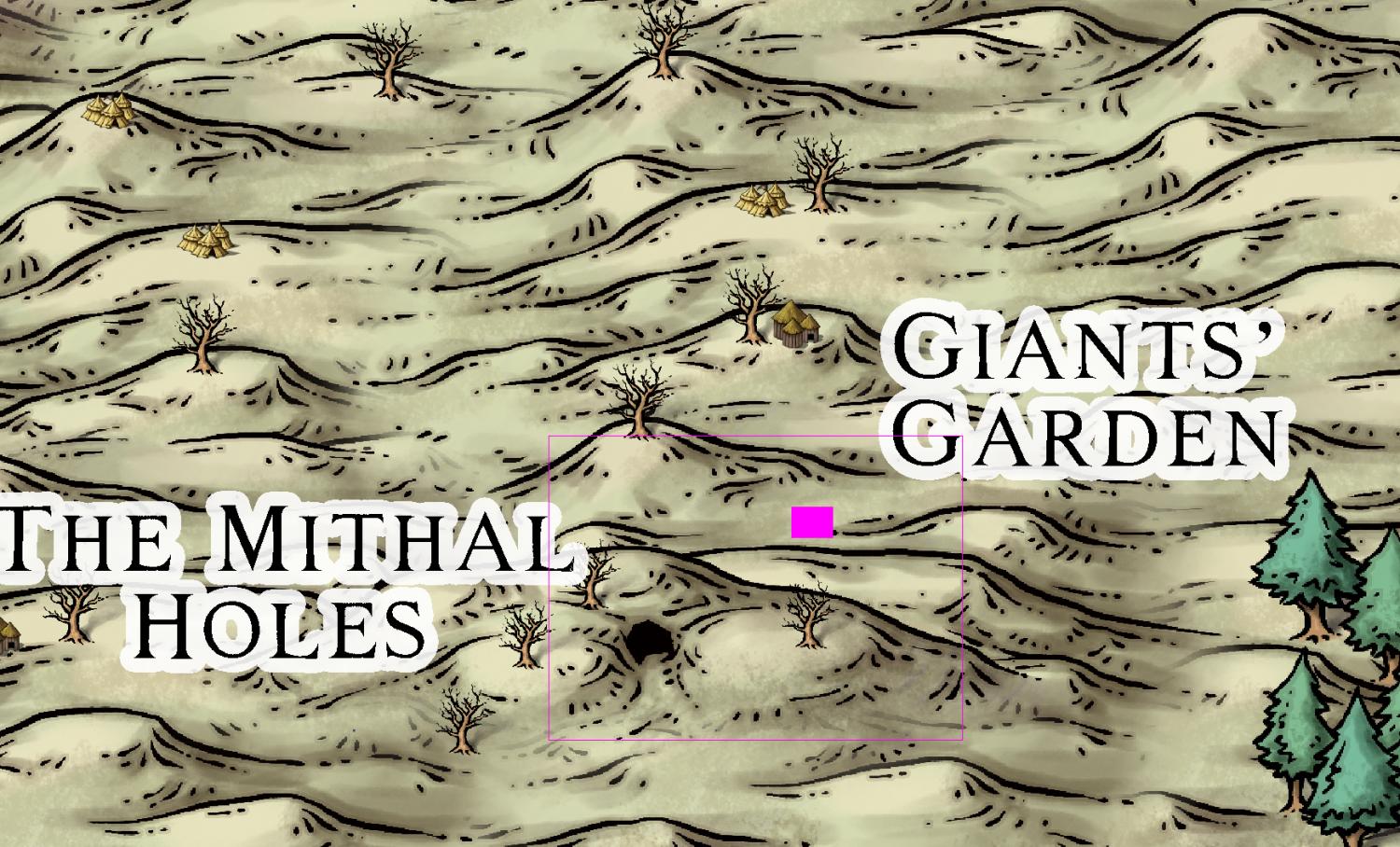
@JimP Looking at these now, and I am wondering a bit on the scale of the the_mithlas_holes_hillentrance.FCW map. The entire map is 3000 x 2200 feet. Converted to miles, that's 0.57 x 0.42 miles. That means that the region on the parent map (the_mithlas_holes_area.FCW) it describes is utterly minuscule, and wouldn't really fit both giant's garden and the mithas holes entrance on the same map. See the solid colored pink rectangle in the image below for the actual area covered here.
The map itself is fine as it is, so my suggestion is just to scale the entire map by a factor of 10, making it cover 30000 by 22000 feet instead (Suggested size shown by the hollow pink rectangle in the image), or whatever you find appropriate. Just remember to actually scale the entire map by the chosen amount, and not just edit the number on the scalebar.
Scalebar on the_mithlas_holes_entrance.FCW also reads "Scale in Miles". I am assuming this is feet?