Monsen
Monsen
About
- Username
- Monsen
- Joined
- Visits
- 723
- Last Active
- Roles
- Administrator
- Points
- 9,029
- Birthday
- May 14, 1976
- Location
- Bergen, Norway
- Website
- https://atlas.monsen.cc
- Real Name
- Remy Monsen
- Rank
- Cartographer
- Badges
- 27
Latest Images



-
Community Atlas: Barrows of the Ferine Magi area, Feralwood Forest, Alarius
These are now integrated into the atlas. Thanks for the submission.




-
[WIP] Wizard's Tower - Interior
I will need to design the small village the tower is in first. Do you think I need to do a more regional map, or will the village with the tower suffice?
I'd say that's up to you.
My general "rule" for the atlas is that if you map a feature, it needs an appropriate symbol on the parent map to be linked from, no placing something in an empty spot on the map just because it could conceivably be there. If no such symbol exist, an appropriate intermediate overland map needs to be made. Same for a map of a single place inside a settlement, a floorplan map shouldn't be linked directly from a city symbol on an overland map.
However, in this case, there is already a tower symbol on the overland map, so I have no issues linking your tower directly to this one. But if you want to make intermediate maps, be it overland and/or settlement that is great. After all, there is no rule to say there can't be a settlement around a tower, a symbol is often used to show the most prominent feature of the place after all.
-
Community Atlas: Lonely lighthouse environs - fisher island - fonlorn arquipelago
Added most of these, except wagon stop for now.

-
Community Atlas: Lonely lighthouse environs - fisher island - fonlorn arquipelago
Thanks. That should complete this set.

-
Annual 2020 - Inked Dungeons question
I think this is a deliberate artistic choice in this style, but you can change it by "cheating" a little. The origin of the fill is determined by the lower left extent of the fill, so if you make a little notch somewhere that forces the start of the fill half a grid square down and to the left, you get your desired result. This little notch can then be covered up by the outside wall details:
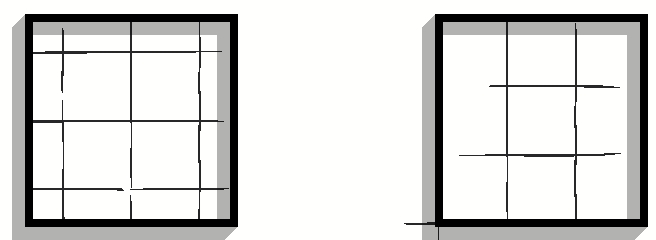
As for the second question, you add grids to your map using the Hex or Square Overlay command found in the Draw menu.

-
Where to find map file data in an XP
These aren't values stored in the map that can be simply accessed.
The Drawing area size is found by calculating the extents of the current drawing. CC3+ drawing doesn't actually have a fixed size (as you may have noticed, you can easily draw far outside the map border with the basic tools. So the size you see in this dialog is just the current extents of the entities in your map. Finding the extents is basically just walk the list of entities and grab all the coordinates there and just pick out the biggest and smallest ones, these will describe your extent.
As for the pixel size, CC3+ doesn't care about pixels at all. The value you refer to is just whatever value you happened to put into the export dialog the last time you used it, but it has nothing at all to do with the current map. And any CC3+ map can be exported to any pixel size, so to calculate in relation to the export size you must know what resolution the user intends to export in. Now, usually, when you export battle maps for VTT use, you would use whatever number of pixels per map square as that particular VTT system prefer. I don't know what foundry want, and it probably can use different values, but that is the value you want, not whatever is stored in the CC3+ dialog. And there is really no way for CC3+ to tell you this since it doesn't work in pixel space. But you could assume some standard pixels/square, for example if you plan on exporting the map as 100 pixels per 5' square, that relates to 20 pixels per map unit.
-
Compass Roses
What Julian says is correct, but just to add one thing; just ignore that number entirely. It doesn't have anything to do with the quality of the image. Or put differently, there are two ways to know the quality, either you know the resolution in pixels, or you know the dpi AND the display size (inches). While sometimes used to make sure things is right sized for a computer screen, the dpi is really a value only appreciated by people who does professional printing and print layout.

-
Community Atlas - Tombs - Fonlorn Archipelago - Bleakness - Plains of Ash
Another set with maps integrated into the atlas. Thanks for the contribution Ricko.
-
Export to CC3+
Part of your problem at least is all those contours.
The Mike Schley style isn't a style that relies on height contours, it uses symbols. So there wouldn't be appropriate fills for those contours which probably leads to all those solid filled areas.
I've attached my Mike Schley export settings to this post. I don't remember if I have modified it or not, but it seems to export an appropriate result for the Schley style anyway. Just unzip the archive and put the file inside in C:\ProgramData\Profantasy\FT35\Export overwriting the one there already
-
Compass Roses
Well, except from the obvious lack of cats, they are awesome.....
I find the divisions of the bottom scale bar slightly hard to make sense of though.