


Monsen
Monsen
About
- Username
- Monsen
- Joined
- Visits
- 723
- Last Active
- Roles
- Administrator
- Points
- 9,029
- Birthday
- May 14, 1976
- Location
- Bergen, Norway
- Website
- https://atlas.monsen.cc
- Real Name
- Remy Monsen
- Rank
- Cartographer
- Badges
- 27
Latest Images



-
Symbol Set 4 - Dungeons of Schley installation issues.
Hi Christian,
I suggest you open a ticket with customer support for this, they'll get you up and running in no time. You'll find the technical support form in your registered user area.
-
Symbol catalog refuses to change back
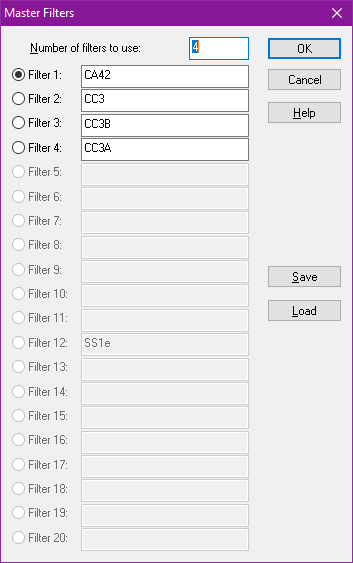
If the symbol catalog buttons doesn't load correctly, it is usually an indication that the master filter was not loaded with the map. Which it should absolutely do with the Modern Political maps.
Can you try loading the filter manually => Right click :CC2SYMPATH: and pick master filter settings, from that dialog, hit LOAD and pick the CA42 filter in the list. Now, the dialog should look like the below image. Make sure filter 1 is the selected one in the dialog before hitting ok, and try the buttons again.

-
Occidental Island
I find overland the most meaningful ones. Knowing the layout of a city is nice, but knowing the lay of the land is far more important. Most of the maps I produce for my own campaign are overland ones.

-
I designed crenellation symbols
I think that approach allows them to be used in the Atlas. @Monsen, can you confirm?
Yes, as long as you don't touch the actual art files (png files) on disk, it will work just fine for the atlas. It is only a problem for the atlas if you bring your own art files, or modify the official ones (including moving/copying/renaming them).
But anything that is done in-map, like importing existing fills from valid products, or changing the settings for them in the fill dialog is fine. (With one caveat, if you import official fills using the import bitmap fill style tool, DO NOT check the "Create Other Resolutions" checkbox, as if the files didn't have multiple resolutions already (Like all the solid xx fills), it would basically be creating new files for you based on the original ones)

-
Community Atlas - Irisian City States - Giant Circle Island
Thanks @Quenten, map is now in the atlas:

-
Font Question
There is a list of fonts on the FAQ page for the atlas, but it is quite a bit outdated by now. I don't know of any other lists.
As for license questions, those are best sent straight to ProFantasy
-
Hardin - Folortalin - Zaraogra Island
I get your point, but if this is a female dominated world where they are the stronger ones, wouldn't they want their own female titles that show that they are a female, the strong sex? Why let a mere male use the same title as them?
-
Can vector symbols be imported?
Unfortunately, while "vector artwork" is a generic term, it is generally not compatible across different programs. The name vector really just means that the artwork is represented as mathematical coordinates so that it can easily be calculated at any size and transformation, but the similarities end there. Every program have their own features that they can apply to the vector artwork, and those features naturally only work in the source program. So even if you could import vector artwork from inkscape, you would still lose all the features of the artwork that inkscape supports that CC3+ doesn't Generally, this means that making vector artwork in an external program isn't really going to do anything for you, just make it in CC3+ directly instead. If you can't do what you want in CC3+, then that feature wouldn't have worked when importing the artwork anyway. When going cross-application the raster formats (png) are generally your best option, while they lack the scaleability vector atwork has, they look the same everywhere because their cintent isn't computer locally.
As for the FSC format, that is the fastcad file format, which is what CC3+ builds on. I don't think any program but fastcad uses this format, and there is no advantage to making them in fastcad over doing it directly in CC3+, the tools are basically the same anyway.
CC3+ can import (older) autocad files, which many programs support exporting to. This is the main option for importing vector artwork, but all the caveats from above still applies, most of the features that another program like inkscape can offer won't survive the transfer.
CC3+ also have some work in progress support fro importing SVG files, which is a popular vector format used by a lot of other software, but again, it is subject to the same restrictions as I discussed above.
-
Community Atlas Project - Download information - Contributions Welcome
No, that's fine, but you shouldn't grab the navigation bar from an existing map. I customize that thing for every map. Just make your map normally without it. I'll add it myself when I process the map for inclusion into the atlas.
Copied from the main map, then had to resize so the scale is correct.
That sounds a bit weird to me. Since the scale is already correct in the source map, no resizing should be required. (Unless you are talking about the resizing the map border, since the map area of the original map would be way to large to just map a small portion.)

-
[WIP] Community Atlas - Gold Coast, Doriant
What did I miss that should be named?
Everything can be named of course, but I feel that huge plain between the desert and the coastal ares deserves a name. It is such a prominent feature. The rest of the mountain ranges, hills and forests would also love a name.
In the future, would be better to post the larger map in my galleries so that folks can zoom in?
If you want people to freely look around the map and zoom in where they want, the gallery is a better option, but if there are specific places you wish to highlight, it may be better to post those views in the post like this. But you'll always have the option of doing both as well.


