


Monsen
Monsen
About
- Username
- Monsen
- Joined
- Visits
- 723
- Last Active
- Roles
- Administrator
- Points
- 9,029
- Birthday
- May 14, 1976
- Location
- Bergen, Norway
- Website
- https://atlas.monsen.cc
- Real Name
- Remy Monsen
- Rank
- Cartographer
- Badges
- 27
Latest Images



-
Alien Style - But Yellow CRT
Nice and simple. I like it.
If you use the "Image" button instead of the attachment one when adding the images, the images will display inline in your post, making them easier to view.

-
Delete Duplicate Entities
Also make sure you don't combine my instructions the wrong way. If you don't select anything with your mouse but then changes to combine-> and, you won't be able to select anything because that means it will only match one criteria, not both, so either:
- Start the command -> select the entities by mouse -> right click/Combine/And -> right click/more/entity tag/type tag number
- Start the command -> DO NOT select anything by mouse -> right click/more/entity tag/type tag number

-
glows aren’t working on all symbols on same sheet
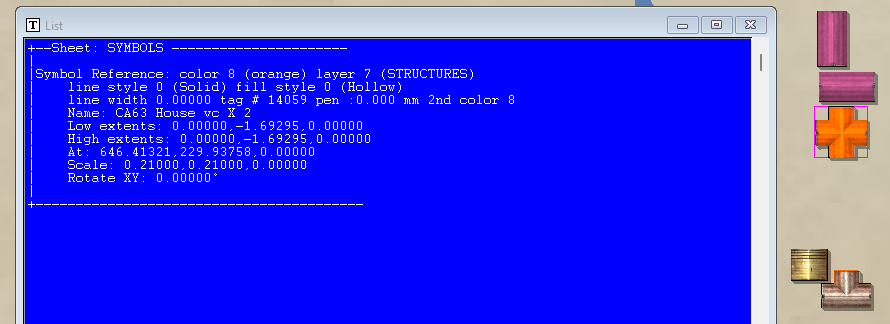
Some of your buildings are on the buildings sheet, but a lot of them are on the SYMBOLS sheet instead. Looks like all the ones not casting shadows in your image is on the SYMBOLS sheet.
The best tool to check this is always the LIST command. It reveals all the needed information.
-
glows aren’t working on all symbols on same sheet
MPEDIT doesn't show the current properties of entities. It always shows the currently active properties from the status bar, basically, it shows the settings that will be applied, not the current setting of the entities.
(And also note that MPEDIT only applies the settings when hitting OK if the checkbox for that setting its set)
A different way to check things is also just to hide the relevant sheet. Expecting everything to be on BUILDINGS?, well, then simply hide that sheet and see if anything remain (Or hide all sheets but that one, which is a nice feature int he sheets dialog I like to use)
Hiding all sheets but one is also nice when working, because that means you can do selection "by all" to grab all the relevant entities instead of trying to select the relevant ones individually
-
Community Atlas - Haddmark - Peredur
Thanks @Ricko . These are added to the atlas now.

-
Community Atlas - Berenur - Buchesi Nations - St. Corrun Monastery
Thanks @Ricko
-
Community Atlas Project - Download information - Contributions Welcome
Also, I have now processed every map in my queue. So if you have sent me a map and it hasn't been added, it means that I have overlooked it somehow, and you need to remind me (Hint: if you just post it on the forum but without tagging me with an @Monsen and explicitly saying you are done, or sending me a PM or email, I am quite likely to not notice the map is done)
-
[Atlas Submission] - Doriant - Gold Coast - Eknapata Desert - Kukaar
This is why I like these single simple maps without any description text or toggles. They are very quick for me to do when I find the time, while larger map dumps or more complicated setups require more time, so they get stuck in my queue until I have a larger chunk of time available.
(Of course, if a map is supposed to be part of a set (like a multi-floored building/dungeon), it is better to get the whole set at once since it will be less time per map compared to going back and forth for every map as they arrive one by one, but I still need to be able to find a larger chunk of time)
-
Community Atlas WIP - Panaur region of Doriant
Then it will be up to Remy to tell me all the shit I did wrong and have to fix.
Some of the more typical things people forget are map title and other labeling, scale bar and compass roses, and they forget to use proper scale for the map. For the latter, when using Info -> Distance, the value should be what is expected. For example, if measuring along the a scale bar, the value in the dialog should match the displayed value on the scale bar. If the measurement come up wrong, it is likely that the entire map is scaled wrongly. Or if it comes up right, but the values on the scale bar doesn't match your intended scale for the map, it also means it is scaled wrong.
-
Jim Pierce 1947 - 2024
That's just because I seem to have posted http: links instead of https: ones. Considering that this isn't sensitive data, and you don't need to submit any data to my server either, this is more an issue of the browser being paranoid rather than an actual issue.
But here's the https link if you need it: https://jimp.monsen.cc/DwarfHome/


