


Monsen
Monsen
About
- Username
- Monsen
- Joined
- Visits
- 723
- Last Active
- Roles
- Administrator
- Points
- 9,029
- Birthday
- May 14, 1976
- Location
- Bergen, Norway
- Website
- https://atlas.monsen.cc
- Real Name
- Remy Monsen
- Rank
- Cartographer
- Badges
- 27
Latest Images



-
Can hexmap symbols be placed on sub-grids?
CC3+ looks for a hex grid on the HEX/SQUARE GRID layer. Only the grid on that layer will affect the scaling/rotation/snapping of the hex symbols, and if you have more than one grid on that layer, CC3+ will pick one of them (Probably the first it encounters in the internal drawing list)
What you need to do is a little manual manipulation. Make one layer for each of the hex grids, and place the one you actually want snapping to occur for on the HEX/SQUARE grid layer.
If you ever want to place hexes on the other grids, then you need to go do a little layer renaming, renaming the current HEX/SQUARE GRID to something else, and the other layer to HEX/SQUARE GRID.

-
Community Atlas - Fonlorn Archipelago - Bleakness - Death Forest.
Here's most of the maps from this set included in the atlas. Which means we have now surpassed 1100 maps.
@Ricko I couldn't process Hearthglen, you had uploaded the wrong fcw to the post.

-
locking things and a ruler
Note that if a layer won't freeze, it is probably because it is the active layer. Make sure to set the layer you want to work on as active first (The first checkbox), then you should be able to freeze the other layer.
-
Add or remove precise amounts with drawtool "edit" function?
No, there is no way to specify that. My approach would be to use the node edit tools instead. Now, you can't do this with them either, but you can easily calculate node positions to make this possible.
This is based on the fact that if you add a new node between two nodes, you are basically adding a triangle to the landmass, defined by the lines between the two old nodes and the new one. And the size of said triangle depends on the position of the new node, and can be calculated doing a bit of trigonometry.
Same if you remove a node, you are basically removing a triangle from the landmass (or adding one actually, if you are adding or deleting a triangle to the total depends both on if the angle is acute or obtuse, as well as if you are adding or removing a node).

-
Macro Weirdness
It is missing a newline (enter) at the end of the last command there.

-
Hex Grids and Labels
So if I understand correctly, you want to adjust the automatically generated labels to be closer to the top of the hex?
There are two ways you can go about that. Both ways require that you unlock groups (button bottom right of UI) to select all the text at once, but just the text:
- First option is to change the justification of the text (by using change properties) to simply change it from bottom center to below center. This won't bring it to the top, but will move it a little bit up
- The other option is to use :CC2MOVE: on them. The snaps aren't set up for this, but unless you need perfect precision, you should be able to do it close enough by eye when you zoom in. Just make sure you have all the text entity selected and snaps off, and they will all be moved by the same amount, ensuring they still line up perfectly.
-
Game Masters: Preferences for Labeling on Game Maps
That really depends on the purpose of the map. For dungeons/battle maps I rarely have any labeling at all on the one the players see. It is supposed to show them what they see, not be a reference item.
Same goes for villages if it is a place the players are unfamiliar with. They don't know what house is important or what's there, so there shouldn't be any labels cluing them in.
For a familiar location, or for a map that is a handout that the characters get in-game, I would usually use numbers and an index, but that would really depend on who made the map and what style it is in.

-
Uninstall procedure
All those installers just need to be run and they will install the components where they should go. You don't need to copy them manually anywhere.
(If you opted for the full Humble Bundle option, you'll have quite a few installers to run)

-
Broken Stuff
Your DD3 installation seems to be missing a lot of stuff. Here's what that location should look like
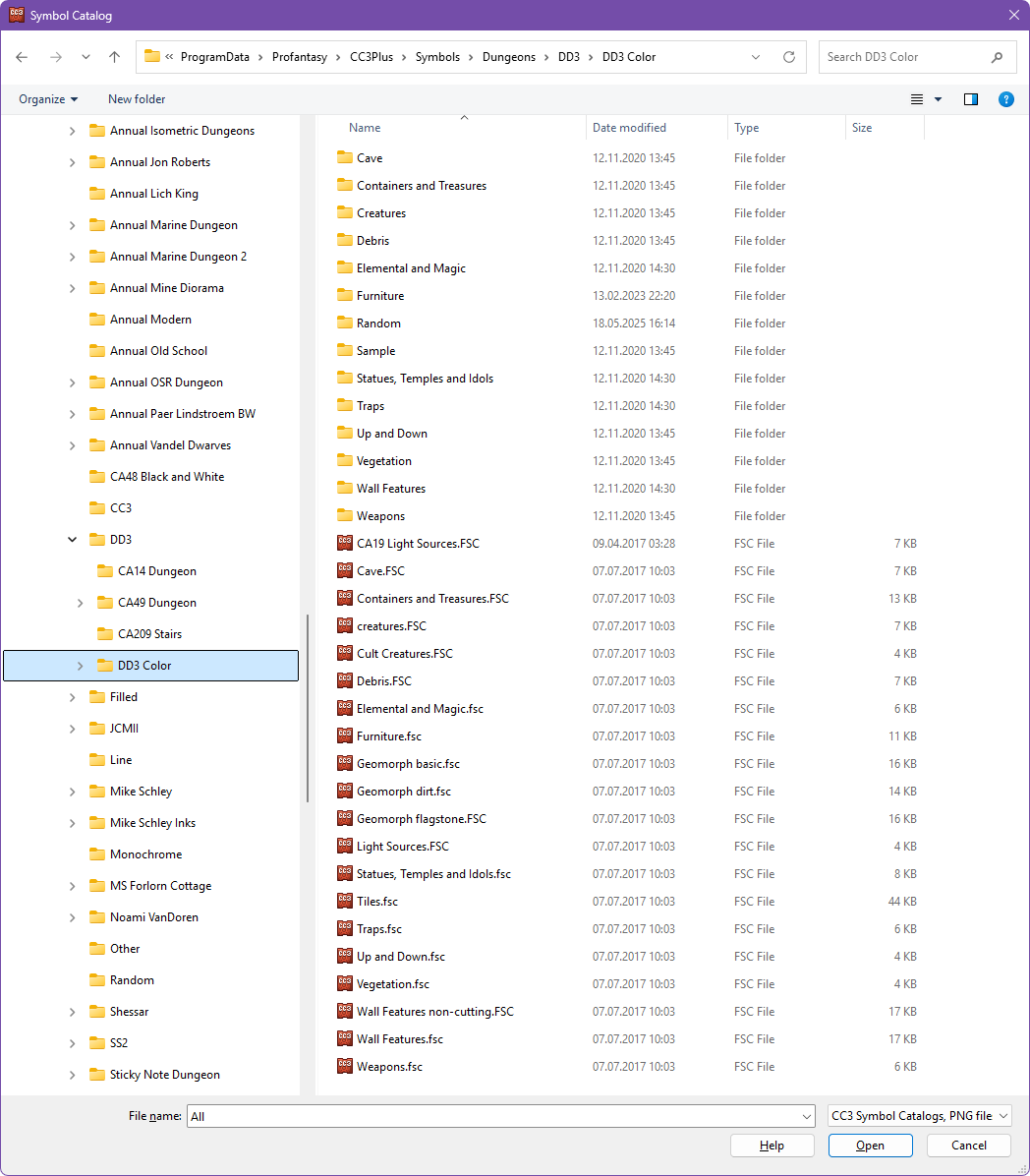
It looks like you maybe don't actually have DD3 installed at all just some random folders that have come with various annuals.
-
Broken Stuff
The best way to check installed products is using the installed apps in the Windows settings. CC3+ itself isn't really aware what a product even is, because all the installers does is to add more files to the relevant folders.
To check inside CC3+, you kind of have to know what is supposed to be there. Do you have the expected templates for the product for example? Or the expected symbol catalogs. Try loading up an example file belonging to the product, is it full of red X'es?
