

Add On File Size Question?
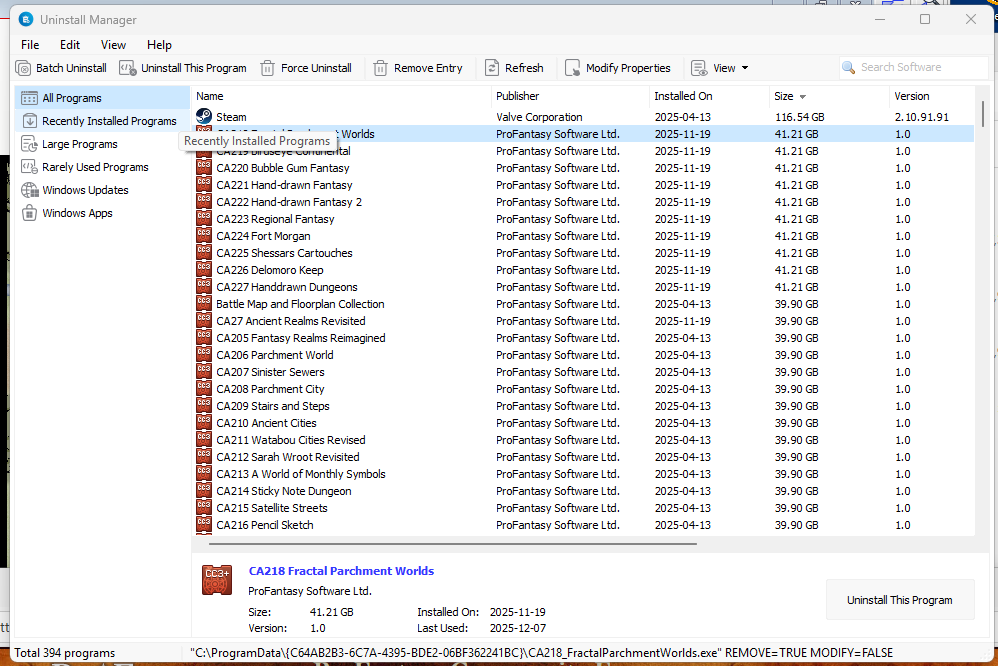
I was looking to delete files I wasn't using that took up a lot of memory on my hard drive and was surprised to find that the Cartographer add-ons using 39 Gig or more each, or least that's what it shows. If I go to the file location indicated in the uninstall program and look at the size of the actual file, they are in the Megs not the Gigs. Is there a reason why these files show using that much resource on my Drive?
I've included a screen shot of what I'm talking about. Any help or information on this would be greatly appreciated. I have a One-Terabyte hard drive that has a little over 300 Gig left on it and the space is being used in a big way by the CC3+ addons. The list shown below is listed from largest to smallest, and as you can see, they are the largest on the computer except for Steam.
Best Answer
-
 Monsen
Administrator 🖼️ 82 images Cartographer
Monsen
Administrator 🖼️ 82 images Cartographer
The issue lies in the way Windows determines the space used. Because all the add-ons are installed to the same directory, it basically ends up counting most of it for each add-on as it can't separate what belongs to each.
It is similar to your steam installation in the same image taking up 116 Gigs. Obviously, steam doesn't take that much, but Windows things the installed games are part of the installation.
You're not going to reclaim all that much by uninstalling the CC3+ add-ons. If you uninstall everything, you'll get back that ~40GB once, but not for each add-on.




Answers
The issue lies in the way Windows determines the space used. Because all the add-ons are installed to the same directory, it basically ends up counting most of it for each add-on as it can't separate what belongs to each.
It is similar to your steam installation in the same image taking up 116 Gigs. Obviously, steam doesn't take that much, but Windows things the installed games are part of the installation.
You're not going to reclaim all that much by uninstalling the CC3+ add-ons. If you uninstall everything, you'll get back that ~40GB once, but not for each add-on.
Windows is crazy sometimes, thanks for the answer.
Only sometimes 😉?
When I tried checking the size of programs on my computer after reading this topic yesterday, I found that most of them have no file size given using the usual Win Settings options, so I'd assumed, also from the weirdly suspicious similarity in these CC3+ file sizes, that Windows can't actually tell the size of such things properly. Nice to have a proper explanation for that now though!
There is a free utility called WinDirStat that graphically shows how big files are. You will see how large Windows temp files are! It's pretty good at tracking down disk space culprits.