

How can I get an open Slope in Ferraris Style (Annual 2020)
 Morrgans
Traveler
Morrgans
Traveler
Sooo... I keep coming back to this style time and time again. And I am still learning. This time I hit a bumper when doing the reliefs in the Ferraris style. Normally, they are closed polygons which have this need effect to visualise the slope
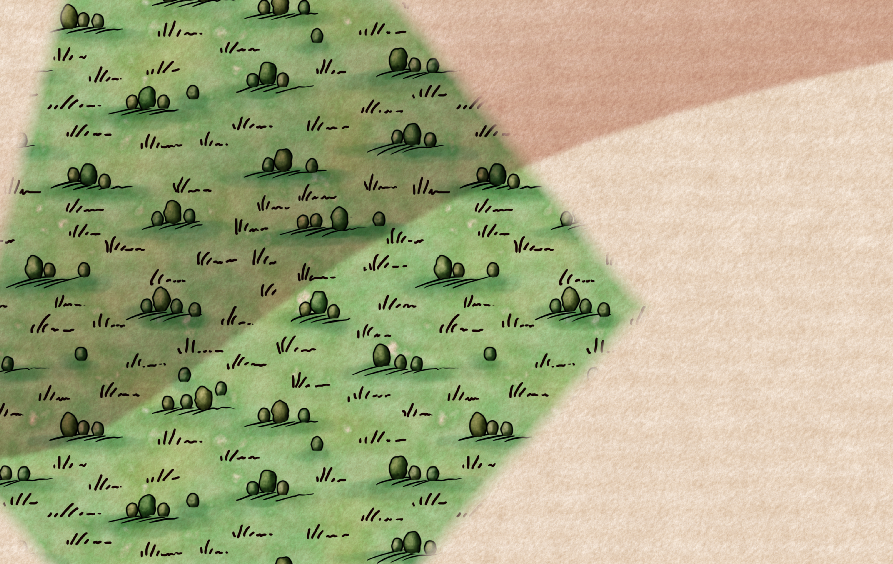
However they are always closed contours. How can I get this effect with a line only? I want to visualise a cost which has cliffs. So on land there are slopes, but on the see I am planning to do something similar like treasure island style.
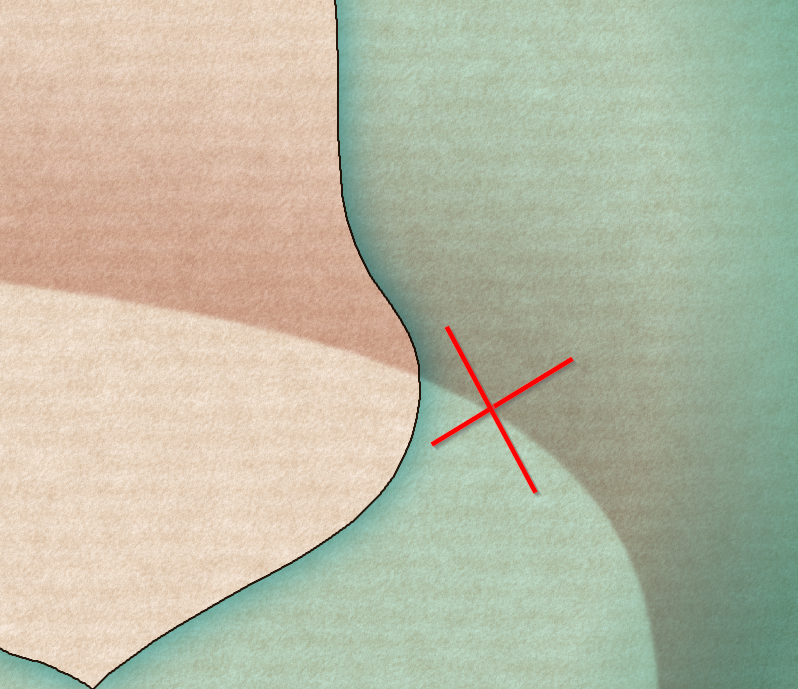
I can move the slopes to another sheet under the water sheet, but then it is also under the terrain sheets and the forrest above would cover it. I could try to do some sheet juggling... which will probably drive me more crazy then I am already. +puppy-eyes+ Any suggestions?
Cheers
Olaf
Comments
It's been a long time since I made this style, so all I remember of it is that it's relatively complicated for an annual style.
Please can you upload your map - the FCW file, so we can have a play around and see if its possible?
If I understand you correctly, you want a cliff behind a cliff. Try making a second closed poly on a different sheet above the base landmass with the same effects. Draw your line but then close it around the outside of the map so you can't see that other side.
I suppose this works only on a contour that doesn't end in the middle if the drawing. If you need that, try a third sheet on top with no effects with a landmass that covers the part you dont need.
I ran into problems when trying to open the Ferraris style example maps, to see if I could help here. The Village of Greythorne map opens, but if I try to access the vegetation catalogue, the program crashes and auto-closes-down. If I try opening The Ferraris Style Legend.FCW, it starts to open, then crashes and closes too. I've done a full repair reinstall, with exactly the same results. No idea why it should be doing this, since as far as I recall, it was fine when I opened it on my old Win 10 machine when the Annual was first released. It's CA158 from 2020 for anyone else wanting to check.
@Wyvern I don't seem to be having that issue on my Win 11 PC.Does it happen when you create a new map in the style?
Does anyone else have CTD issues with the example map and legend for CA158?
Sue, I have created a new map in the style as a test. If I click to open the vegetation catalogue by the button, or navigate to it using the right-hand symbol pane button, it crashes. If I open the "All" symbols catalogue, it's fine, and I can see and access the vegetation symbols perfectly OK. There seems to be an issue with the Vegetation.FSC file for some reason. I can also navigate to the two example files in the style using the opened new map file OK as well - as long as I don't click the vegetation catalogue button! However, if I try to open the Legend example file directly from the Program Data => etc. option, it crashes after opening. Very odd.
[And with apologies for hijacking the topic!]
I'm sorry you're having problems.
I don't think this is related to whether you have Win 10 or 11, but since I can't replicate any of these issues at all on either my PC or my laptop it's probably best to ask for help from Tech Support.
Here there be map. I hope everything is in there. The cartouche in the upper right corner might be missing/red X as it is an outside asset.
Thanks, Morrgans :)
I came up with a solution for this map, but it might only work for this particular map, and it might break as you continue to add more details. It depends very much on where you go from here, but we can look at it again if necessary.
I created a second WATER sheet, called WATER (sea only), copied the sheet effects across from WATER, then copied just the sea parts of the water to it. This was to preserve the rivers and marshes. Moving them down the list by moving the original WATER sheet did bad things to your map.
Then, because CC doesn't react well to having the exact same shape with the exact same fill on different sheets I changed properties on the original sea polygons on the WATER sheet to a solid grey colour, knowing that they would be entirely covered by the new sea polygons on the new sheet.
However, even though at first glance it all looked great, zooming in to the coastline revealed that the rivers were now blocked by black lines - the dark glows on both WATER and WATER (sea only). So I removed the dark glows from the new WATER (sea only) sheet, and added a series of Edge Fade, Inner sheet effects to it so that the black line effect from the underlying (and now grey) original sea polygons on WATER were visible just around the edge but without revealing the grey polygons.
I had to move the deep water down so it still appeared on top of the new WATER (sea only) sheet.
Summary:
The original WATER sheet is exactly where it was but only has the rivers and marshes on it, with a grey copy of the sea. The WATER (deep) sheet has been moved right down the stack to stay on top of the new WATER (sea only) sheet, and I've moved the TEXT water names sheet down for the same reason - so the labels stay on top of the sea.
As I said at the outset, this is a 'here and now' fix and might break. But if it does cause problems as you map more details, shout again and we'll have another look at the situation.
Thanks! I had similar ideas, but couldn't get it to work properly....
1) I struggled with copying the sea shape to the extra sheet. (Right-click on copy, copy to sheet, select the sea (only) copy it to the sheet. Nothing seemed to happen.
2) Having a new sea contour on the extra sheet to just block the contours did kinda work, but you could still see some of the effect. (Lots of seas and sees in this message...)
2b) I still do not quite get, why on the original sea sheet you can see the blue edge fade effect... from where? the colour is brown?
(Anm. d. R.: It is now a glow! tricky!)
Thanks again. I still have like 36 hours left until the session starts and need to make Grand Vague and the terrain. And Real Life work. And snow cleaning. ... Panic Mode: ON
Oh dear! I might not have explained it that clearly. I won't muddle your life further by trying again, but if you have more issues with the map just shout.
That's what you get, when you help me! Thanks again!
The cartouches and the upper ship are outside (non Profantasy) assets I aquired for my "contemporary" maps of Warhammer Fantasy.
All the best!
Olaf
Great map :)
I'm glad the fix worked for you.
Thanks. I just noted that a) I forgot to unhide the deep see sheet AND b) the legend lower frame is over the map frame. But I guess you get the idea.
It also took like a third of the terrain definition to realise that I have three sheets for terrain and if I set two adjacent areas of terrain on two different sheets I can have a smooth(er) transition of one fill style to the next. But I have no more time until tomorrow. Now that the towns are mapped, I can start to define the intreagues, villainy and drama for the next 3 or 4 weeks of play...