

Symbols Catalogue Wonky
 FarsightX3
Surveyor
FarsightX3
Surveyor
I did a fresh install of CC3+ and all of the Annuals I have on a new computer. (Work Computer. lol)
So I can so I can work on maps when I have downtime.
The way my file structure is laid out is.
Parent Folder > Map Folder > World Folder > Map Scale Folder > Symbol Folder > All kinds of Custom
Symbols in their respective folder.
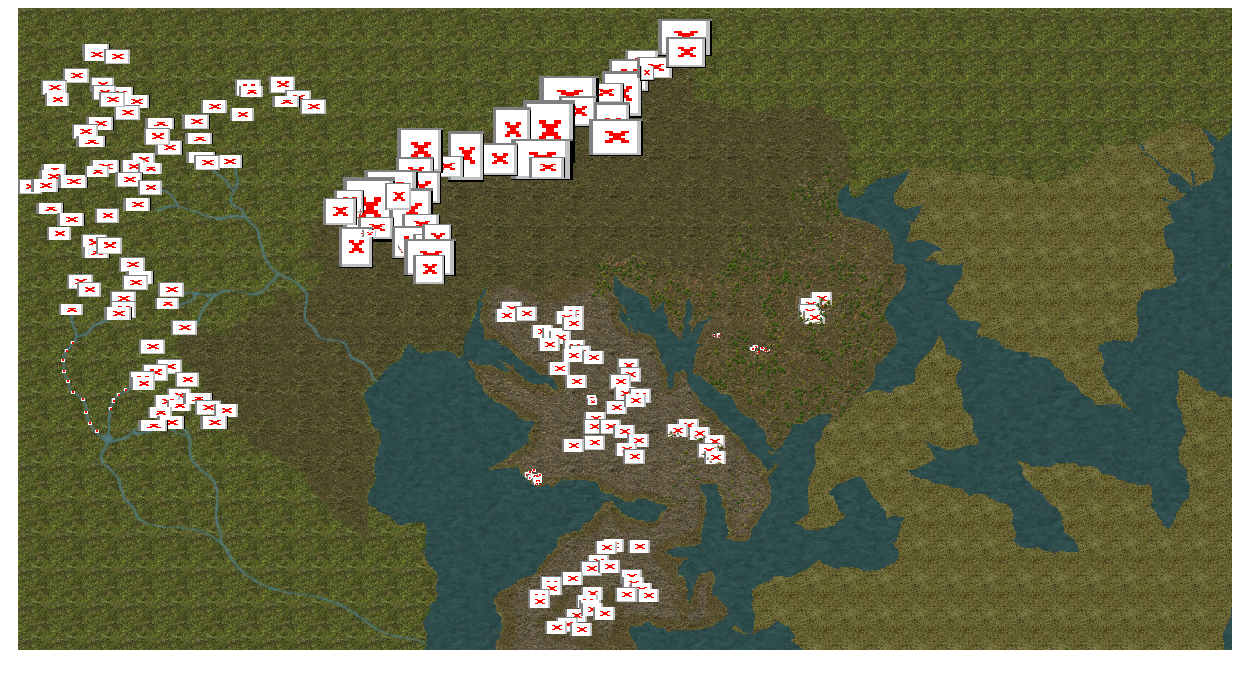
The custom symbols are the error X's on the map. In my experience that typically means the path isn't set up right. But I am not sure if that is the case.
I did not copy the Parent Folder because that has other stuff that I don't need. Everything CC3+ related only lives within the Map Folder. So I copied the Map Folder to my work computer.
So if this is not a path issue, I assume that the symbols from the .FSC files I made are not loaded. When I try to load them in via Draw > Insert File
It says 0 symbols imported to the drawing. I did not move them or swap locations within that map folder.
This is how I have been making them:
So the way I made "catalogues" is this.
Import PNG.
Symbols Manager
Options Stuff
Save as Catalogue
Then it name a file I put in my custom symbols folder. Became an FCS File
It looks like I may have to remake them on this computer.
Not showing up in the screen shot there either.
I assume that this isn't a path issue for those additional symbols I added but rather they are not uploaded.
Not hard to make new catalogues, just tedious and time consuming for all of the ones I have lol
So I can so I can work on maps when I have downtime.
The way my file structure is laid out is.
Parent Folder > Map Folder > World Folder > Map Scale Folder > Symbol Folder > All kinds of Custom
Symbols in their respective folder.
The custom symbols are the error X's on the map. In my experience that typically means the path isn't set up right. But I am not sure if that is the case.
I did not copy the Parent Folder because that has other stuff that I don't need. Everything CC3+ related only lives within the Map Folder. So I copied the Map Folder to my work computer.
So if this is not a path issue, I assume that the symbols from the .FSC files I made are not loaded. When I try to load them in via Draw > Insert File
It says 0 symbols imported to the drawing. I did not move them or swap locations within that map folder.
This is how I have been making them:
So the way I made "catalogues" is this.
Import PNG.
Symbols Manager
Options Stuff
Save as Catalogue
Then it name a file I put in my custom symbols folder. Became an FCS File
It looks like I may have to remake them on this computer.
Not showing up in the screen shot there either.
I assume that this isn't a path issue for those additional symbols I added but rather they are not uploaded.
Not hard to make new catalogues, just tedious and time consuming for all of the ones I have lol
Comments
I basically could just re-make them all but I don't know if there was a quick fix.
It's important that none of the Profantasy assets are moved or renamed, but I don't think that's what you are talking about.
Are all your custom symbols in folders that live inside the "ProgramData\Profantasy\CC3Plus\Symbols" folder? Possibly in a subfolder of the Symbols folder called User (or some such appropriate name for things that are not part of Profantasy's asset collection)?
EDIT: If they are and that's all correct, have you moved the FSC (the symbol catalogues you made) relative to the symbols - ie, moved them to a different position in the folder hierarchy. That will also break the references.
The easiest way is to make the path on your work machine identical if you can, but if you can't...
Before you start from scratch with the cataloges, open an existing catalogue and reimport the png files. That should make the red crosses vanish. Then save the catalogue.
If you scaled any of them you may have to scale them again after the import, but otherwise all the other options should be preserved.
Note that if you make new catalogs, make sure to so as Sue said above and store inside the CC3+ data folder. CC3+ can refer to this using a relative path, which means catalogs can easily be moved between computers as long as they are in the same relative location inside the data directory. This is how the official ProFantasy catalog is built to allow them to work no matter where you choose to put your data directory during the install (or even move it later).
There is an article about relative paths here.
When I reimport the new symbols, they delete the rest on the map. There is about 3-5 folders worth of symbols I need to import separately. Is there a way to turn off those when I import the PNGS? Below are my settings when I import PNGs. Unless there is an additional way?
Usually, the only reason CC wants to delete symbols is if png files that used to be in that folder (according to the definitions in your map or catalogue) are no longer there. You can override that deletion by picking 'No', but you will see red Xs in those places until you import the rest of the folders.
I hope that makes sense to you.
I'm a bit apprehensive about the way the absolute path option is picked in your Make path section. That should always be "relative to CC3 path". If you can't make the relative path choice work then either your pngs aren't inside the Symbols folder, or your catalogue file isn't inside it. Absolute paths are to be avoided at all costs.
Are you saving your catalogues in your Documents folder, or somewhere other than in the Symbols folder?
That would explain why you mentioned your user name as being a factor earlier in the thread. It would also explain why you are having to use absolute paths instead of relative paths. Relative paths only work within the data folder - as Remy pointed out earlier.
Catalogues should be saved in the folder that contains your symbols, alongside the subfolder containing the pngs, and preferably with the same name as the folder where the pngs are drawn from (or the majority of them). Like these catalogue files in MS Overland.
So don't hate me and I know a long time ago Remy told me this is bad but at the time I didn't do it.
That map path I said in the OP is on my desktop. That's why I use absolute because its not relative to the CC3 folder structure. I think I got i fixed it. Just importing the symbols is doing the trick. Thanks again!
LOL! I don't hate you.
If you intend to keep building everything larger and doing more and more maps between the 2 machines it would be best to move the symbol pngs and the catalogue files into the Symbols folder. Otherwise what you do to a map on either machine won't work correctly on the other machine.
So I realized that importing the pngs does fix it but some symbols don't need to be rescaled and others do. But is there any other way to fix this issue so I don't have to scale? That is gonna be a tedious pain lol
Would the way to fix the issue is to just remake the catalogues and reimport them?
Well, you could scale the png file itself in GIMP or some other bitmap editor and reimport it - ready scaled to be the right size once it's imported.
I really do recommend you opt for the temporary pain of moving your symbol folders and your catalogue files into the Symbols folder and using relative references as you repair the catalogues and map files. Once you've done it on one machine you can copy the resulting folders and catalogues to the other machine and put them in the same place in that Symbols folder. That way, you won't ever have to carry on remaking catalogues every time you sit at the other machine. That would be a pain that will never go away.
It doesn't matter where your drawings are. Most of my maps are in sub folders of My Documents or on the desktop where I've downloaded maps from other users. The problem you have is that the way it's set up you can't easily port things from one system to another, unless you have both computers set up with exactly the same hierarchies from top to bottom.
If all your previous maps use symbols that are outside the Symbols folder, or use catalogues that are outside the Symbols folder, those maps will break if you put everything in the right place. So it's up to you. What is worse? Having to repair all the old maps, or putting up with the problems you are just beginning to experience now for the rest of however many years you spend mapping on this project?
Maybe there is a kind of solution - a way of breaking out of the problem going forward without upsetting the older maps.
You could duplicate those symbol folders you have on the outside of the data folder into the ProgramData\Profantasy\CC3Plus\Symbols folder and make catalogues for them in the right place - next to the folders the pngs are in as I showed above, then create all your new maps from now on using those correctly placed folders and catalogue files instead of the ones that are causing problems outside the Symbols folder, but which you still need to keep for your older files.
The only drawback there would be that you would have two copies of everything.
I don't have to have cc3+ on my work computer, it was just a "luxury" for when I had down time. Nonetheless, still learned something.